


Profile Manager Theme Suddenly Turns Into Light

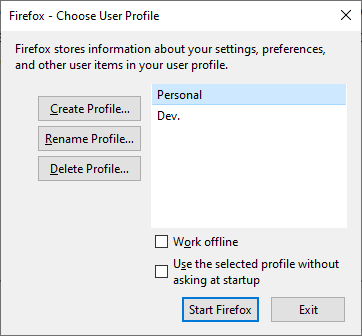
Firefox's Profile Manager has always been in dark theme, which makes sense as my Windows theme preferences dictate that. However, once, I launched Firefox, which, as per preferences, asks which profile to use (i.e. Profile Manager), and the window is in light theme! I tried refreshing Firefox, and when that didn't work uninstalling Firefox along with user data and preferences (along with the "Old Firefox Data" folder on Desktop), but none of that made a difference. I restarted the computer, and that didn't nudge a thing either. What is happening?
Выбранное решение
Can you do that for me? You probably are going to get noticed more easily than me.
Все ответы (6)
Hmm, that's interesting. In Firefox 96, many more built-in pages/dialogs are themed according to your toolbar theme:
- dark text on tabs => Light theme
- light text on tabs => Dark theme
Do you use a Light theme for your toolbar?
Sorry, what do you mean by the toolbar?
This may be easier to explain with a picture.

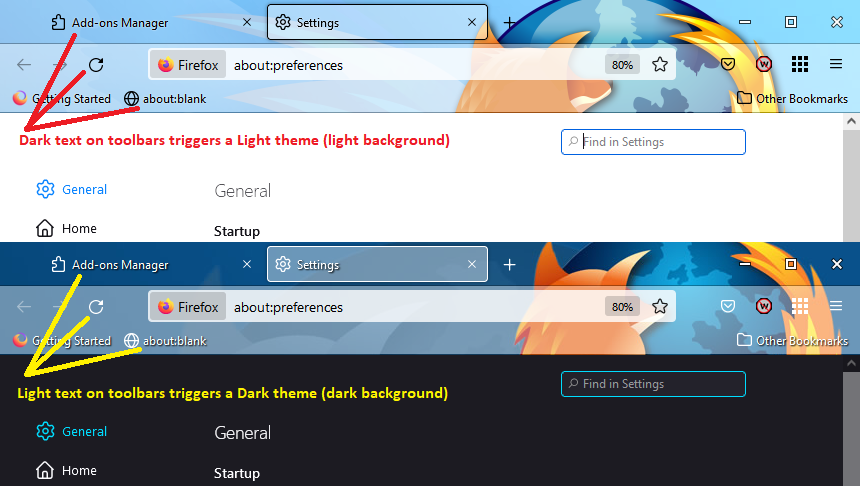
Text and controls are actually light there. See the attachments.

Hmm, I don't know then. Firefox must be getting that color scheme from some other source for the "external" profile manager. Which I guess makes some sense because it hasn't loaded a profile yet.
You could file a bug if no one else has done so already: https://bugzilla.mozilla.org/
Выбранное решение
Can you do that for me? You probably are going to get noticed more easily than me.