


Windows 10 reached EOS (end of support) on October 14, 2025. If you are on Windows 10, see this article.

Поиск в поддержке

Избегайте мошенников, выдающих себя за службу поддержки. Мы никогда не попросим вас позвонить, отправить текстовое сообщение или поделиться личной информацией. Сообщайте о подозрительной активности, используя функцию «Пожаловаться».

Подробнее
Решено Архивировано

Firefox 86: change print margin unit from inch to millimeters

Jonathan Watt отвечено
mrmustard1

Firefox 86 has introduced a new print preview panel which I like. What I don't like though is that the unit for print margins has changed from millimeter to inch (see screenshot, in German). In previous versions, it was possible to set the unit in the prefs by changing "print.printer_PostScript/default.print_paper_size_unit". Value 0 meant imperial units, value 1 meant metric units. This entry does no longer exist.

There is still the entry "print.printer_printername.print_paper_size_unit" for every printer that's installed. Those values are all set to 1 in my case but this doesn't seem to have any effect.

So how can I set the margins of printed pages in millimeters instead of inches?
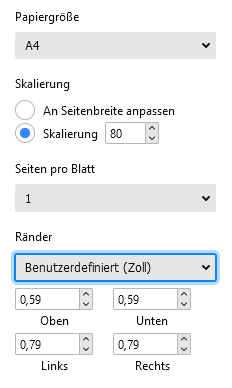
Firefox 86 has introduced a new print preview panel which I like. What I don't like though is that the unit for print margins has changed from millimeter to inch (see screenshot, in German). In previous versions, it was possible to set the unit in the prefs by changing "print.printer_PostScript/default.print_paper_size_unit". Value 0 meant imperial units, value 1 meant metric units. This entry does no longer exist. There is still the entry "print.printer_printername.print_paper_size_unit" for every printer that's installed. Those values are all set to 1 in my case but this doesn't seem to have any effect. So how can I set the margins of printed pages in millimeters instead of inches?
Приложенные скриншоты

Все ответы (1)

Выбранное решение

Agreed, we should fix that. https://bugzilla.mozilla.org/show_bug.cgi?id=1682162 covers making that happen.