


Changing URL status bar background/text color
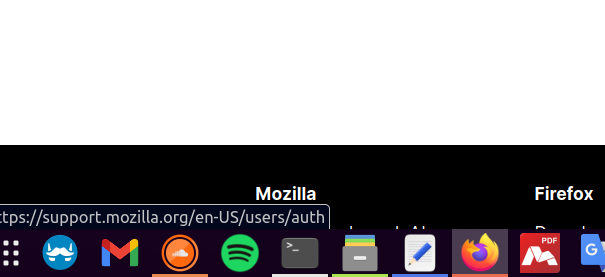
When I'm hovering the mouse over a link, a URL status bar appears at the bottom of the window. Is there any way to change the background and text color of that URL status bar? I'm attaching an image showing what is that status bar.
Thanks,
Itai
Выбранное решение
I think you only need the one with !important, so try:
#statuspanel-label {
  color: #c2c2c4 !important; /* light text */
  background-color: #00061c !important; /* dark background */
  border-color: #00061c !important; /* dark border */
}
Все ответы (8)
Hi Itai, there's no built-in setting for that, and I don't think themes on the add-ons site can modify it, either.
That leaves the community-supported option of using a custom style rule in an optional userChrome.css file.
Have you already set up a userChrome.css file? If it's completely new to you, I have a website with general information about it: https://www.userchrome.org/
What colors were you thinking of?
jscher2000 said
Hi Itai, there's no built-in setting for that, and I don't think themes on the add-ons site can modify it, either. That leaves the community-supported option of using a custom style rule in an optional userChrome.css file. Have you already set up a userChrome.css file? If it's completely new to you, I have a website with general information about it: https://www.userchrome.org/ What colors were you thinking of?
Hi jscher2000,
I tried to add the code below to the userChrome.css file, but with no success of seeing any change.
.statuspanel-label { background: #131314 !important; color: #2D2D2D !important; /*background: #1E1E1E !important;*/ /*font-size: 13pt !important;*/ /*font-weight: normal !important;*/ /*color: darkslateblue !important;*/ }''
jscher2000 said
Hi Itai, there's no built-in setting for that, and I don't think themes on the add-ons site can modify it, either. That leaves the community-supported option of using a custom style rule in an optional userChrome.css file. Have you already set up a userChrome.css file? If it's completely new to you, I have a website with general information about it: https://www.userchrome.org/ What colors were you thinking of?
Hi jscher2000, I tried to add the code below to the userChrome.css file, but with no successes of seeing any change.
.statuspanel-label { background: #131314 !important; color: #2D2D2D !important; /* background: #1E1E1E !important;*/ /* font-size: 13pt !important;*/ /* font-weight: normal !important;*/ /* color: darkslateblue !important;*/ }
Hi, it's an id attribute, not a class name, so:
#statuspanel-label {
  background: #131314 !important;
  color: #2D2D2D !important;
}
However, there's not enough contrast between those colors so it's not readable, at least for me.
These seem to be the built-in colors on Windows (regular and dark system theme):
@media (-moz-windows-default-theme) {
  #statuspanel-label {
    background-color: #f9f9fa;
    color: #444;
  }
}

@media (prefers-color-scheme: dark) {
  #statuspanel-label {
    background-color: hsl(240, 1%, 20%);
    border-color: hsl(240, 1%, 40%);
    color: rgb(249, 249, 250);
  }
}
any suggestions for Ubuntu? it's not readable for me.
What colors do you want?
I found this pretty comfortable:
- statuspanel-label {
 background: #00061c !important;
 color: #c2c2c4 !important;
}
@media (-moz-windows-default-theme) {
 #statuspanel-label {
   background-color: #00061c;
   color: #c2c2c4;
 }
}
@media (prefers-color-scheme: dark) {
 #statuspanel-label {
   background-color: #00061c;
   color: #c2c2c4;
 }
}
but now I would like to change the status bar border from white to dark as well. see picture.
Изменено itai590
Выбранное решение
I think you only need the one with !important, so try:
#statuspanel-label {
  color: #c2c2c4 !important; /* light text */
  background-color: #00061c !important; /* dark background */
  border-color: #00061c !important; /* dark border */
}