


How to view bookmarks without sidebar.

With the new update that has just been done to firefox, and downloaded automatically when I tried to start firefox, I can not see my bookmarks in the drop down box from the menu bar. All I get are recently visited sites, but not my bookmarks. At first I thought the bookmarks were lost, but finally found them by opening the bookmark sidebar. However, I am not liking how much side space the sidebar takes up. Is there anyway to get it to show me the bookmarks and then close after selecting the bookmark I want? You know like it used to before the update. I see that the new way is to start typing the bookmark but honestly I do not remember all the bookmarks I have or exactly what they are called, that is why I bookmark them.
Выбранное решение
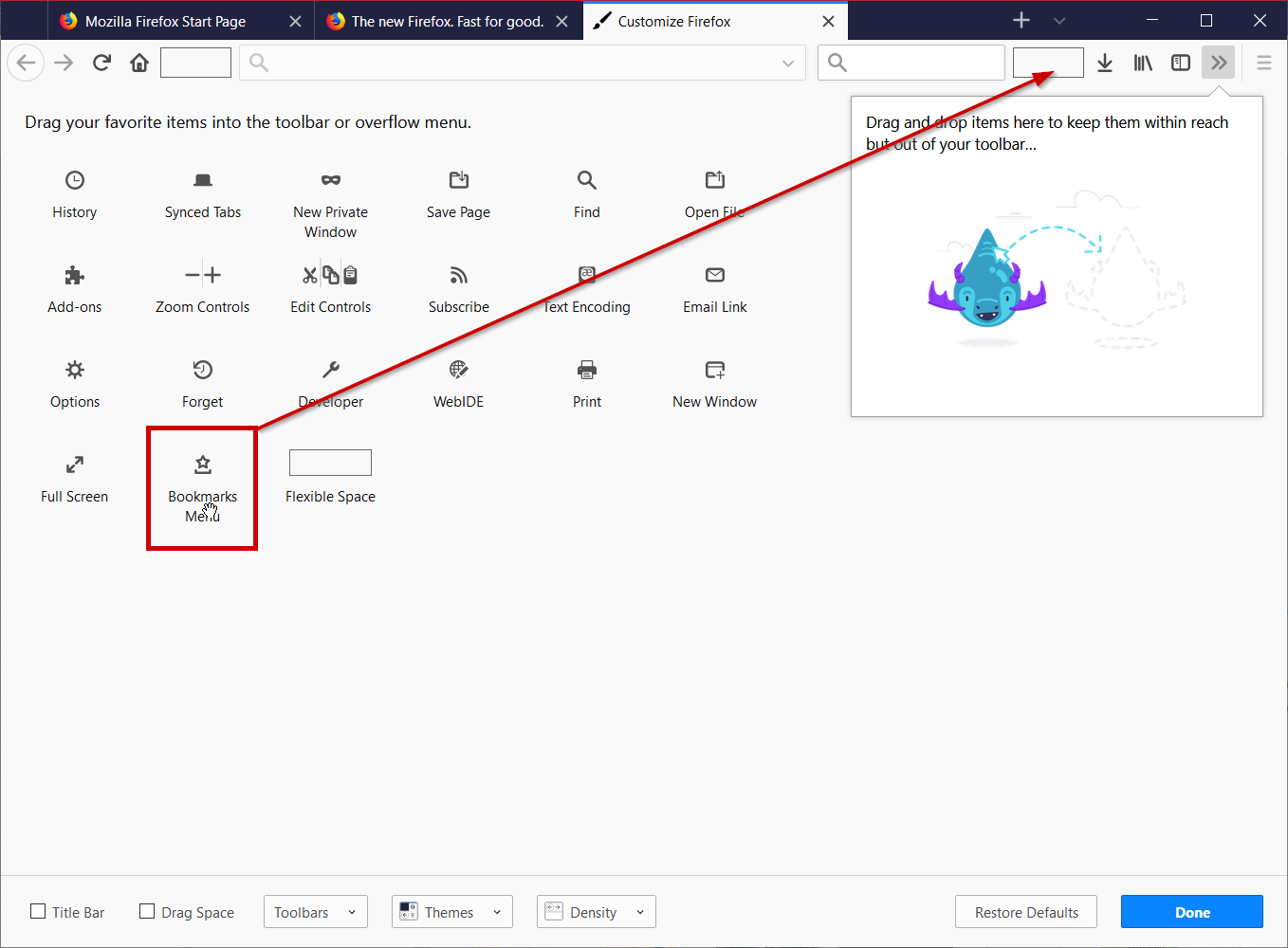
Hello, goto the hamburger menu >> click on Customize Firefox >> drag the Bookmarks Menu back onto the UI like in the attached image below.
If this solved your problem, please mark as the solution!
Прочитайте этот ответ в контексте 👍 5Все ответы (2)
Выбранное решение
Hello, goto the hamburger menu >> click on Customize Firefox >> drag the Bookmarks Menu back onto the UI like in the attached image below.
If this solved your problem, please mark as the solution!
Thank you very much Mkll.