


Youtube

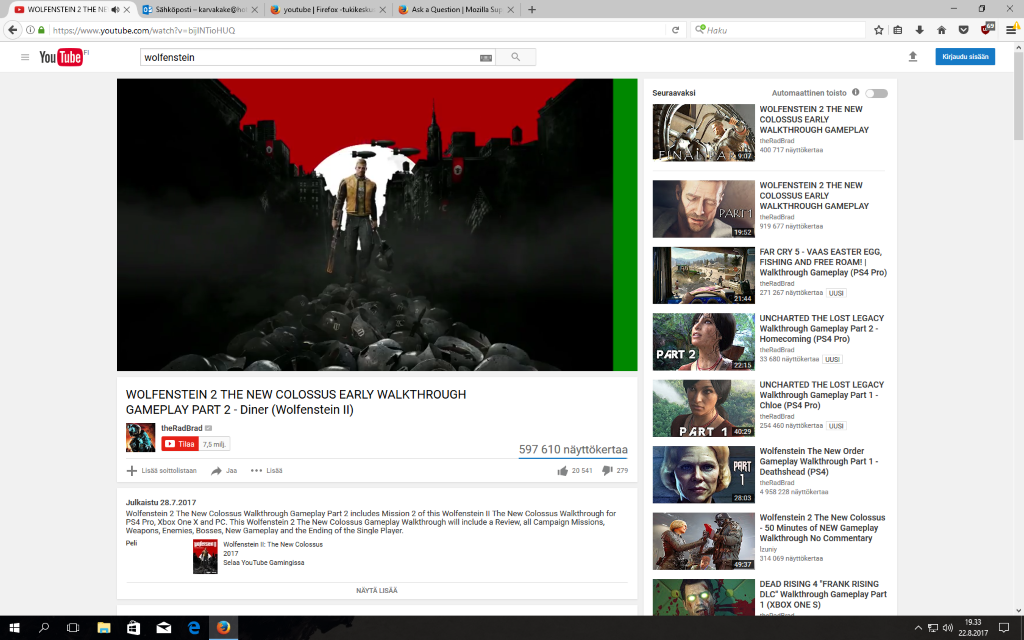
After update 55.0.2 64-bit i see green line at the right corner of the youtube video (480p) or at the bottom 720p. I dont see it in any other web browser. Why is that? I got picture on it. Plus make more space if you want better pictures than 1024kt, its not enough. Thanks!
Все ответы (4)
Выбранное решение
Hi !
First you could try this :
3-bar menu => Options => Advanced => General tab => under 'Browsing' : uncheck ' Use hardware acceleration when available'.
But maybe your graphics drivers need to be updated ......
Would you please take a look at the article :
Upgrade your graphics drivers to use hardware acceleration and WebGL
Изменено Happy112
Thanks!
I have the same problem, with EVGA GE8600 GT, using latest nvidia driver. Windows 10 x64 bit, 1920x1080. No problem with Edge or IE. Have tried with and without hardware acceleration, and with all plugins disabled - same green borders. Safe mode - no problem. Any video, here: https://www.youtube.com/channel/UCkEKLTfO0PP_Y9tYBTAoRuQ/videos
Изменено user1089320