

Эта тема была архивирована.
Если вам нужна помощь, задайте новый вопрос.

Архивировано
missing sub folders and emails

Hi,
I had sub folders in my inbox for my yahoo account that contained lots of important saved emails. All the sub folders have gone,when i do a search for the emails they show up,with a preview pane. if i then click to open the email it does not exist. None the attachments with the emails are available either.
Please help! Many Thanks in advance.
Hi,
I had sub folders in my inbox for my yahoo account that contained lots of important saved emails. All the sub folders have gone,when i do a search for the emails they show up,with a preview pane. if i then click to open the email it does not exist. None the attachments with the emails are available either.
Please help! Many Thanks in advance.
Все ответы (4)
Hi,
Neither the folders or the messages that I moved into the sub-folders are visible from the Yahoo website.
When I right-click the account in the folder pane, all the folders are checked, however the sub-folders that have disappeared are not listed.
Thanks.
Okay, thank you for your help.
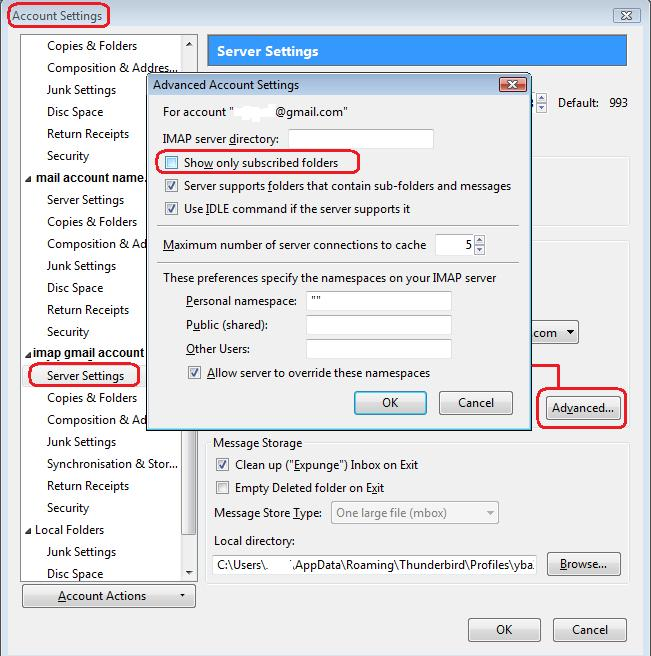
Try this: right click on imap mail account in folder pane and select 'Settings' select 'Server settings' for the imap mail account click on 'Advanced' button. uncheck: 'show only subscribed folders' click on OK click on OK
Does this allow you to subscribe /show more folders?
Hi,
I have tried the above, and it doesn't allow me to subscribe or show any folders that weren't there before.