

Эта тема была архивирована.
Если вам нужна помощь, задайте новый вопрос.

Архивировано
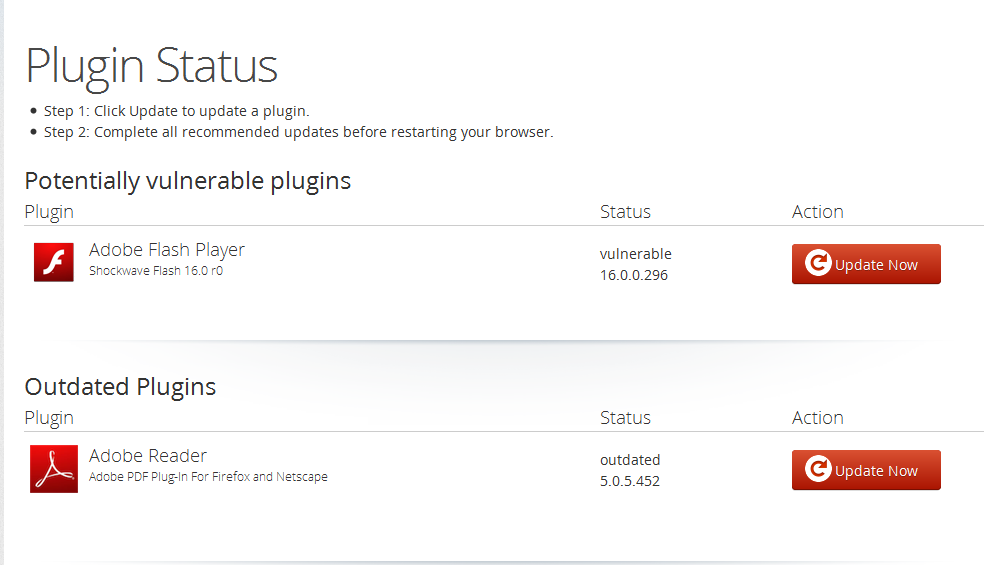
firefox says adobe flash and acrobat are out of date, but they aren't. help?

I'm currently have Firefox 38.0.5, Adobe Flash 17.0.0.188, and Acrobat Reader 15.007.20033. Firefox says Reader and Flash are both out of date and I don't know how to fix it. I've tried restarting and reinstalling them and it didn't work. It also says Java deployment toolkit is out of date, I don't know what that is but I can't remove it,
I'm currently have Firefox 38.0.5, Adobe Flash 17.0.0.188, and Acrobat Reader 15.007.20033. Firefox says Reader and Flash are both out of date and I don't know how to fix it. I've tried restarting and reinstalling them and it didn't work. It also says Java deployment toolkit is out of date, I don't know what that is but I can't remove it,
Все ответы (1)
Your System Details List shows two Flash plugins.
- Shockwave Flash 16.0 r0
- Shockwave Flash 17.0 r0
You can find the installation path of all plugins on the about:plugins page.
You can check the Flash player installation folder for multiple Flash player plugins and remove older version(s) of the plugin (NPSWF32) and possibly (re)install the latest Flash player.
- (32 bit Windows) C:\Windows\System32\Macromed\Flash\
- (64 bit Windows) C:\Windows\SysWOW64\Macromed\Flash\