


Events are not showing in my calendar

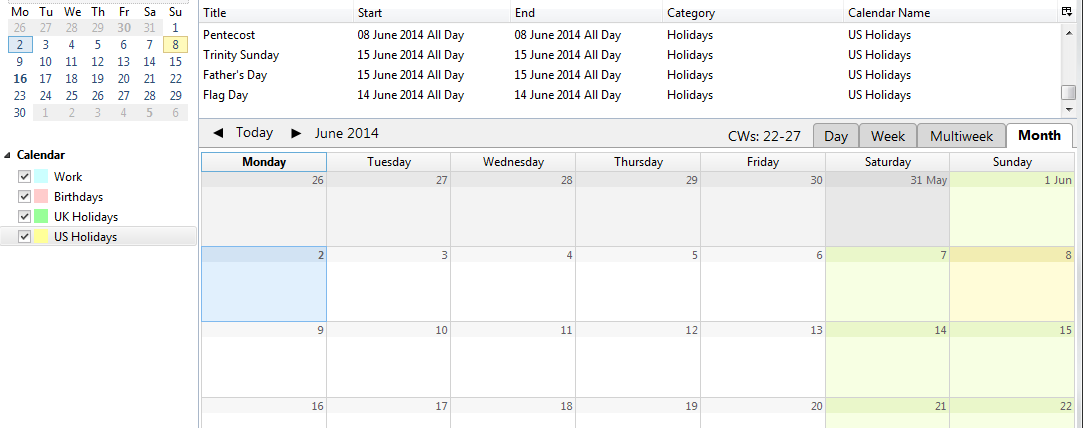
I've just installed Lightning Add-On to Thunderbird and I soon found that the events disappeared from view in the Calendar. I followed notes to add the UK and US holiday network calendars (eg: iCal at: http://mozorg.cdn.mozilla.net/media/caldata/UKHolidays.ics) and the UK ones appeared, until I selected the calendar section again to add the us ones. All calendars are ticked. I clicked synchronize calendars to no avail. I can see Father's Day in the list at the top, but not on the day, week, multiweek or month tab. I hunted the docs, but couldn't find anything that would show/hide events from those views for calendars that are switched on.
Any thoughts welcome. Thanks
Thunderbird 24.5.0 Lightning 2.6.5 Windows 7 x64 (Home)
Выбранное решение
I had cause to restart Thunderbird moments ago (Virtual Identify add-on wasn't picking up a new SMTP account). I found that a Thunderbird process was "hiding" and used TaskManager to Kill it.
Virtual Identity picked up the changes. The events appeared on the calendar, and in the Events sidebar etc...
Hopefully that's sorted it.
Все ответы (3)
obvious I know, but all calendars have a tick beside them?
indeed, yes - all calendars have ticks beside them. The screenshot should show this.
Выбранное решение
I had cause to restart Thunderbird moments ago (Virtual Identify add-on wasn't picking up a new SMTP account). I found that a Thunderbird process was "hiding" and used TaskManager to Kill it.
Virtual Identity picked up the changes. The events appeared on the calendar, and in the Events sidebar etc...
Hopefully that's sorted it.