


when i open any website,i am redirected to windows website and message is displayed "Windows Expired" please complete bellow survey to continue

when i open youtube,gmail,google or any other website ->i am redirected to windows website and a pop up message says "Windows Updated" please complete survey to continue
the survey contains an android application to be download
Modificat la de smitshah06
Toate răspunsurile (6)

Hello,
Try Firefox Safe Mode to see if the problem goes away. Safe Mode is a troubleshooting mode, which disables most add-ons.
(If you're not using it, switch to the Default theme.)
- On Windows you can open Firefox 4.0+ in Safe Mode by holding the Shift key when you open the Firefox desktop or Start menu shortcut.
- On Mac you can open Firefox 4.0+ in Safe Mode by holding the option key while starting Firefox.
- On Linux you can open Firefox 4.0+ in Safe Mode by quitting Firefox and then going to your Terminal and running: firefox -safe-mode (you may need to specify the Firefox installation path e.g. /usr/lib/firefox)
- Or open the Help menu and click on the Restart with Add-ons Disabled... menu item while Firefox is running.
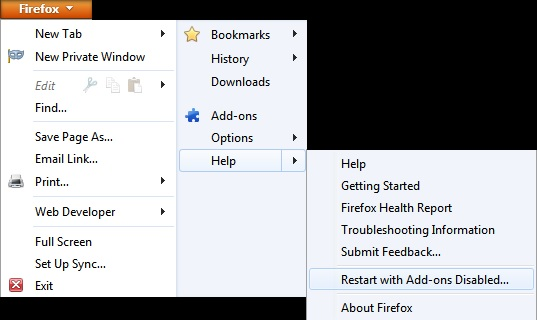
Once you get the pop-up, just select "'Start in Safe Mode"
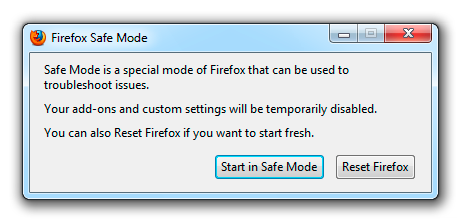
If the issue is not present in Firefox Safe Mode, your problem is probably caused by an extension, and you need to figure out which one. Please follow the Troubleshoot extensions, themes and hardware acceleration issues to solve common Firefox problems article for that.
To exit the Firefox Safe Mode, just close Firefox and wait a few seconds before opening Firefox for normal use again.
When you figure out what's causing your issues, please let us know. It might help other users who have the same problem.
Thank you.
Hi,
thank you for your reply but I have tried that thing.....it don't work
the message actually shows "windows updated"
please check image for more details


Sometimes a problem with Firefox may be a result of malware installed on your computer, that you may not be aware of.
You can try these free programs to scan for malware, which work with your existing antivirus software:
- Microsoft Safety Scanner
- MalwareBytes' Anti-Malware
- TDSSKiller - AntiRootkit Utility
- Hitman Pro
- ESET Online Scanner
Microsoft Security Essentials is a good permanent antivirus for Windows 7/Vista/XP if you don't already have one.
Further information can be found in the Troubleshoot Firefox issues caused by malware article.
Did this fix your problems? Please report back to us!
Create a new profile as a test to check if your current profile is causing the problems. See "Creating a profile":
- https://support.mozilla.org/kb/profile-manager-create-and-remove-firefox-profiles
- http://kb.mozillazine.org/Standard_diagnostic_-_Firefox#Profile_issues
Profile Backup and Restore
I have tried the malware scanner also but it needs to delete the corupted files which also includes system files
formatting will only the option to solve this?
- just you made update of your PC with a high speed internet.
- Mal ware is attached in c drive so uninstall and remove unwanted software from your laptop or PC.
- the best of is full uninstall Mozilla and again fresh download the #Mozilla #firefox of latest version.http://www.mozilla.org/en-US/firefox/new/?utm_source=firefox-affiliates&utm_medium=banner&utm_campaign=aff-student-ambassadors
- if you wanna to remove malware and by default brouser that stick into your mozilla browser so you use.
a) Awd Cleaner b) malware byte.