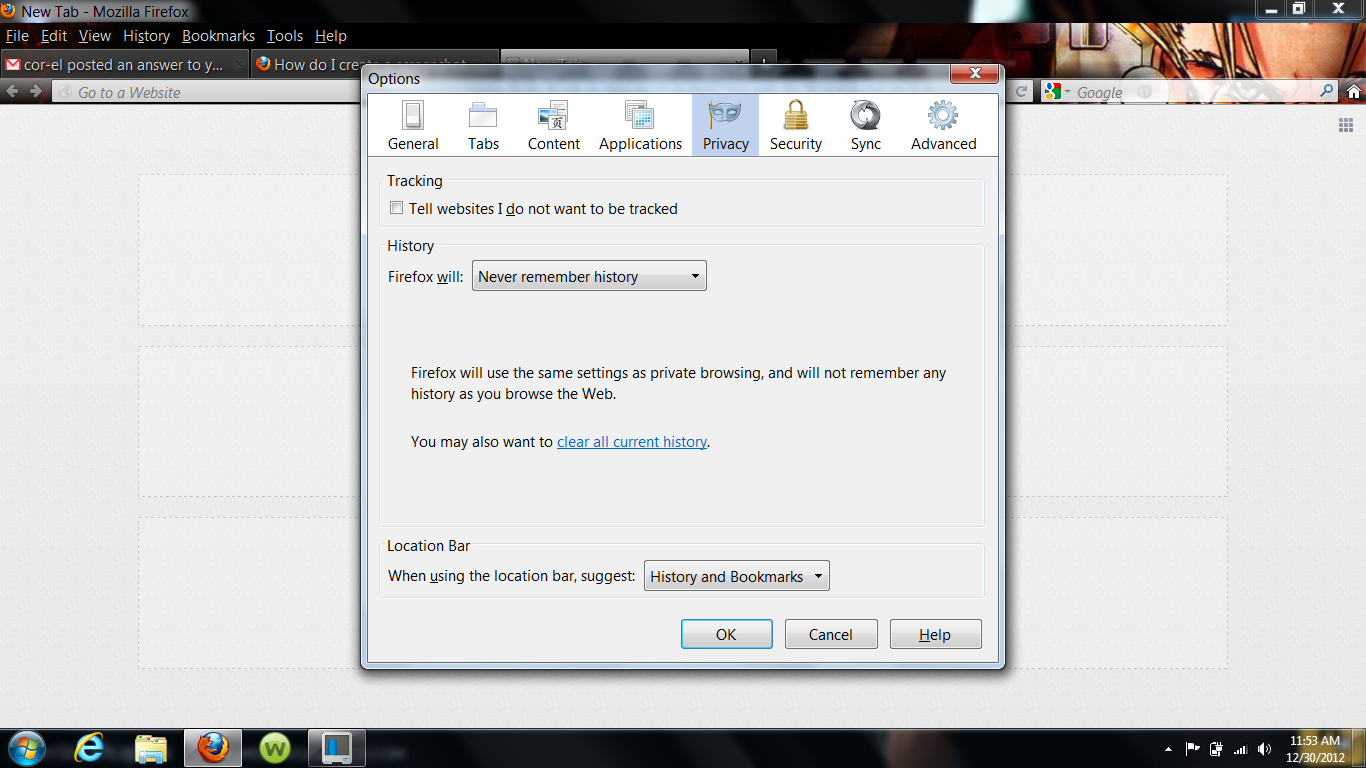
How to make the text of the toolbar smaller?

I went to see some friends one weekend, an left my computer at home. No one touched the laptop in my absence, nor does anyone but myself use it. The text in the firefox toolbar was the right size to me, as well as the sizes of the windows that popped up from them (i.e, the options window that appears when customizing privacy and security from clicking 'options' on the 'tools' dropdown bar.) when I came back, the text of the toolbar and the windows that appear from them seemed larger than I wanted. (NOT the web page font, but the browsing toolbar font itself, such as the font for my bookmarks, the font for the tabs, etc.) How do I adjust this to make it smaller? The size they are now takes up too much space, and is not needed.
Toate răspunsurile (2)
Can you attach a screenshot?
- http://en.wikipedia.org/wiki/Screenshot
- https://support.mozilla.org/kb/how-do-i-create-screenshot-my-problem
Use a compressed image type like PNG or JPG to save the screenshot.
Start Firefox in Safe Mode to check if one of the extensions (Firefox/Tools > Add-ons > Extensions) or if hardware acceleration is causing the problem (switch to the DEFAULT theme: Firefox/Tools > Add-ons > Appearance).
- Do not click the Reset button on the Safe mode start window or otherwise make changes.
here is the screenshot