


Stop default search engine from changing to Google and restore Firefox

All of a sudden, my default search engine changed to Google. I didn't do it and don't want it. The "settings" still show Firefox as my default, but it doesn't stop Google from hijacking my searches. I want to get rid of it.
Soluție aleasă
There was never a Firefox search engine so if you were not using Google then it was likely another search engine that you forgot what it was.
Yahoo for example was one of the default search engines to choose from though it has not been in Firefox releases since Firefox 57.0 (Nov 2017) and one has to manually install it in Firefox since if you want to use it
Also you say "The "settings" still show Firefox as my default"
What settings are you referring to?
If you mean default web browser on Windows? https://support.mozilla.org/en-US/kb/how-change-your-default-browser-firefox-windows
Citește răspunsul în context 👍 0Toate răspunsurile (8)
Do you think that Firefox is a search engine?? No, it's a browser. That's why you can't find it on a list of search engines.

You can switch from Google to a different default search engine in Firefox Search settings, which you can open from the Firefox menu  by clicking on Settings and selecting Search on the left:
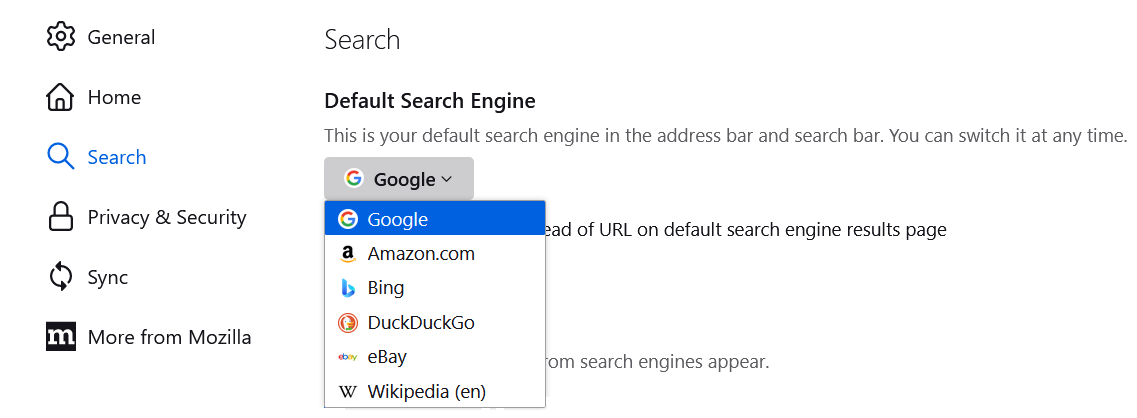
For more information, see Manage Firefox search settings
But Firefox is not listed among the options. I've tried a few of them, but it's still just settling for something I don't want. And, yes, I may have become confused about search engines and browsers, but I don't know what to do about that. I got the notification from Firefox that I could actually block AI responses, and I was delighted with that, but I can't turn AI responses off from anywhere else. My settings say that Firefox is my default, but it doesn't give me any acceptable alternatives. I've tried, with Amazon, and Wikipedia, and most of the others, but I'm just stuck. I don't understand why I can't just go back to what I had for years.
Again Firefox is a web browser and not a search engine. A search engine is for example google.com. duckduckgo.com. bing.com yahoo.com etc.
Mozilla the makers of the Firefox web browsers for desktop Windows, macOS, Linux and mobile versions for Android and iOS/iPadOS does not have a search engine of their own.
There is the default list of search engines you can use in Firefox depending on the language locale you have and you can also add other search engines in Firefox to use.
https://support.mozilla.org/en-US/kb/add-or-remove-search-engine-firefox https://support.mozilla.org/en-US/kb/add-custom-search-engine-firefox https://support.mozilla.org/en-US/kb/change-your-default-search-settings-firefox
Thank you for trying to help. I'm afraid I'm not enough of a techie to understand it all. I don't know why it worked so well in Firefox for several years, and now I'm being banished to Google.
Soluție aleasă
There was never a Firefox search engine so if you were not using Google then it was likely another search engine that you forgot what it was.
Yahoo for example was one of the default search engines to choose from though it has not been in Firefox releases since Firefox 57.0 (Nov 2017) and one has to manually install it in Firefox since if you want to use it
Also you say "The "settings" still show Firefox as my default"
What settings are you referring to?
If you mean default web browser on Windows? https://support.mozilla.org/en-US/kb/how-change-your-default-browser-firefox-windows
Yes, I guess you're right. Now I have no idea what to do if I am limited to the choices provided. Wikipedia??? Amazon??? Not appealing. But thank you for taking the time to hold my hand about my dissatisfaction with searching any longer.
Deadline said
Yes, I guess you're right. Now I have no idea what to do if I am limited to the choices provided. Wikipedia??? Amazon??? Not appealing. But thank you for taking the time to hold my hand about my dissatisfaction with searching any longer.
Here are the default choices I see in Firefox 148 (Windows 11 en-US):
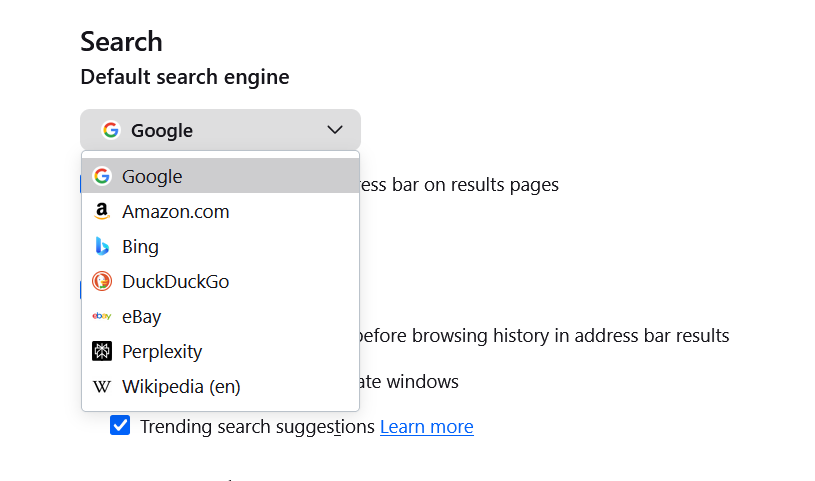
You aren't limited since you can always add new search engines, as James mentioned. See:
I'll mark this question as solved, based on the answer by James and your last reply.