


Join us to show up for other Firefox users 🦊. Earn fun badges and Mozilla swag vouchers! Find out more: https://mzl.la/askafox150

Windows 10 reached EOS (end of support) on October 14, 2025. If you are on Windows 10, see this article.

Caută ajutor

Atenție la excrocheriile de asistență. Noi nu îți vom cere niciodată să suni sau să trimiți vreun SMS la vreun număr de telefon sau să dai informații personale. Te rugăm să raportezi activitățile suspecte folosind opțiunea „Raportează un abuz”.

Află mai multe

ChromeOS and firefox

  • 2 răspunsuri
  • 0 au această problemă
  • 149 de vizualizări
  • Ultimul răspuns dat de hessian13
  • Open

[https://support.mozilla.org/en-US/kb/.../run-firefox-chromeos?utm_source=www.firefox.com&utm_medium=referral&utm_campaign=desktop-browsers-chromebook&utm_content=seo]

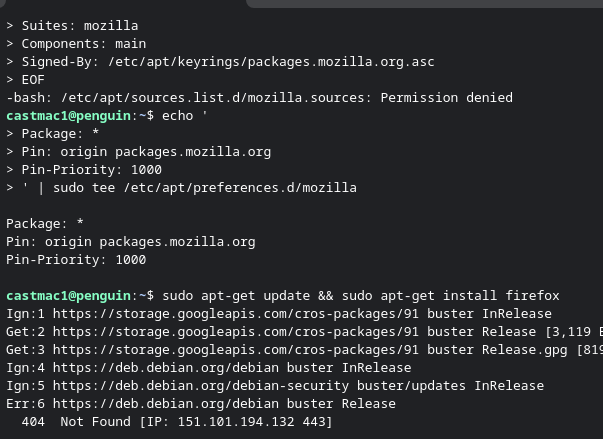
I am trying to follow the guide linked to install Firefox on an older Chromebook. It looks like the device should be supported, as running the command cat /etc/os-release returns that it is version 10. When I get to step 4 and try and run that I get a permission denied error and later steps do not work.

I did try the Google play option on the Chromebook, it says the device is not supported.

[[https://support.mozilla.org/en-US/kb/run-firefox-chromeos?utm_source=www.firefox.com&utm_medium=referral&utm_campaign=desktop-browsers-chromebook&utm_content=seo|https://support.mozilla.org/en-US/kb/run-firefox-chromeos?utm_source=www.firefox.com&utm_medium=referral&utm_campaign=desktop-browsers-chromebook&utm_content=seo]] I am trying to follow the guide linked to install Firefox on an older Chromebook. It looks like the device should be supported, as running the command cat /etc/os-release returns that it is version 10. When I get to step 4 and try and run that I get a permission denied error and later steps do not work. I did try the Google play option on the Chromebook, it says the device is not supported.

Toate răspunsurile (2)

Hi,

Step 4 just creates a text file. If you get a permission denied error, try selecting a more privileged user or adjust directory permissions. Either way, this error shouldn't be related to Firefox.

When I copy and paste step 4 is when I get the error. If I manually type it all in without adding newlines and hit enter I get a ">" "cat <<EOF > /etc/apt/sources.list.d/mozilla.sources Types: deb URIs: https://packages.mozilla.org/apt Suites: mozilla Components: main Signed-By: /etc/apt/keyrings/packages.mozilla.org.asc EOF "

If I try and skip to step 6 it also gives me a bunch of 404. It looks like only a terminal is installed, so I do not know how to translate the lines in step 4 to make it into the file.
Adresează o întrebare

Trebuie să intri în cont ca să răspunzi la o postare. Te rugăm să adresezi o întrebare nouă dacă nu ai încă un cont.