


Remove "translate selection" from context menu

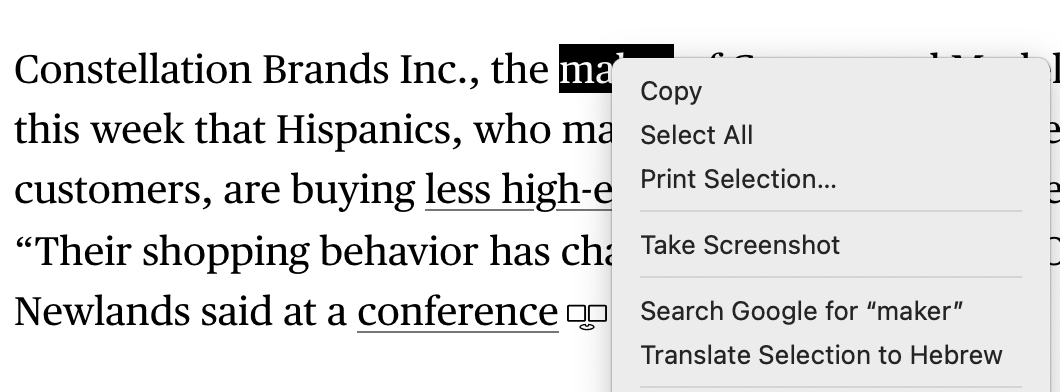
I don't know why, but when I browse pages in English, the context menu offers to "translate selection into Hebrew". This is weird and totally unwanted. I don't know how FF decided that I need translations, and specifically to Hebrew!
In the settings, my preferred language is "English (US)". In "translation settings", the list of "Translation will happen automatically for the following languages" is empty, and the list of "Translation will not be offered for the following languages" has Hebrew and French. (I would add English but I don't see how.)
Is there a way to just remove this translation option from the context menu?
Modificat la de gidiav
Soluție aleasă
Hello
You can test
1 - Go to Configuration Editor for Firefox https://support.mozilla.org/en-US/kb/about-config-editor-firefox 2 - Enter a search term browser.translations.select.enable You can double-click on the preference to set the value to false
WARNING from the moderator team: Changing Firefox preferences from the about:config page can sometimes break Firefox or cause strange behavior. You should only do this if you know what you're doing. Please read Firefox advanced customization and configuration options to learn more.
Citește răspunsul în context 👍 0Toate răspunsurile (2)
Soluție aleasă
Hello
You can test
1 - Go to Configuration Editor for Firefox https://support.mozilla.org/en-US/kb/about-config-editor-firefox 2 - Enter a search term browser.translations.select.enable You can double-click on the preference to set the value to false
WARNING from the moderator team: Changing Firefox preferences from the about:config page can sometimes break Firefox or cause strange behavior. You should only do this if you know what you're doing. Please read Firefox advanced customization and configuration options to learn more.
Modificat la de Paul
Hello
To complement, this discussion.
Additional information.
Take a look at https://connect.mozilla.org/t5/discussions/translate-button-not-visible-in-right-click-menu/m-p/84929/highlight/true#M32480, about, Enable Firefox Select translations powered by the Bergamot translations.
Modificat la de Agent virtuel