


After Thunderbird update email send doesnt work

Since last Thunderbird update my sending of email in Thunderbird no longer works. Email provider is AOL and email address ends in @verizon.net ,It is a POP3 config. No problem sending via AOL website. Any ideas to allow Thunderbird send of mail?
Soluție aleasă
That fixed it!!! Thank you all so much for your help! That made my day!!
Citește răspunsul în context 👍 0Toate răspunsurile (7)
Try with theses settings:
incoming POP: pop.aol.com, 995, SSL/TLS security, OAuth2 authentication, User Name = email address
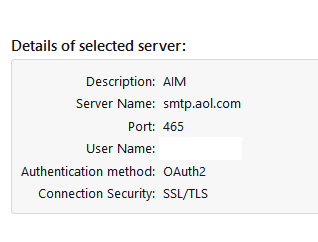
outgoing SMTP: smtp.aol.com, 465, SSL/TLS security, OAuth2 authentication, User Name = email address
Accept cookies in TB (not browser) Settings/Privacy & Security for OAuth2 to work.
I have Thunderbird version 140.1.0esr (64-bit) which is supposed to be the latest version from what I can tell (from Help/About). It does not offer OAuth2 in the drop down list for Authentication method. The following are listed:
1) No Authentication
2) Normal Password
3) Encrypted Password
4)  Kerberos/ GSSAPI
5)  NTLM
Attempted changing server to AOL with Normal Password setting and it did not work. Not sure what to do?
If you can't select OAuth2 for the authentication method, try removing the smtp server, restart TB, and add it again. I've attached a picture of my AOL smtp server.
Did not work. Asked for a password, I used the AOL website password, but that did not work. Tried a new password in Thunderbird and it did not work either.
Settings/General, Config.editor (bottom of tab), type authmethod in the search box. Look for a preference
mail.smtpserver.smtp1.authMethod (if you only have one account).
Edit the value and change the value to 10, Save, then see if the authentication for the outgoing is OAuth2.
Soluție aleasă
That fixed it!!! Thank you all so much for your help! That made my day!!