


Weird florescent lime green showing up over photos, behind streaming on hulu, and elsewhere

I first noticed it on Hulu while watching a show, the command bar was lime green and if I moved the cursor over the video to pause, there would be a flash of lime green jagged lines (migraine producing!). I switched browsers for Hulu and it's gone on a different browser.
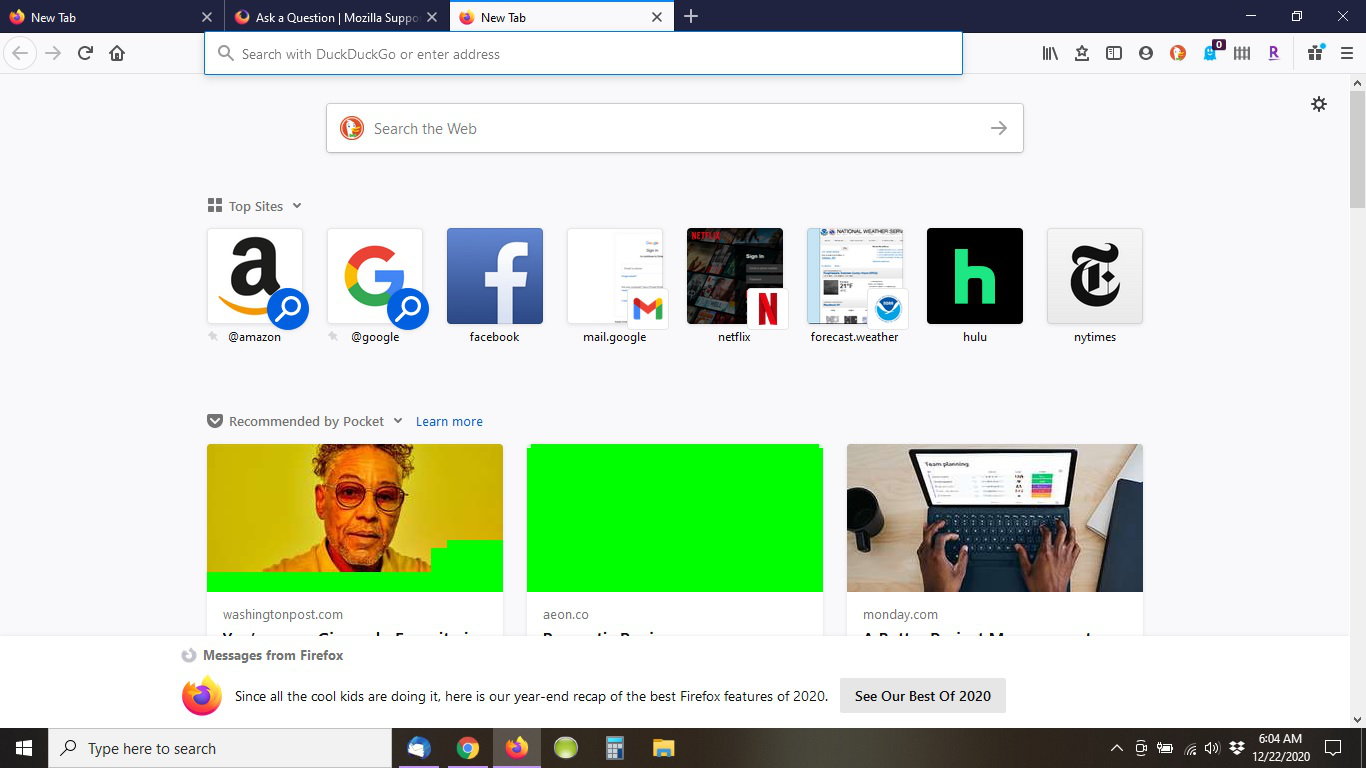
Now, I'm noticing that the photos over article headlines on pocket and on facebook are sometimes partially or fully covered with the same florescent lime green. This color is brutal for a person who gets migraines. I'm attaching a print screen.
Thoughts? Thank you!
Soluție aleasă
This looks like some kind of graphics issue, although it's odd that it doesn't happen in other browsers.
I'd recommend updating your graphics driver on your computer to see if maybe it's outdated or the driver was corrupted. See Upgrade your graphics drivers to use hardware acceleration and WebGL for more information.
If the issue is still there after rebooting the computer, I'd recommend running Firefox in Safe Mode (not to be confused with Windows Safe Mode) to see if the issue is present there. It's a troubleshooting mode that temporarily disables some Firefox features and your add-ons to help rule out conflicts there.
If the issue doesn't happen in Safe Mode, my guess would be something related to hardware acceleration. In that case, you should be able to turn off hardware acceleration in Firefox.
Hope this helps.
Citește răspunsul în context 👍 1Toate răspunsurile (2)
Soluție aleasă
This looks like some kind of graphics issue, although it's odd that it doesn't happen in other browsers.
I'd recommend updating your graphics driver on your computer to see if maybe it's outdated or the driver was corrupted. See Upgrade your graphics drivers to use hardware acceleration and WebGL for more information.
If the issue is still there after rebooting the computer, I'd recommend running Firefox in Safe Mode (not to be confused with Windows Safe Mode) to see if the issue is present there. It's a troubleshooting mode that temporarily disables some Firefox features and your add-ons to help rule out conflicts there.
If the issue doesn't happen in Safe Mode, my guess would be something related to hardware acceleration. In that case, you should be able to turn off hardware acceleration in Firefox.
Hope this helps.
Thank you Wesley! I turned off hardware acceleration and it seems to be fixed!