


Firefox 63.0.1 crashes during every start / macOS Mojave

Two days ago Frirefox crashes and won't start again. First I delete the Firefox.app and reinstall, same Problem. Then I uninstall Firefox.app (plus ~Library/Application Support/Firefox and ~/Library/Preferences/org.mozilla.firefox.plist), restart the MacBook Pro and install Firefox again. And Firefox chrashes during every start. Has anybody an idea? Thanks Haio
Here is the crash-report: AdapterDeviceID: 0x0d26 AdapterVendorID: 0x8086 BuildID: 20181030165643 ContentSandboxCapable: 1 ContentSandboxLevel: 3 CrashTime: 1541427259 DOMIPCEnabled: 1 Email: EventLoopNestingLevel: 1 FramePoisonBase: 9223372036600930304 FramePoisonSize: 4096 InstallTime: 1541418297 Notes: FP(D00-L1000-W00000000-T000) WR? WR- OMTP? OMTP+4 ProductID: {ec8030f7-c20a-464f-9b0e-13a3a9e97384} ProductName: Firefox ReleaseChannel: release SafeMode: 0 SecondsSinceLastCrash: 571 StartupCrash: 0 StartupTime: 1541427258 TelemetryEnvironment: {"build":{"applicationId":"{ec8030f7-c20a-464f-9b0e-13a3a9e97384}","applicationName":"Firefox","architecture":"x86-64","buildId":"20181030165643","version":"63.0.1","vendor":"Mozilla","displayVersion":"63.0.1","platformVersion":"63.0.1","xpcomAbi":"x86_64-gcc3","updaterAvailable":true},"partner":{"distributionId":null,"distributionVersion":null,"partnerId":null,"distributor":null,"distributorChannel":null,"partnerNames":[]},"system":{"memoryMB":16384,"virtualMaxMB":null,"cpu":{"count":8,"cores":4,"vendor":"GenuineIntel","family":6,"model":70,"stepping":1,"l2cacheKB":256,"l3cacheKB":6144,"speedMHz":2200,"extensions":["hasMMX","hasSSE","hasSSE2","hasSSE3","hasSSSE3","hasSSE4_1","hasSSE4_2","hasAVX","hasAVX2","hasAES"]},"os":{"name":"Darwin","version":"18.2.0","locale":"de-DE"},"hdd":{"profile":{"model":null,"revision":null},"binary":{"model":null,"revision":null},"system":{"model":null,"revision":null}},"gfx":{"D2DEnabled":null,"DWriteEnabled":null,"ContentBackend":"Skia","adapters":[{"description":null,"vendorID":"0x8086","deviceID":"0x0d26","subsysID":null,"RAM":null,"driver":null,"driverVersion":null,"driverDate":null,"GPUActive":true}],"monitors":[{"screenWidth":1440,"screenHeight":900,"scale":2},{"screenWidth":1680,"screenHeight":1050,"scale":1},{"screenWidth":1680,"screenHeight":1050,"scale":1}],"features":{"compositor":"none","gpuProcess":{"status":"unused"},"wrQualified":{"status":"blocked"},"webrender":{"status":"opt-in"}}},"appleModelId":"MacBookPro11,4"},"settings":{"blocklistEnabled":true,"e10sEnabled":true,"e10sMultiProcesses":4,"telemetryEnabled":false,"locale":"de","update":{"channel":"release","enabled":true,"autoDownload":true},"userPrefs":{"browser.search.widget.inNavBar":false},"sandbox":{"effectiveContentProcessLevel":3},"addonCompatibilityCheckEnabled":true,"isDefaultBrowser":null},"profile":{}} ThreadIdNameMapping: 5:"Gecko_IOThread",6:"Timer",7:"Socket Thread",8:"JS Watchdog",12:"JS Helper",10:"JS Helper",11:"JS Helper",9:"JS Helper",13:"JS Helper",14:"JS Helper",15:"JS Helper",16:"JS Helper",19:"Cache2 I/O",20:"Cookie",21:"GMPThread",23:"Compositor",24:"VRListener",25:"ImgDecoder #1",26:"ImageIO",27:"IPDL Background",34:"DOM Worker",36:"StyleThread#0",40:"StyleThread#4",39:"StyleThread#3",38:"StyleThread#2",41:"StyleThread#5",37:"StyleThread#1",43:"StreamTrans #13",43:"ImageBridgeChild", Throttleable: 1 UptimeTS: 1.0504584 Vendor: Mozilla Version: 63.0.1 useragent_locale: de
Soluție aleasă
ok, so it appears to be the same issue (and hopefully also the same solution) as in https://support.mozilla.org/en-US/questions/1238157.
Citește răspunsul în context 👍 1Toate răspunsurile (6)

In the address bar, type about:crashes<enter>. Note: If any reports do not have BP- in front of the numbers/letters, click it to submit them.
The crash report is several pages of data. We need the report numbers to see the whole report.
Using your mouse, mark the most recent 7 - 10 crash reports, and copy them. Now go to the reply box and paste them in.
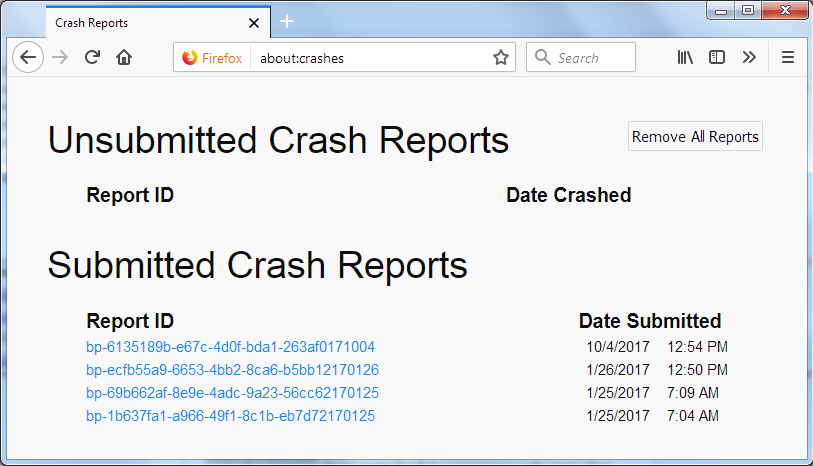
For more help on crash reports, see; https://support.mozilla.org/en-US/kb/firefox-crashes-asking-support
Unfortunately Firefox crashes immediately after starting. So I can't type anything in the address bar.
with the following steps it should be possible to get a crash id even if firefox is starting on startup:
- Click the Finder icon in the dock. On the menu bar, click the Go menu, hold down the option or alt key and select Library. A window will open containing your Library folder. Then open the "Application Support" folder, the "Firefox" folder, the "Crash Reports" folder and finally the "submitted" folder.
- Open the 5 most recent files with a text editor and copy the IDs.
- Paste each ID with bp- into the reply window on the forums.
Thanks in advance!
Thanks for your attention. There is only one ID: bp-5f8b16f5-5c5a-4f0d-9896-cfd590181105
Soluție aleasă
ok, so it appears to be the same issue (and hopefully also the same solution) as in https://support.mozilla.org/en-US/questions/1238157.
Thank you very much! Deleting the "fbplugin" solved the problem. Firefox is working.