


Firefox will not allow me to sign into certain sites, have to use other browsers.How can I fix it?

I have a site that I go to to watch certain programs and I have always watched them on Firefox until about a month ago, it wouldn't let me sign in. It kept telling me that I had the wrong password but it wasn't changed. I used another browser and signed in no problem. I have checked my settings and done what I could to see what the problem was, but it's not fixed. That is not the only problem that I've had with Firefox but it's the biggest.
Toate răspunsurile (3)
Hello,
Try Firefox Safe Mode to see if the problem goes away. Firefox Safe Mode is a troubleshooting mode that temporarily turns off hardware acceleration, resets some settings, and disables add-ons (extensions and themes).
If Firefox is open, you can restart in Firefox Safe Mode from the Help menu:
- Click the menu button
 , click Help
  and select Restart with Add-ons Disabled.
If Firefox is not running, you can start Firefox in Safe Mode as follows:
- On Windows: Hold the Shift key when you open the Firefox desktop or Start menu shortcut.
- On Mac: Hold the option key while starting Firefox.
- On Linux: Quit Firefox, go to your Terminal and run firefox -safe-mode
(you may need to specify the Firefox installation path e.g. /usr/lib/firefox)
When the Firefox Safe Mode window appears, select "Start in Safe Mode".
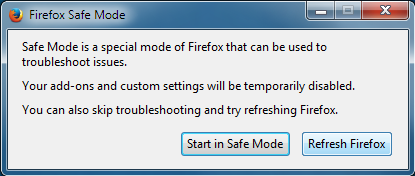
If the issue is not present in Firefox Safe Mode, your problem is probably caused by an extension, theme, or hardware acceleration. Please follow the steps in the Troubleshoot extensions, themes and hardware acceleration issues to solve common Firefox problems article to find the cause.
To exit Firefox Safe Mode, just close Firefox and wait a few seconds before opening Firefox for normal use again.
When you figure out what's causing your issues, please let us know. It might help others with the same problem.

Your System Details shows you are using Last Pass. It may be your problem.
Separate Issue; Your System Details shows;
Installed Plug-ins
Shockwave Flash 18.0 r0
Shockwave Flash 26.0 r0
Having more than one version of a program may cause issues.
You must remove the older programs. Then get the current full installer.
Flash: Grab the uninstaller from here:
http://helpx.adobe.com/flash-player/kb/uninstall-flash-player-windows.html Uninstall Flash Player | Windows
http://helpx.adobe.com/flash-player/kb/uninstall-flash-player-mac-os.html Uninstall Flash Player | Mac
Then reinstall the latest version.
Note: Windows users should download the active_x for Internet Explorer. and the plugin for Plugin-based browsers (like Firefox).
Note: Windows 8 and Windows 10 have built-in flash players and Adobe will cause a conflict. Install the plugin only. Not the active_x.
Flash Player Version: 26.0.0.131
https://get.adobe.com/flashplayer/ Direct link scans current system and browser Note: Other software is offered in the download. <Windows Only>
https://get.adobe.com/flashplayer/otherversions/ Step 1: Select Operating System Step 2: Select A Version (Firefox, Win IE . . . .) Note: Other software is offered in the download. <Windows Only>
See if there are updates for your graphics drivers https://support.mozilla.org/en-US/kb/upgrade-graphics-drivers-use-hardware-acceleration
In the event that the passwords information is lost, you should record all information in a separate text file somewhere else on your hard drive, or written down. You can easily copy and paste if you need to do so. If you are concerned about someone else looking at that file, you can compress it using a password.