


authentication window not displaying correctly

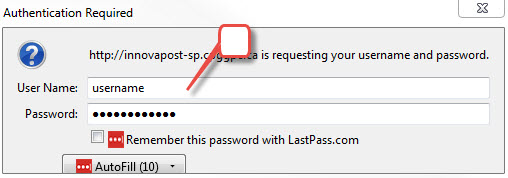
Authentication pop up window is not displaying the buttons to submit or cancel credential submission. Keyboard still works, but the pop up window is frame is smaller than the content of the window.
Soluție aleasă
This is likely caused by the extra content that is added by the LastPass and AutoFill extensions that do not fit in this authentication window.
On Linux I am able to resize this window in the normal way by dragging its border(s).
Citește răspunsul în context 👍 0Toate răspunsurile (4)
Is this a standalone window or a pop-up that appears on the current tab?
You can try to drag the window border/corner to make the pop-up window larger. You can try to zoom out the page to see if that makes the buttons visible.
No option to resize the pop up...page zoom has no impact. It is a pop up in front of the current tab...
Soluție aleasă
This is likely caused by the extra content that is added by the LastPass and AutoFill extensions that do not fit in this authentication window.
On Linux I am able to resize this window in the normal way by dragging its border(s).
I am going to report this to Lastpass, as disabling the Extension resolved the display issue of the window. Thanks for the pointer to the extension!