


Plugin conatainer still eating ram without any plugins

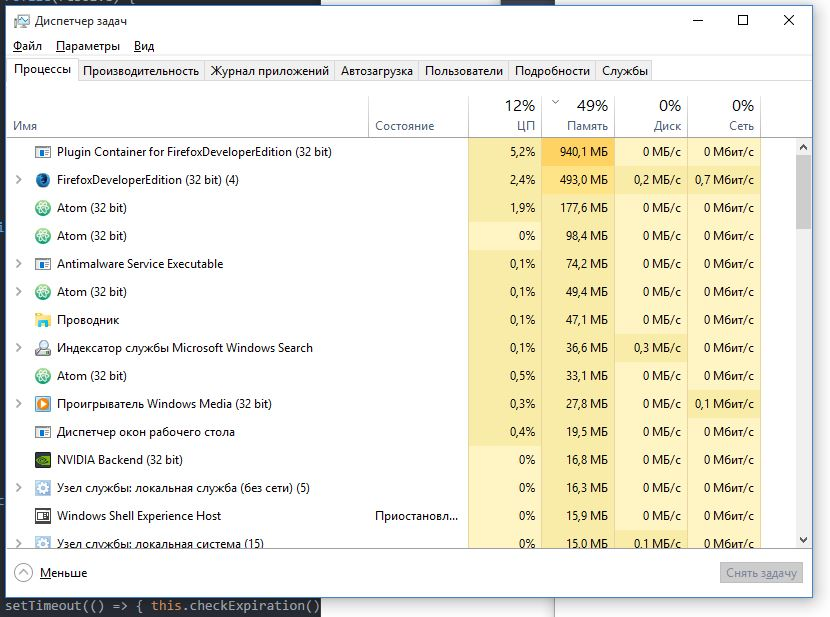
All plugins set to Never Activate, no addons installed, default theme. Plugin container still starting and constantly eating ram. Now it consumes 940 mb and keep going up. If I kill this process all open tabs crashes and afeter 30 sec plugin container restarting and continue rising mem usage from 100mb. Also it reads and writes disk at around 0.1Mb/s rate
Modificat la de ownageismagic
Soluție aleasă
hi, when you are on pre-release you are probably using multiprocess firefox. all web content will run in the plugin-container.exe process in this case. https://wiki.mozilla.org/Electrolysis
Toate răspunsurile (6)
Here is screenshot

Let’s do a full clean re-install; Download Firefox For All languages And Systems {web link} Save the file. Then Close Firefox.
Using your file browser, open the Programs Folder on your computer.
Windows: C:\Program Files
C:\Program Files (x86)
Mac: Open the "Applications" folder.
https://support.mozilla.org/en-US/kb/how-download-and-install-firefox-mac
Linux: Check your user manual.
Do Not remove the profiles folder.
Look for, and rename any Mozilla or Firefox program folders by adding .old to them. Do not rename the Mozilla Thunderbird folder.
After rebooting the computer, run a registry scanner. Then run the installer. If all goes well, remove the OLD folders when you are done.
If there is a problem, start your Computer in safe mode and try again.
Soluție aleasă
hi, when you are on pre-release you are probably using multiprocess firefox. all web content will run in the plugin-container.exe process in this case. https://wiki.mozilla.org/Electrolysis
philipp said
hi, when you are on pre-release you are probably using multiprocess firefox. all web content will run in the plugin-container.exe process in this case. https://wiki.mozilla.org/Electrolysis
Thank you for the answer. But why it leaking so bad? Calling GC from about:memory stips around 2 mb only. Killing process and reloading all tabs releases 300-500 mb
Modificat la de ownageismagic
that probably depends on the kinds of websites you are using. e10s is generally increasing the memory-footprint though: http://www.erahm.org/2016/02/11/memory-usage-of-firefox-with-e10s-enabled/