


Where can I find the Forget button?

After updating to v33.1 on OSX Yosemite, I tried adding the Forget button, but I can't find it anywhere. I have followed the steps listed on https://support.mozilla.org/en-US/kb/forget-button-quickly-delete-your-browsing-history#firefox:mac:fx33 , but the button isn't listed.
Even a re-install didn't do the trick. How can I get the button?
Soluție aleasă
A second re-install made the Forget-button appear.
For Mac:
- Download the installer (DMG-file).
- Close Firefox completely.
- Open the DMG-file and move Firefox from the DMG-file to your Applications folder. Your personal settings and such will still be there after the installation is completed.
- Open Firefox again. Now just follow the steps listed here here and you'll find the Forget button where it should have been all along.
Toate răspunsurile (7)
You can find this Forget button in the Customize palette and drag it on a toolbar or in the "3-bar" Firefox menu button drop-down list.
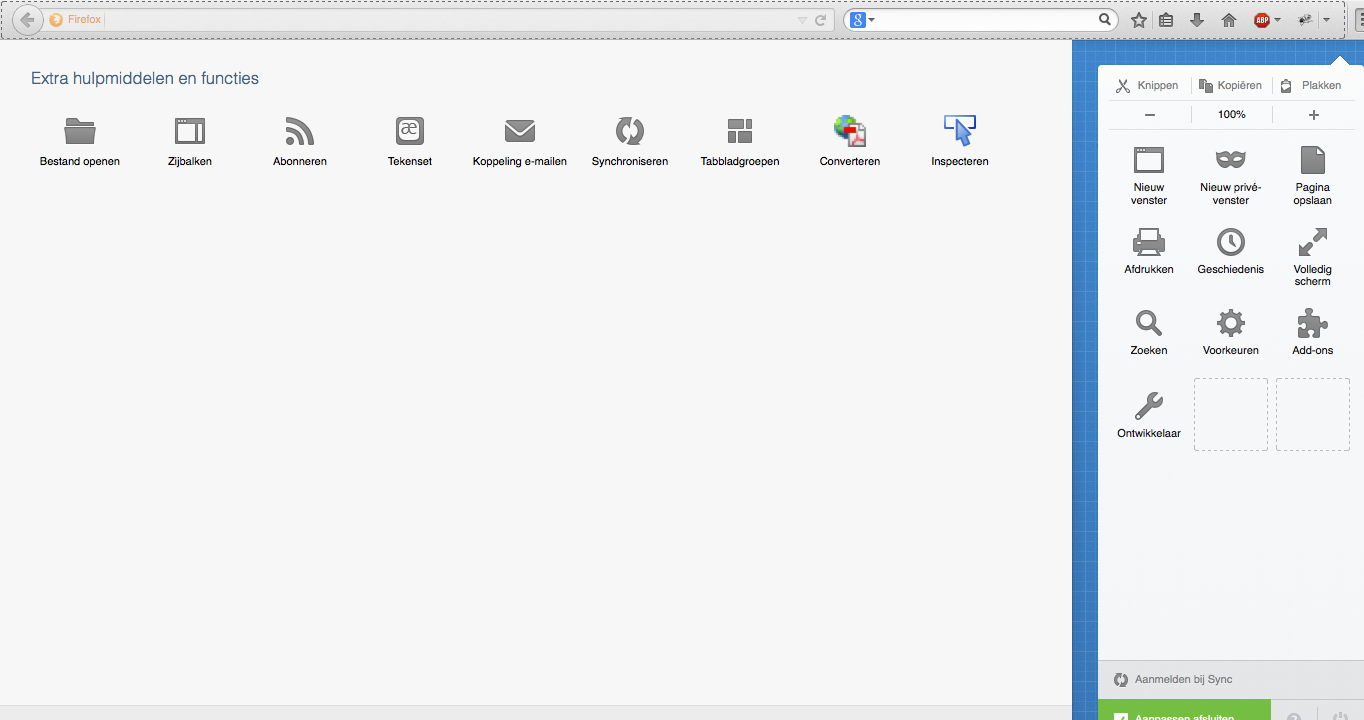
Like I stated before, I followed the steps as listed on the page I referred to before - the forget button is not with all the other buttons I can add to either the toolbar of the 3-bar menu. See for yourself in the attached screenshot.
Soluție aleasă
A second re-install made the Forget-button appear.
For Mac:
- Download the installer (DMG-file).
- Close Firefox completely.
- Open the DMG-file and move Firefox from the DMG-file to your Applications folder. Your personal settings and such will still be there after the installation is completed.
- Open Firefox again. Now just follow the steps listed here here and you'll find the Forget button where it should have been all along.
In such a case it might help to click the Restore Defaults button in the Customize palette.

I did a second reinstall and still no forget button. :(
What Firefox locale do you use (user interface language)?
It is possible that your locale is currently not supported.
There was a link to the install downloads in a post above. I used that and chose English U.S. as my language. That's all I know.