

A mostrar questões marcadas:

Update to beta prompt

I'm having trouble posting here with that error message, and problems uploading images, so forgive me if you have not seen the latest updated post. error cor-el said Yo… (ler mais)

I'm having trouble posting here with that error message, and problems uploading images, so forgive me if you have not seen the latest updated post.

error

cor-el said

You are still on the beta update channel as you can see in the "Help -> About Firefox" screenshots.
That's why I'm here. How do I get off the beta channel?

cor-el said

You can possibly check about:support for the path of the Firefox binary and profile folder..
Update Channel: beta. The binary path is to my Firefox stable install, E:\My Documents\A_FIREFOX BROWSER\FIREFOX\firefox.exe. How can that be? Why am I'm listed on the beta channel when the system is pointing to using a stable install, listed as 128.03? about:support
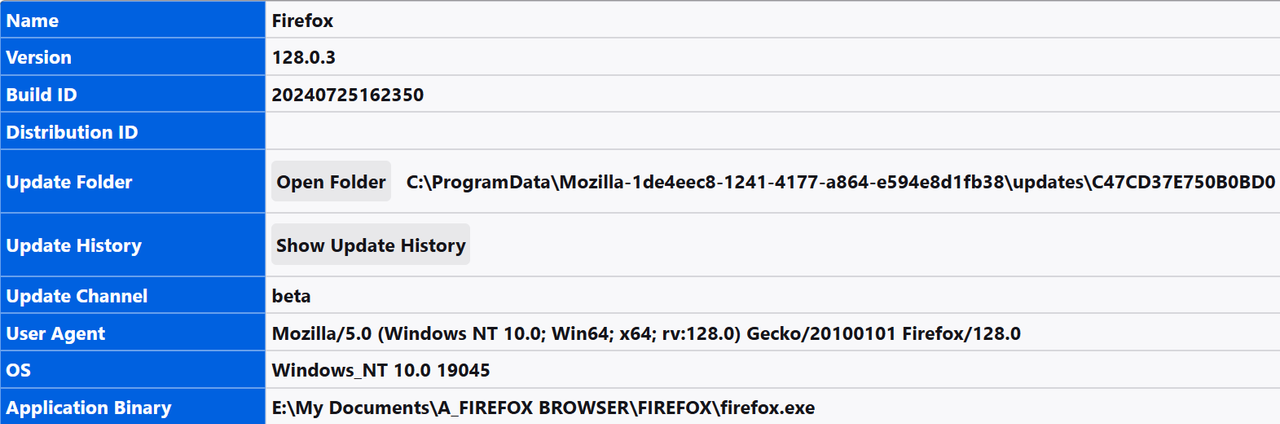
cor-el said

Above you mention portable, are you using a portable Firefox version? To update, it's just a matter of extracting the executable and replacing the contents of the portable folder.
Can we define portable? Does this only include only "official" version releases. Would we not be having this problem with an official release.


What differentiates the "portable"method, that I've been using as my method for years without an incident, up until recent recent Firefox releases? The only thing I do when there's an update is replace the contents of the install folder, the same folder that the profile manager is pointing to, with the contents of the extracted executable,

I just realized the existence of this folder in about:support "Update Folder: C:\ProgramData\Mozilla-1de4eec8-1241-4177-a864-e594e8d1fb38\updates\C47CD37E750B0BD0. I tried to delete it. It recreated itself, changed my settins to "Update Autoimatically" and wiped out my entire session.

The contents of it's update-config.json file are the following. Would changing these values to "false" do any good? Or perhaps altering the contents of updates.xml in the same folder

"{"__DEFAULTS__":{"app.update.auto":true,"app.update.background.enabled":true},"app.update.auto":false}"

I do have a "Profile" folder at C:\Users\mr\AppData\Local\Mozilla\Firefox\Profiles. The two entries are from 2019. One is empty, ans these are the contents of the other
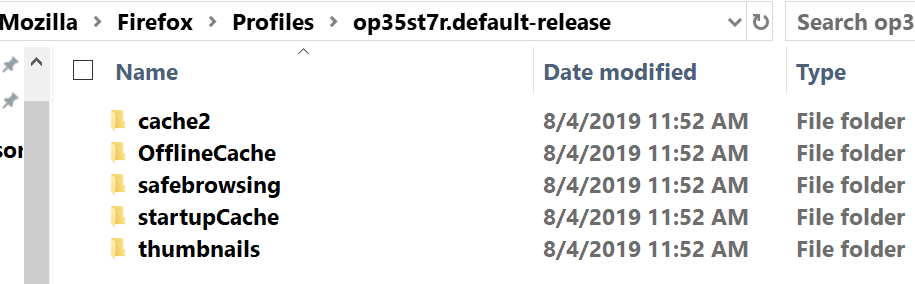
profile contents

Arquivadas 2 146

Firefox browswer failed to check for update.

I am on a Windows 10 Pro PC 64 Bit OS with 16GB of memory, running Bit Defender Total Security. I have used Firefox for many years and have never had a problem The browse… (ler mais)

I am on a Windows 10 Pro PC 64 Bit OS with 16GB of memory, running Bit Defender Total Security. I have used Firefox for many years and have never had a problem The browser is version 128.0.2 (64-bit). A few days ago in the application menu told me there was an update and said to install it because it couldn't check for updates. I downloaded and installed it three times now, but the problem still persists. My Bit Defender also keeps popping up messages telling me "firefox.exe attempted to establish a connection relying on an unmatching security certificate to aus5.mozilla.org. We blocked the connection to keep your data safe since the used certificate was issued for a different web address than the targeted one." I have had over 2000 of those messages in the past few days.

I have never had an issue like this before. Is there a glitch in the most recent update? What can I do to fix it outside of resetting my browser, which logs me out of my google accounts and causes me to not be able to get back into them.

Arquivadas 3 91

Disabling updates

Hello. How on earth I disable updates? I tried in about:config, but there - the updates come back. So how I disable uploads completely? The second question is: Why do you… (ler mais)

Hello. How on earth I disable updates? I tried in about:config, but there - the updates come back. So how I disable uploads completely? The second question is: Why do you have so many updates? I don't wanna be the slave to your updates, I don't wanna be the slave to your updates so badly that I will risk all security and everything in my life just to get rid of them! Why? Why? How can I disable updates? I don't want you to touch my computer digitally ever again! Please advise. Otherwise, I am completely leaving Mozilla after 30+ years of usage. And turning to some completely other browser that is not based on google engine and doesn't need more than one update monthly, and if, that I am aiming that for long. What in the hell you have to update so much? Almost on [redacted] daily basis? Are you completely nuts? What is wrong with you? What is wrong with you? Do you also want me to sue you in front of the EU courts? Whats wrong with you? Darko Bertovic Software Engineer, 40+ years experience

Arquivadas 1 64

Can not disable auto update on Firefox/Linux

Please advise how to disable automatic updates on Firefox running on Linux Kubuntu. Solutions posted on mozilla.org do not work because stated disable options are not av… (ler mais)

Please advise how to disable automatic updates on Firefox running on Linux Kubuntu. Solutions posted on mozilla.org do not work because stated disable options are not available(see screenshot). I have set app.auto.update to false in about:config but this does not disable updates. I have been repeatedly advised not to disable updates so I am aware of the so called risk. I am very tired of every update breaking a reliable browser and having to repair/fix/workaround each and every time. Please provide a viable solution.

Arquivadas 1 78