


Windows 10 reached EOS (end of support) on October 14, 2025. For more information, see this article.

Pesquisar no apoio

Evite burlas no apoio. Nunca iremos solicitar que telefone ou envie uma mensagem de texto para um número de telefone ou que partilhe informações pessoais. Por favor, reporte atividades suspeitas utilizando a opção "Reportar abuso".

Saber mais

FireFox asks for an applicaiton to open https on websites

  • Nenhuma resposta
  • 0 têm este problema
more options

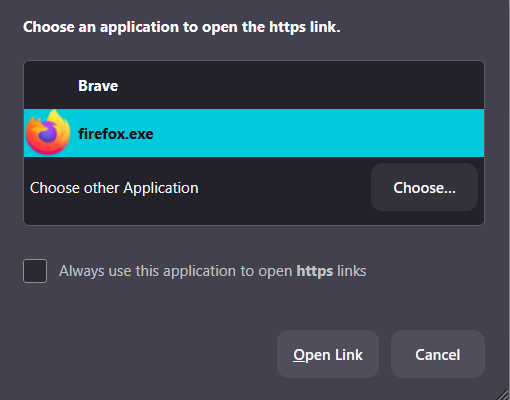
This is a brand new problem, for me. It just started today when using FireFox. On nearly all websites, including Mozilla support, when I click on an embedded link on a site, firefox asks me to select an app to open the https. Even if I tell it to let firefox open all https, it still asks me everytime. to make it better, it still doesn't always let me open the link and I go through the same thing when I click the link again.

This also happens when clicking on the search box in *any* search engine, e.g. Google, Startpage

See the image below.

I've attempted to change all cookie & tracking settings, no help. I even uninstalled and reinstalled Firefox.

This is making FireFox useless.

I had to use my default browser, Brave, just to submit this question. I only use FireFox for social media accounts, sites I need to link to my sm accounts and the occasional web search. For example, linking my Etsy shop to facebook. When I clicked the link "link to facebook" is when I noticed this problem.
This is a brand new problem, for me. It just started today when using FireFox. On nearly all websites, including Mozilla support, when I click on an embedded link on a site, firefox asks me to select an app to open the https. Even if I tell it to let firefox open all https, it still asks me everytime. to make it better, it still doesn't always let me open the link and I go through the same thing when I click the link again. This also happens when clicking on the search box in *any* search engine, e.g. Google, Startpage See the image below. I've attempted to change all cookie & tracking settings, no help. I even uninstalled and reinstalled Firefox. This is making FireFox useless. I had to use my default browser, Brave, just to submit this question. I only use FireFox for social media accounts, sites I need to link to my sm accounts and the occasional web search. For example, linking my Etsy shop to facebook. When I clicked the link "link to facebook" is when I noticed this problem.
Capturas de ecrã anexadas

Deve iniciar a sessão com a sua conta para responder às mensagens. Por favor, comece uma nova pergunta, se ainda não tiver uma conta.