


Windows 10 reached EOS (end of support) on October 14, 2025. If you are on Windows 10, see this article.

Pesquisar no apoio

Evite burlas no apoio. Nunca iremos solicitar que telefone ou envie uma mensagem de texto para um número de telefone ou que partilhe informações pessoais. Por favor, reporte atividades suspeitas utilizando a opção "Reportar abuso".

Saber mais

Can't open PG&E, and some web sites ftom Firefox. It says browser is not compatible.

  • Nenhuma resposta
  • 0 têm este problema
  • 4 visualizações
  • Arquivadas

am wondering if you could help in a matter with Firefox, since seems to beg Firefox access problem, apparently due to a new feature in Firefox? I was told to change the policy settings in Firegox about config to show false, which I did. I attached a picture of the pop up I get when I open Firefox, which opens to

Yahoo.com, news feed

It has to do with not being able to access Firefox, when I try to open PG&E, (Pacific Gas & Electric Company), as I usually do. I have searched and found that this is apparently a Firefox issue that is being caused by a new feature being utilized in Firefox. It appears that the issue is NOT a PG&E's problem, but some program in Firefox not being compatible with something in PG&E website. Also with this issue, I can't view videos in the news stories, because of thr privacy pop up, it says to allow advertising, which I don't select, since I have gone into Firefox settings and set the it to don't srll my info. And, btw, I was getting the pop up BEFORE I I changed the don't sell settings in Firefox. I have to copy the URL and paste it into Chrome to see the vidros in the news stories. Is there a work around in Firefox that can be used to access PG&E with Firefox, as I have read in a few forums that we need to ‘allow' Firefox from the PG&E web site, but that can't be done if we can't open it in the browser? Not sure if that info is accurate though. Why would Firefox be using a feature that doesn't allow all web sites, if that is the actual cause? Thank you for your help, and hopefully there is a solution to fix this particular issue. Stay safe and well. Mike S
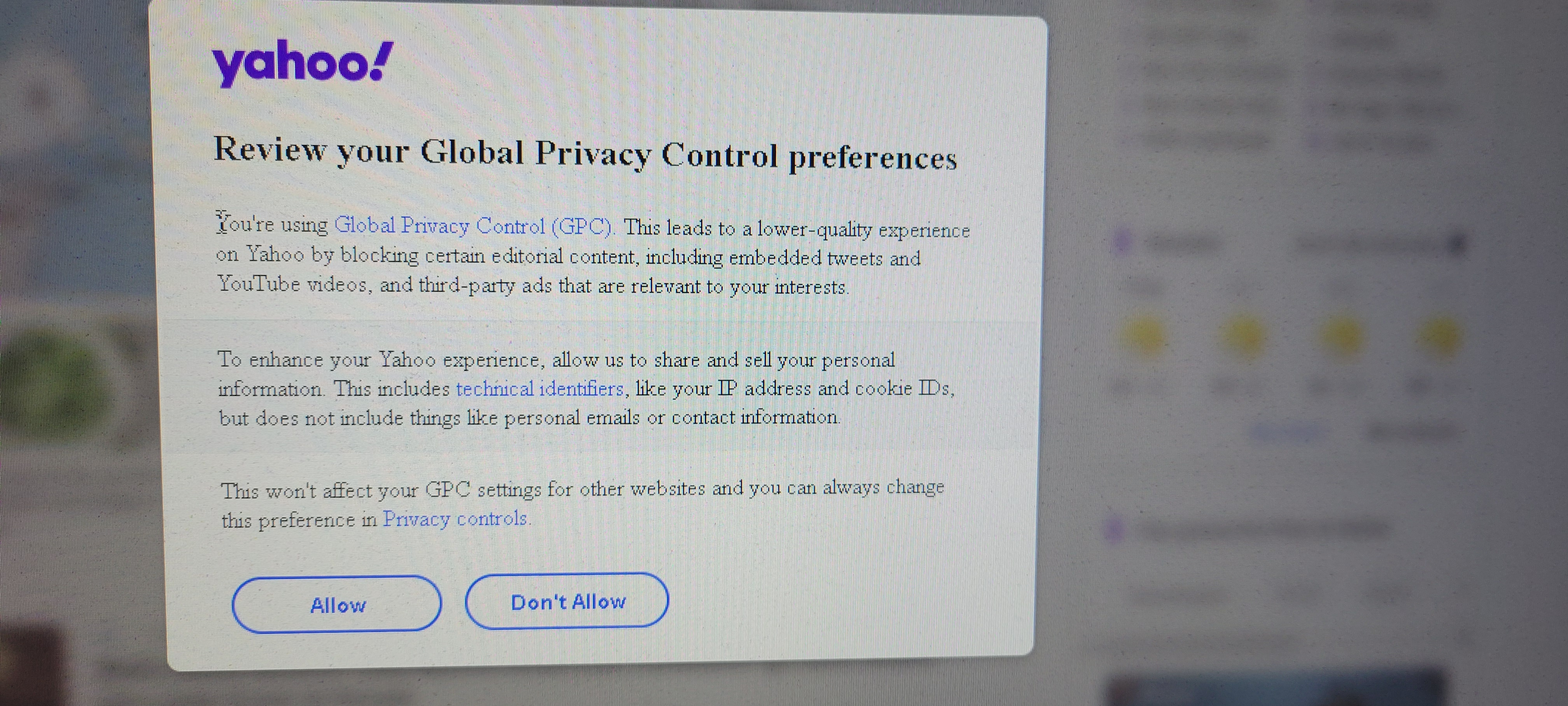
am wondering if you could help in a matter with Firefox, since seems to beg Firefox access problem, apparently due to a new feature in Firefox? I was told to change the policy settings in Firegox about config to show false, which I did. I attached a picture of the pop up I get when I open Firefox, which opens to Yahoo.com, news feed It has to do with not being able to access Firefox, when I try to open PG&E, (Pacific Gas & Electric Company), as I usually do. I have searched and found that this is apparently a Firefox issue that is being caused by a new feature being utilized in Firefox. It appears that the issue is NOT a PG&E's problem, but some program in Firefox not being compatible with something in PG&E website. Also with this issue, I can't view videos in the news stories, because of thr privacy pop up, it says to allow advertising, which I don't select, since I have gone into Firefox settings and set the it to don't srll my info. And, btw, I was getting the pop up BEFORE I I changed the don't sell settings in Firefox. I have to copy the URL and paste it into Chrome to see the vidros in the news stories. Is there a work around in Firefox that can be used to access PG&E with Firefox, as I have read in a few forums that we need to ‘allow' Firefox from the PG&E web site, but that can't be done if we can't open it in the browser? Not sure if that info is accurate though. Why would Firefox be using a feature that doesn't allow all web sites, if that is the actual cause? Thank you for your help, and hopefully there is a solution to fix this particular issue. Stay safe and well. Mike S
Capturas de ecrã anexadas