


Windows 10 reached EOS (end of support) on October 14, 2025. If you are on Windows 10, see this article.

Pesquisar no apoio

Evite burlas no apoio. Nunca iremos solicitar que telefone ou envie uma mensagem de texto para um número de telefone ou que partilhe informações pessoais. Por favor, reporte atividades suspeitas utilizando a opção "Reportar abuso".

Saber mais

Add-ons not display on toolbar

  • Nenhuma resposta
  • 1 tem este problema
  • 2 visualizações

Hi. I believe my Firefox browser was updated - it now is version 82.0.2 and I now have a folder labelled Old Firefox Data on my desktop. The update lost all of my settings and add-ons. So, I changed the settings back to the former state. And, I downloaded / installed the add-ons, which show as "Enabled" . But, the add-ons don't appear on the toolbar.

If I go to Options and set Enhance Tracking Protection to Standard and History to Remember History, then I can 1) see the add-ons in the Customize section and 2) successful place the add-ons on the toolbar. But, after I vhange Enhanced Tracking Protection back to Strict and History to Never Remember, then the add-ons again disappear from the toolbar.

Can you please advise me of the fix to this problem.

Thanks much
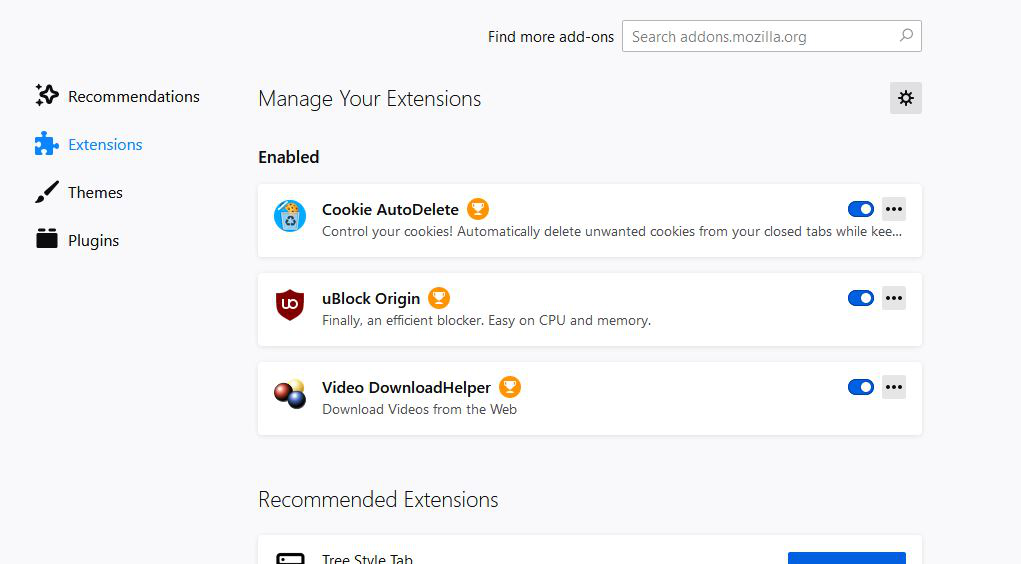
Hi. I believe my Firefox browser was updated - it now is version 82.0.2 and I now have a folder labelled Old Firefox Data on my desktop. The update lost all of my settings and add-ons. So, I changed the settings back to the former state. And, I downloaded / installed the add-ons, which show as "Enabled" . But, the add-ons don't appear on the toolbar. If I go to Options and set Enhance Tracking Protection to Standard and History to Remember History, then I can 1) see the add-ons in the Customize section and 2) successful place the add-ons on the toolbar. But, after I vhange Enhanced Tracking Protection back to Strict and History to Never Remember, then the add-ons again disappear from the toolbar. Can you please advise me of the fix to this problem. Thanks much

Capturas de ecrã anexadas