


I cannot play java based games in my browser, they get blocked no matter what I do with my settings.

I have followed instructions in all the other threads and nothing has worked. I tried safe mode and that did not work either, I went into the page permissions and activated everything for that page and still no luck.
Solução escolhida
Ok, your last comment got me there! Thanks. It seems that in some x64 based systems when you go through the windows control panel to access the java control panel it actually opens a different java control panel. But if you search java in the start menu you can "configure java" and that will get you to the proper window to add the exception. Thank you for your help!
Ler esta resposta 👍 0Todas as respostas (5)
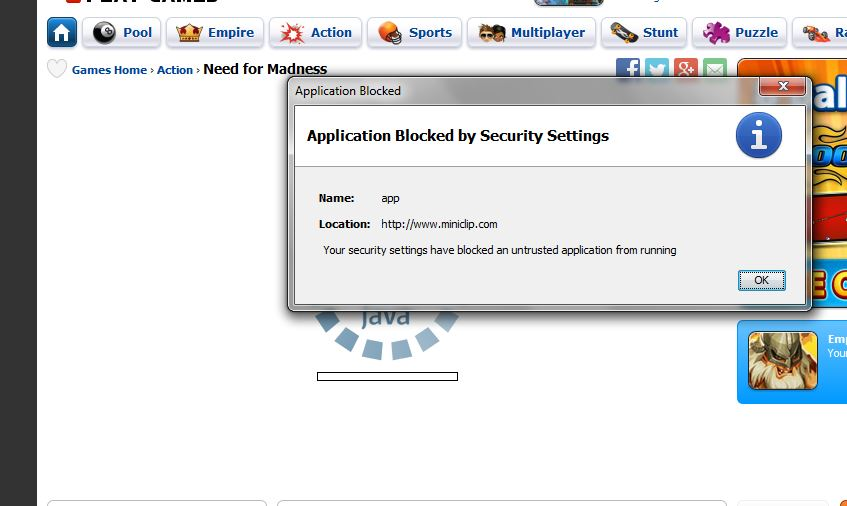
Here's a screenshot of the page

There has been a change in the Java security settings, see:
- "What should I do when I see a security prompt from Java?":
http://www.java.com/en/download/help/appsecuritydialogs.xml
If you visit a website regularly then a possible workaround is to add the URL to the Java Exceptions Site List, see:
- "Why are Java applications blocked by your security settings?":
http://www.java.com/en/download/help/java_blocked.xml - "How can I configure the Exception Site List?":
http://www.java.com/en/download/faq/exception_sitelist.xml
I am never prompted to allow or deny the program, it just blocks it. The newest java doesn't have the exception list options in the java control panel. I have changed my security settings through tools> page info> Permissions and it still blocks it automatically
You may have to open the Java Control Panel as Administrator if you do not see the exception settings in the Security tab as a normal user.
Solução escolhida
Ok, your last comment got me there! Thanks. It seems that in some x64 based systems when you go through the windows control panel to access the java control panel it actually opens a different java control panel. But if you search java in the start menu you can "configure java" and that will get you to the proper window to add the exception. Thank you for your help!