


Tabs keep crashing

Why do tabs keep crashing?
All Replies (12)
We're sorry to hear that Firefox is crashing. In order to assist you better, please follow the steps below to provide us crash IDs to help us learn more about your crash.
The crash report is several pages of data. We need the report numbers to see the whole report.
- Enter about:crashes in the Firefox address bar and press Enter. A list of Submitted (and Unsubmitted, if any) Crash Reports will appear, similar to the one shown below.
- Copy the 5 most recent Submitted Report IDs that start with bp- and then go back to your forum question and paste those IDs into the "Post a Reply" box.
Note: If a recent Report ID does not start with bp- click on it to submit the report.
(Please don't take a screenshot of your crashes, just copy and paste the IDs. The below image is just an example of what your Firefox screen should look like.)

Thank you for your help!
More information and further troubleshooting steps can be found in the Troubleshoot Firefox crashes (closing or quitting unexpectedly) article.
bp-09d04492-7bda-4a99-9fd9-bab830260630 6/30/2026, 11:37 AM View bp-5ecbcf97-b4ac-4e93-b880-9b2fe0260630 6/30/2026, 11:37 AM View bp-3ba967a0-84d2-4e25-85f4-ff25e0260630 6/30/2026, 11:37 AM View bp-6740bb0a-ec71-4427-afaf-cd0bb0260630 6/30/2026, 11:37 AM View bp-23f40aa8-2f69-41b3-a48b-e6f870260630 6/30/2026, 11:37 AM View bp-fb545f09-2e92-4a52-a8cf-f1ae30260630
These crash at random places, always by running out of memory. So it's either hitting system limits, you have a particular site open causing that over time, or more likely an addon is exhausting your resources.
Could you try running for a bit in Use Troubleshoot Mode in Firefox without customizations loaded to see if there's any difference?
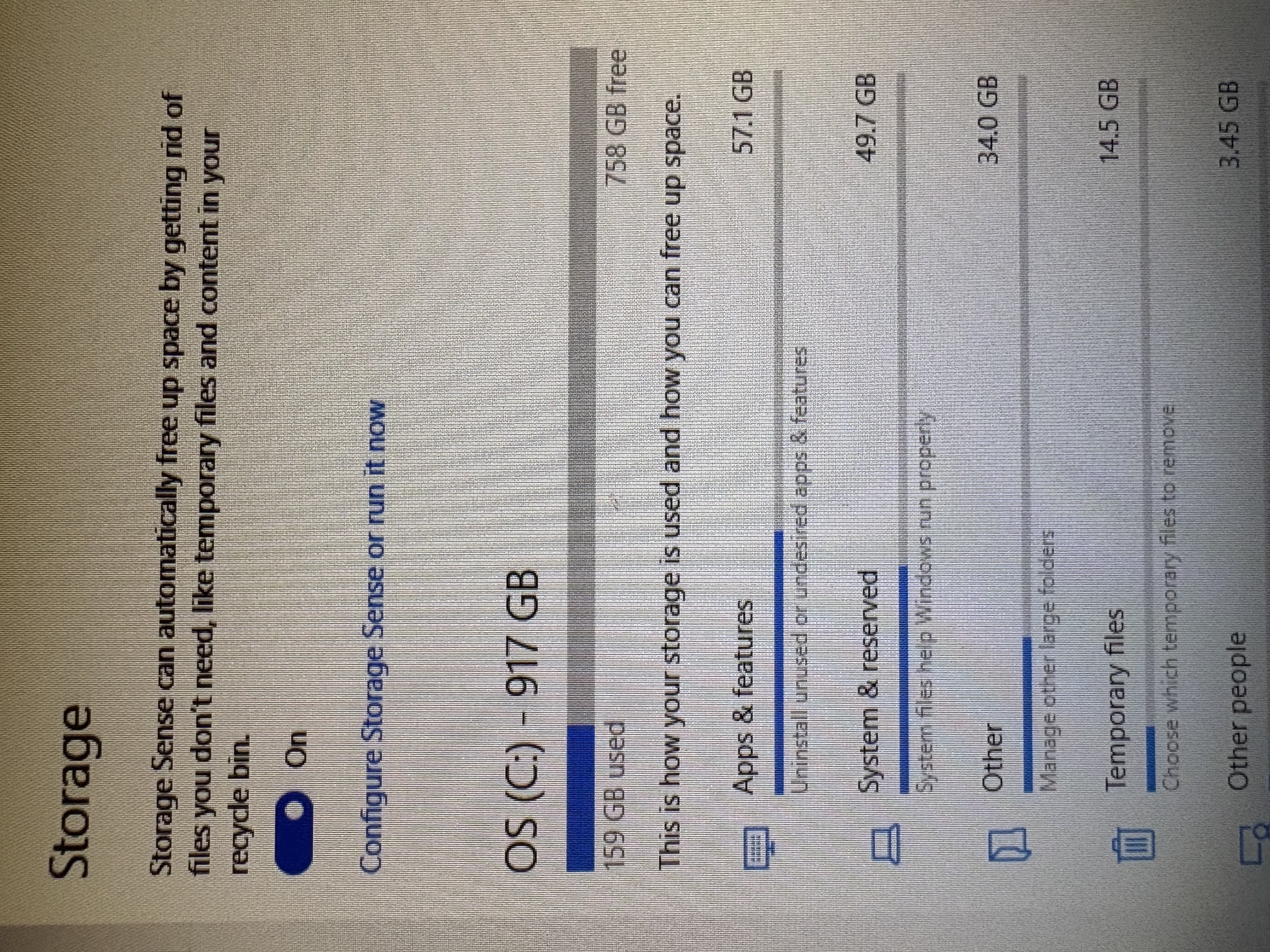
I have 917GB of storage on my computer. 157GB used and 760GB free
STILL CRASHING!!
It's not apparent if that means it's also exhibiting in the Troubleshoot Mode as mentioned earlier.
If that's the case, I'd recommend getting a good hardware scan load testing things like RAM modules, as this looks like the system is not providing the resources asked for when moving things around in memory.
However before going to look at HW faults, I'd still say this is just system resources exhausted. From one of your reports:
| Total Virtual Memory | 140.74 TB |
| Available Virtual Memory | 138.52 TB |
| Available Page File | 5.48 MB |
|---|---|
| Available Physical Memory | 548.7 MB |
| System Memory Use Percentage | 93 % used |
My computer is in Troubleshoot Mode
Date Submitted
bp-8e0f103c-3e0c-45b1-b36b-0a4540260702 7/1/2026, 9:57 PM View bp-1820cac5-b746-4226-8830-1f57a0260701 7/1/2026, 2:02 PM View bp-c14f20a3-5715-455d-a269-58d060260701 7/1/2026, 2:01 PM View bp-42809738-2cd3-4857-ac6b-4291a0260630 6/30/2026, 7:03 PM View bp-c2cad499-9f2d-4faa-8518-799090260630 6/30/2026, 7:03 PM View bp-4ca45379-6a1f-4054-a104-e267d0260630 6/30/2026, 7:03 PM View
He meant Firefox troubleshoot mode, not computer troubleshoot mode.
Also, I have no idea what you mean by If that's the case, I'd recommend getting a good hardware scan load testing things like RAM modules, as this looks like the system is not providing the resources asked for when moving things around in memory.
However before going to look at HW faults, I'd still say this is just system resources exhausted. From one of your reports:
I am NOT computer knowledgeable. This is what I see when I check storage:
TyDraniu, I meant Firefox Troubleshoot mode
I still see the two addons loaded in all the shared crash reports (and no troubleshoot mode fwiw) so I can't compare.
Also please keep in mind the crash data here does not capture any traffic logs for privacy reasons so it's not apparent if you're starting with a certain number of tabs, loading a specific collection of sites — I however see some crashes are very early after starting up, so it's not accumulating too much footprint over time, the demand must come from what's being loaded — might be worth mentioning the amount of tabs opened and the general content (webmail, docs, chatbot, livestream… etc.) as some recent out–of–memory crashes simply stem from the sites being extremely resource intensive, like Google's AI search or Youtube long running streams with hundreds of thousands participants in the chat timelines etc.
These are slightly out of scope here so I'll just try to provide some hints to external sources, which however might need some professional help with potentially:
Hardware test — to give you the idea about a memory check details: https://windowsforum.com/threads/master-your-pcs-performance-how-to-use-windows-memory-diagnostic-tool.348496/
(however as I've mentioned, I don't believe it's an unexpected fault, but a resource limit really…)
Given you have lots of storage, but not enough operating memory, I'd try to stabilize the system by optimizing this: https://windowsforum.com/threads/set-custom-virtual-memory-paging-file-for-faster-windows-10-11.385476/
(There might be others better suited here to advice the values for W10 but if the system recommended are not enough I'd go 8GB minimum and 24GB maximum as a starting point, but wouldn't hesitate to go even higher up to 32GB or 40GB if the results are worth it.)
I did a Windows Memory Diagnostics check and No Issues Were Found. The other suggestion you gave, that scares me. I really have NO IDEA what I am doing. I am in Troubleshoot Mode. Unless I have to re-do that after every crash? I only have two tabs open at a time until I open an email, then it's 3