


What is wrong with the menu

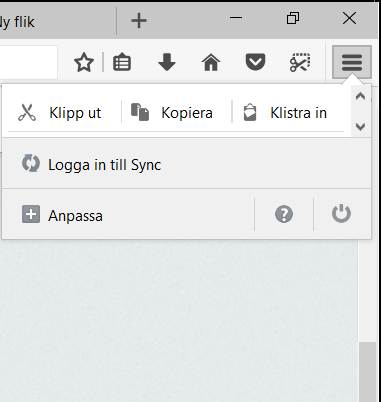
When I click on the "burger" icon just below the close button on the top right, to open the menu, it will only briefly show at normal size. It is instantly minimized, as in the attached image, so I have to scroll in the menu to chose a menu item.
When I click on the "burger" icon just below the close button on the top right, to open the menu, it will only briefly show at normal size. It is instantly minimized, as in the attached image, so I have to scroll in the menu to chose a menu item.
All Replies (3)

Start Firefox in Safe Mode {web link} by holding down the <Shift> (Mac=Options) key, and then starting Firefox.
A small dialog should appear. Click Start In Safe Mode (not Refresh). Is the problem still there?
Okey, the attachement failed. This is what it looks like. It opens with normal height, but is instantly minimized vertically even though there is plenty of space. Tried safe mode with the same result.
Endret av burktelefon
Have you tried Safe Mode?