


Windows 10 bereikte EO (einde ondersteuning) op 14 oktober 2025. Als je Windows 10 gebruikt, lees dan dit artikel.

Windows 10 reached EOS (end of support) on October 14, 2025. If you are on Windows 10, see this article.

Zoeken in Support

Vermijd ondersteuningsscams. We zullen u nooit vragen een telefoonnummer te bellen, er een sms naar te sturen of persoonlijke gegevens te delen. Meld verdachte activiteit met de optie ‘Misbruik melden’.

Meer info
Deze conversatie is gearchiveerd. Stel een nieuwe vraag als u hulp nodig hebt.
Gearchiveerd

Thunderbird 147 release install gives error "XML-parsefout: ongedefinieerde entiteit"

HansBinBrabant

Hallo Mozilla Thunderbird support

I was executing this manual : https://support.mozilla.org/nl/kb/thunderbird-installeren-linux#w_thunderbird-handmatig-installeren-voor-een-specifiek-releasekanaal-voor-gevorderde-gebruikers.

Reason : I have installed Linux Mint 22.3 Cinnamon which came with Thunderbird 140 ers. My mail has been transferred from a computer (with problems), which used ? a younger ? version !?

I use Thunderbird for many years, with profile manager and 6 profiles in it. At the moment I cannot work with my mail. Which is bad for me ... >:-|

Starting thunderbird with thunderbird -P "You have launched an older version of Thunderbird" A newer version of Thunderbird may have made changes to your profile which are no longer compatible with this older version. Use this profile only with that newer version, or create a new profile for this installation of Thunderbird. Creating a new profile requires setting up your accounts, calendars and add-ons again.

I did worked al those instructions, which went good.

Almost done

I dont get the launcher on the desktop

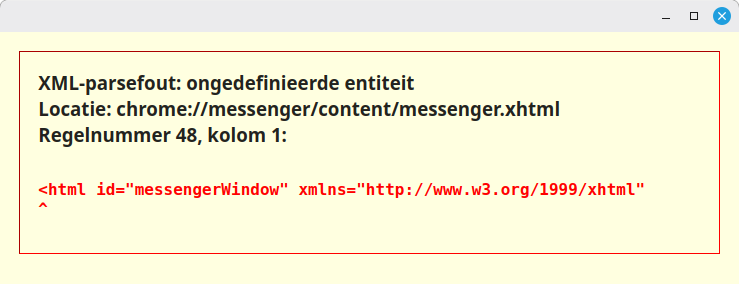
Most important is this error popping up in a yellow box

This is the error XML-parsefout: ongedefinieerde entiteit Locatie: chrome://messenger/content/messenger.xhtml Regelnummer 48, kolom 1:

Please help

Thanks in advance

Hans Bollen hans.bollen@linuxzob.nl

https://www.linuxzob.nl/wiki https://www.linuxzob.nl/wiki/doku.php?id=linux_internet:thunderbird#thunderbird_mail_-_verjongen
Hallo Mozilla Thunderbird support I was executing this manual : https://support.mozilla.org/nl/kb/thunderbird-installeren-linux#w_thunderbird-handmatig-installeren-voor-een-specifiek-releasekanaal-voor-gevorderde-gebruikers. Reason : I have installed Linux Mint 22.3 Cinnamon which came with Thunderbird 140 ers. My mail has been transferred from a computer (with problems), which used ? a younger ? version !? I use Thunderbird for many years, with profile manager and 6 profiles in it. At the moment I cannot work with my mail. Which is bad for me ... >:-| Starting thunderbird with thunderbird -P "You have launched an older version of Thunderbird" A newer version of Thunderbird may have made changes to your profile which are no longer compatible with this older version. Use this profile only with that newer version, or create a new profile for this installation of Thunderbird. Creating a new profile requires setting up your accounts, calendars and add-ons again. I did worked al those instructions, which went good. Almost done I dont get the launcher on the desktop Most important is this error popping up in a yellow box This is the error XML-parsefout: ongedefinieerde entiteit Locatie: chrome://messenger/content/messenger.xhtml Regelnummer 48, kolom 1: <html id="messengerWindow" xmlns="http://www.w3.org/1999/xhtml" ^ Please help Thanks in advance Hans Bollen hans.bollen@linuxzob.nl https://www.linuxzob.nl/wiki https://www.linuxzob.nl/wiki/doku.php?id=linux_internet:thunderbird#thunderbird_mail_-_verjongen
Gekoppelde schermafbeeldingen

Alle antwoorden (1)

Probeer het eens in De probleemoplossingsmodus van Thunderbird. Ik vermoed een add-on die dwars ligt.

Bewerkt door Mozilla-assistent op