


Font wanted isn't the font that's displayed in Linux Ubuntu.
TL/DR: See the image. ;)
I'm on Ubuntu 20.04 (Xubuntu flavor), using Firefox 79.0, working on a web site. I'm coding specifically for Arial... and it's returning Times New Roman.
I have Arial installed, via the ttf-mscorefonts package and also adding them from a Win10 box.
Please, no "But you should do 'font-family: Arial, Veranda, sans-serif'" dismissive answers. Why? Because if I do "font-family: Arial, Veranda" I still get Times New Roman. I can even substitute "Pulsar Beta" here (a font that is installed to my local account) and it still gives me Times New Roman.
If I do "font-family: sans-serif" I get Veranda, not Arial... which is odd because Arial is my default font.
Doing "font-family: Veranda" gets my Times New Roman.
Chrome doesn't have this issue!
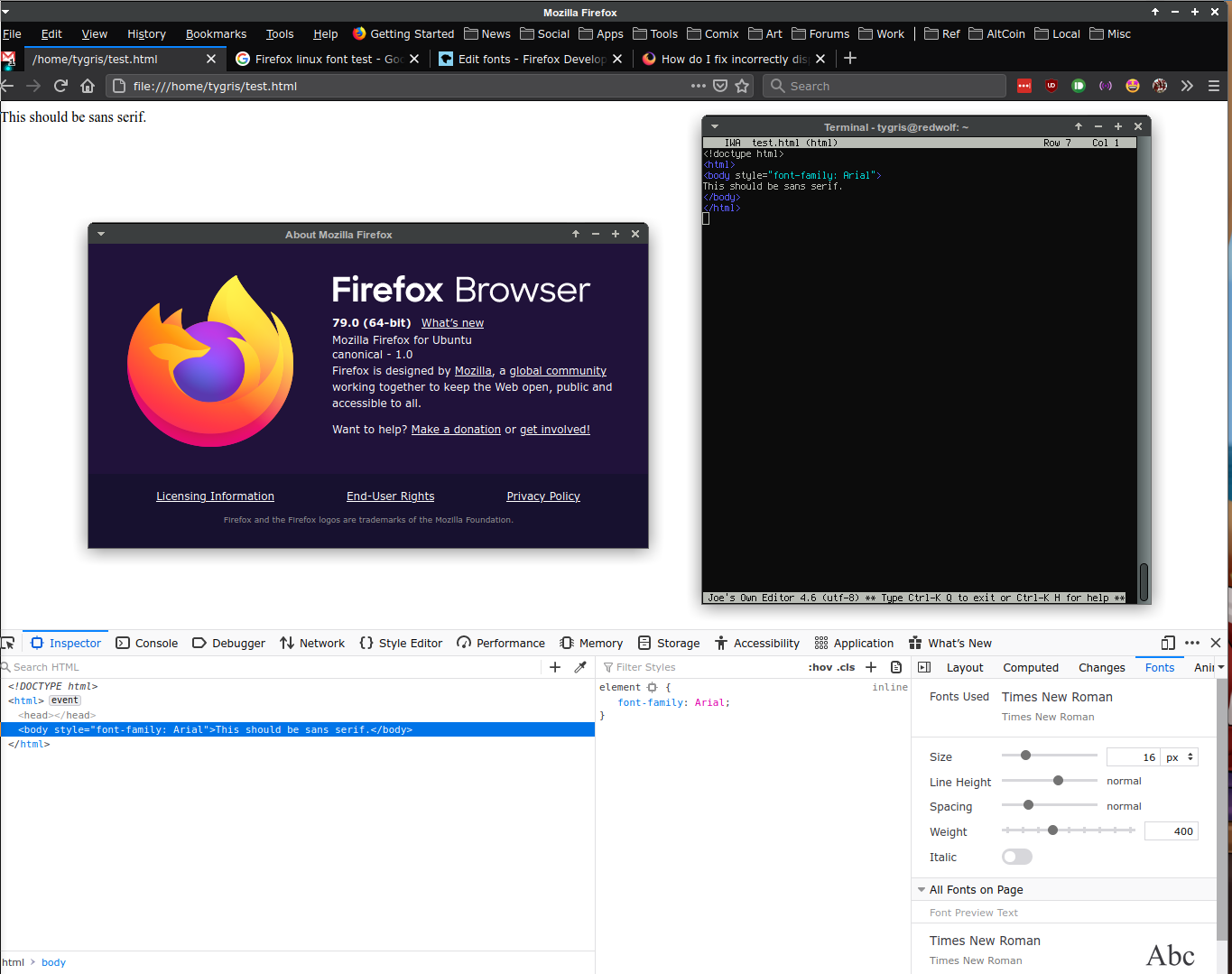
As a picture is worth a thousand words, see the pic.
What can I do? I did see some bugs that were fixed in v56, but none of the debugging tips help there.
Gekozen oplossing
Huh... It looks like fonts-twemoji-svginot was the bad package... but it's no longer in Ubuntu's repos. Removing it has solved the problem.
Dit antwoord in context lezen 👍 0Alle antwoorden (13)
Do you allow pages to choose their own fonts ? What are the default font settings ?
- Options/Preferences -> General: Fonts & Colors -> Advanced
[X] "Allow pages to choose their own fonts, instead of my selections above"
Did you check the Arial font and Verdana font in FontForge ?
Allow pages to choose their own fonts/colors is checked. Default serif is Times New Roman. Default sans-serif is "Default (Verdana)" Default monospace is "Default (Bitstream Vera Sans Mono)"
Installing FontForge... Checking /usr/share/fonts/truetype/msttcorefonts...
Arial.ttf says "ArialMT" Verdana.ttf says "Verdana"
tygris@redwolf:~$ fc-match Arial arial.ttf: "Arial" "Regular"
Scratch that, sorry.
Bewerkt door TyDraniu op
Where are the fonts installed ?
Does Firefox show them as possible choices for the default font ?
/usr/share/fonts/truetype/msttcorefonts
And yes, they're shown as possible choices. I can set sans-serif as Arial and monospace as Courier New.
Also, in the test HTML I used, if I substitute in "Pulsar Beta" I get the default "Times New Roman" as well. This is also in the choices. "Pulsar Beta" is in ~/.local/share/fonts .
Quote: I can set sans-serif as Arial and monospace as Courier New.
Does Firefox use that font when you set is as the default font if you check this in the Inspector ?
You can check in the Rules tab in the right panel in the Inspector what font-family is used for selected text. You can check in the Font tab in the right panel in the Inspector what font is actually used because Firefox might be using a different font than specified by the website.
Negative. If I set it, for the test html file (see pic), it uses Times New Roman (the serif default) for Arial (a sans-serif font).
Rules says:
element {
font-family: Arial;
}
Fonts says Times New Roman is used. No mention of Arial.
Also, as a follow-up, if I change the default serif from "Times New Roman" to "Pulsar Beta" (a comic font), it uses Times New Roman.
Is this with Firefox from the repositories or with Firefox from the Mozilla server ?
Firefox from the repos, but Firefox from Mozilla has the same issue. I pulled a fresh copy to see if that had issues... and it does.
I've gone through my Xubuntu setup... and the font-config setup doesn't have any config files that would cause this issue. I can use Arial outside of Firefox. Chrome correctly pulls Arial as does XFCE and LibreOffice. It only happens in Firefox.
I have already removed my profile and pulled fresh, and used "Safe Mode". Same issue.
Hmmm... weird... I just checked another install of Ubuntu on another PC, version 20.04 (same as the affected one)... and it's working there.
I wonder what the difference is...
Just to document things, one of the installed fonts I had was screwing things up. I'm pinpointing the font now so I can send a bug report to Ubuntu... and also document it here.
Gekozen oplossing
Huh... It looks like fonts-twemoji-svginot was the bad package... but it's no longer in Ubuntu's repos. Removing it has solved the problem.