


I can't change my primary email address, can you help?

I went through this article:
https://support.mozilla.org/en-US/kb/change-primary-email-address-firefox-accounts
But I am missing the button to change the secondary email to the primary one.
Gekozen oplossing
If you use the special link, when you click the button for Secondary email, there should be an extra "Make Primary" button (see attached screenshot). Does your secondary email show as verified? If not, do that first, then use the special link again after it is verified.
Dit antwoord in context lezen 👍 1Alle antwoorden (11)

Separate Security Issue: Update your Flash Player Note: Windows users should download the ActiveX for Internet Explorer. and the plugin for Plugin-based browsers (like Firefox).
Note: Windows 8 and Windows 10 have built-in flash players and Adobe will cause a conflict. Install the plugin only. Not the ActiveX.
Flash Player Version: Version 28.0.0.137
https://get.adobe.com/flashplayer/ Direct link scans current system and browser Note: Other software is offered in the download. <Windows Only>
https://get.adobe.com/flashplayer/otherversions/ Step 1: Select Operating System Step 2: Select A Version (Firefox, Win IE . . . .) Note: Other software is offered in the download. <Windows Only> +++++++++++++++++++ See if there are updates for your graphics drivers https://support.mozilla.org/en-US/kb/upgrade-graphics-drivers-use-hardware-acceleration
jaysamuelprice said
I am missing the button to change the secondary email to the primary one.
Does the window that opens look like the window displayed in the link?
Make sure you are not blocking content.
Start Firefox in Safe Mode {web link} by holding down the <Shift> (Mac=Options) key, and then starting Firefox.
A small dialog should appear. Click Start In Safe Mode (not Refresh). Is the problem still there?
My window does look like the window displayed in the link (minus the primary email button)
I restarted in safe mode, unfortunately this didn't solve the problem
Any other suggestions?
Check your zoom controls.
<Control> (Mac=<Command>) + (plus) enlarge - (minus) reduce 0 (zero) restore
Zoom controls are at 100%. I tried zooming in and out, No change to the options presented.
I called for an administrator.
Alright, thank you for the help!
Gekozen oplossing
If you use the special link, when you click the button for Secondary email, there should be an extra "Make Primary" button (see attached screenshot). Does your secondary email show as verified? If not, do that first, then use the special link again after it is verified.
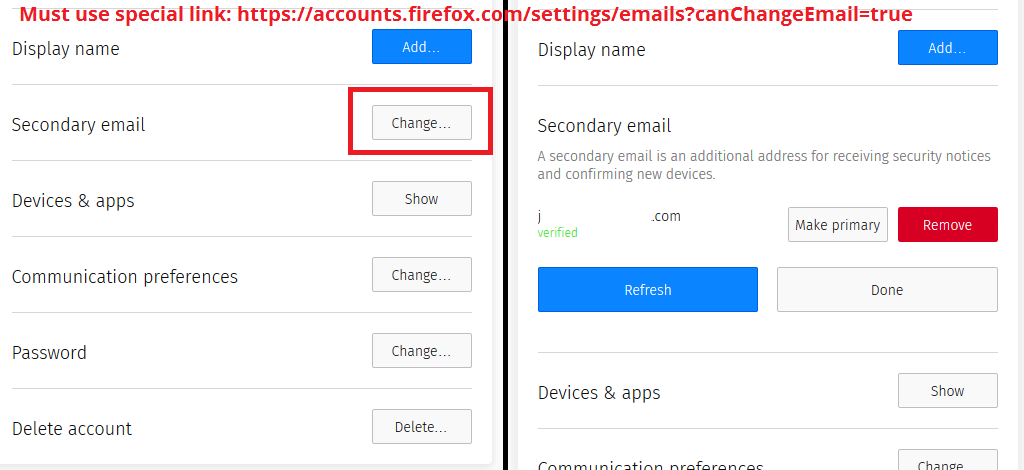
Try these steps: Open the Options/Preferences page (about:preferences). Go to the Sync tab and sign in if necessary. Click the "Manage account" button. This should open the Firefox Account settings page.
On this page there is a "Secondary email" item. Click the Add button to add a secondary email address. Follow the instructions in your verification email to confirm your second email address. Refresh the page and the "Make primary" button will now show up under Secondary email.
jscher2000 said
If you use the special link, when you click the button for Secondary email, there should be an extra "Make Primary" button (see attached screenshot). Does your secondary email show as verified? If not, do that first, then use the special link again after it is verified.
Yaaaassss!!! This one worked for me!
Cheers all!