


Since latest update, all my subfolders have disappeared and no messages showing as being in in box, help please

Since latest update of todays date, all my subfolders have disappeared and no messages showing as being in the in box or deleted. Any help appreciated, thanks
All Replies (4)
This is too poor information to understand your problem. A screenshot of your Thunderbird folder pane might be helpful
Modified by Mapenzi
Help > Troubleshoot Mode better?

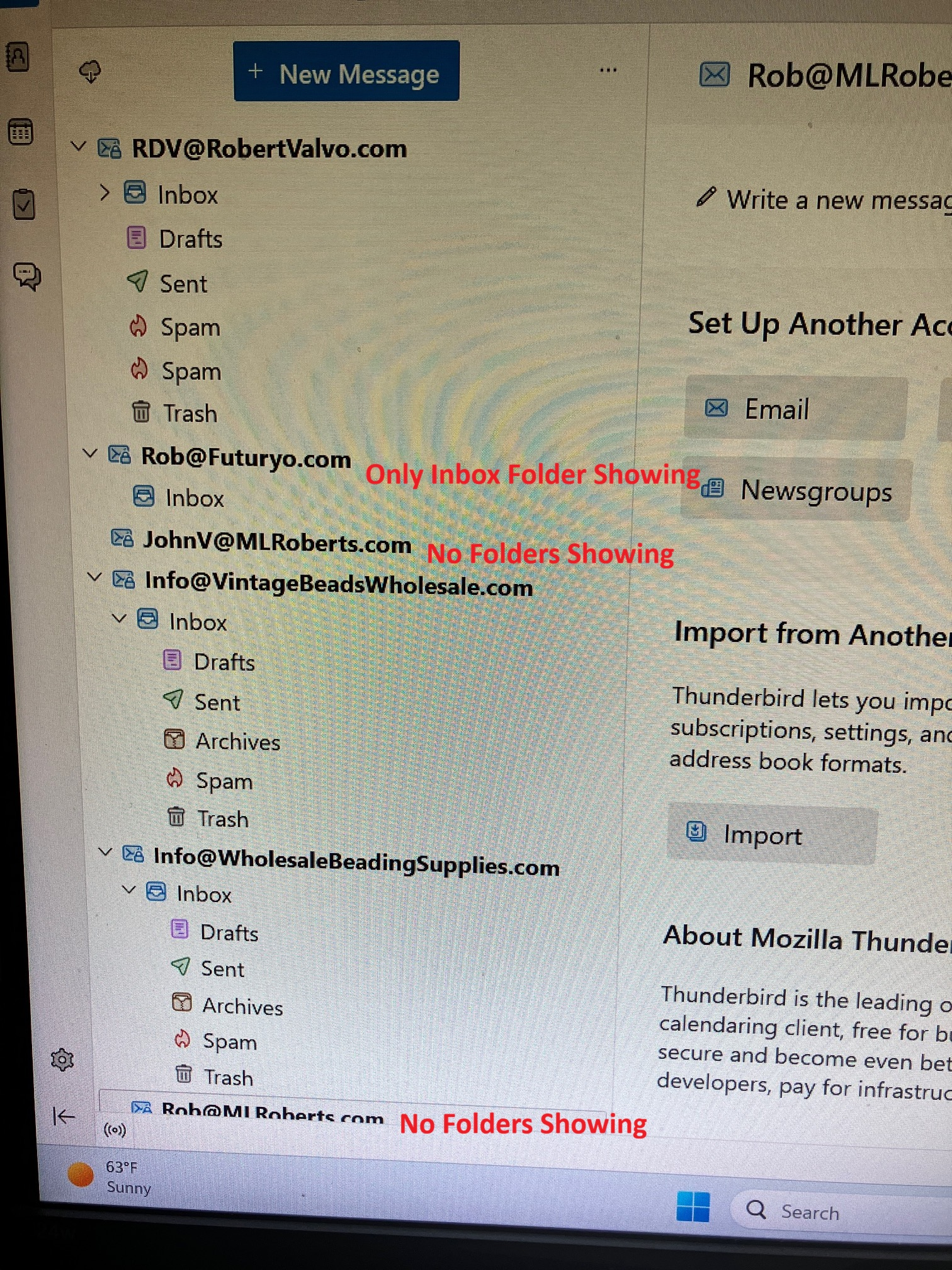
Hello: I am experiencing the same issue... Folders disappearing and reappearing or not appearing at all. Each time I open and close Thunderbird it changes with different email addresses and different folders appearing / disappearing and or being out of order. It started with one email address about a week ago (after a Thunderbird Update - Now using version X64 - 159.0) and now it is occurring with multiple email addresses.... (see attached screenshot) I use IMAP email settings and a Windows 11 Home computer operating system. Please let me know if you need any further information to troubleshoot or resolve this known issue... Thank you for attention to this matter. Rob
I have also tried Troubleshooting mode and the problems persist in trouble shooting mode. I also uninstalled and re-installed email accounts and Thunderbird in full and the problem still persists...

Same problem too.