


Avoid support scams. We will never ask you to call or text a phone number or share personal information. Please report suspicious activity using the “Report Abuse” option.

Learn More
Open

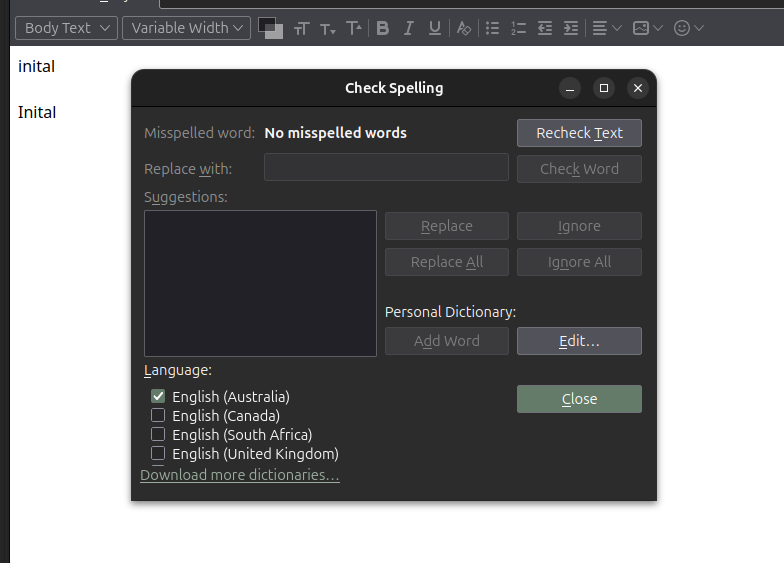
incorrect word in English (Australia) dictionary in Linux Thunderbird

dav.nik

Hi All,

I was writing an email, and completed a spell check where I had written "inital" instead of initial. I clicked on replace with Initial as I have done with many errors in the past, but this time the change wasnt made to the text before the email was sent.

Now, whenever I write inital as a test, it is no longer underlined in red and the spell checker is happy with it.

I have checked the personal dictionary list to see if I added it by mistake but its empty. Also, If I choose another english dictionary i.e. English (United Kingdom) it is once again recognised as a typo.

Is there a way for me to remove and reinstall the Australian English dictionary, or is there an easier solution I can try?

I am a relative newcomer to Linux but can follow terminal directions if provided. Thanks for your help!
Hi All, I was writing an email, and completed a spell check where I had written "inital" instead of initial. I clicked on replace with Initial as I have done with many errors in the past, but this time the change wasnt made to the text before the email was sent. Now, whenever I write inital as a test, it is no longer underlined in red and the spell checker is happy with it. I have checked the personal dictionary list to see if I added it by mistake but its empty. Also, If I choose another english dictionary i.e. English (United Kingdom) it is once again recognised as a typo. Is there a way for me to remove and reinstall the Australian English dictionary, or is there an easier solution I can try? I am a relative newcomer to Linux but can follow terminal directions if provided. Thanks for your help!
Lampirkan skrinsyot

You must log in to your account to reply to posts. Please start a new question, if you do not have an account yet.