


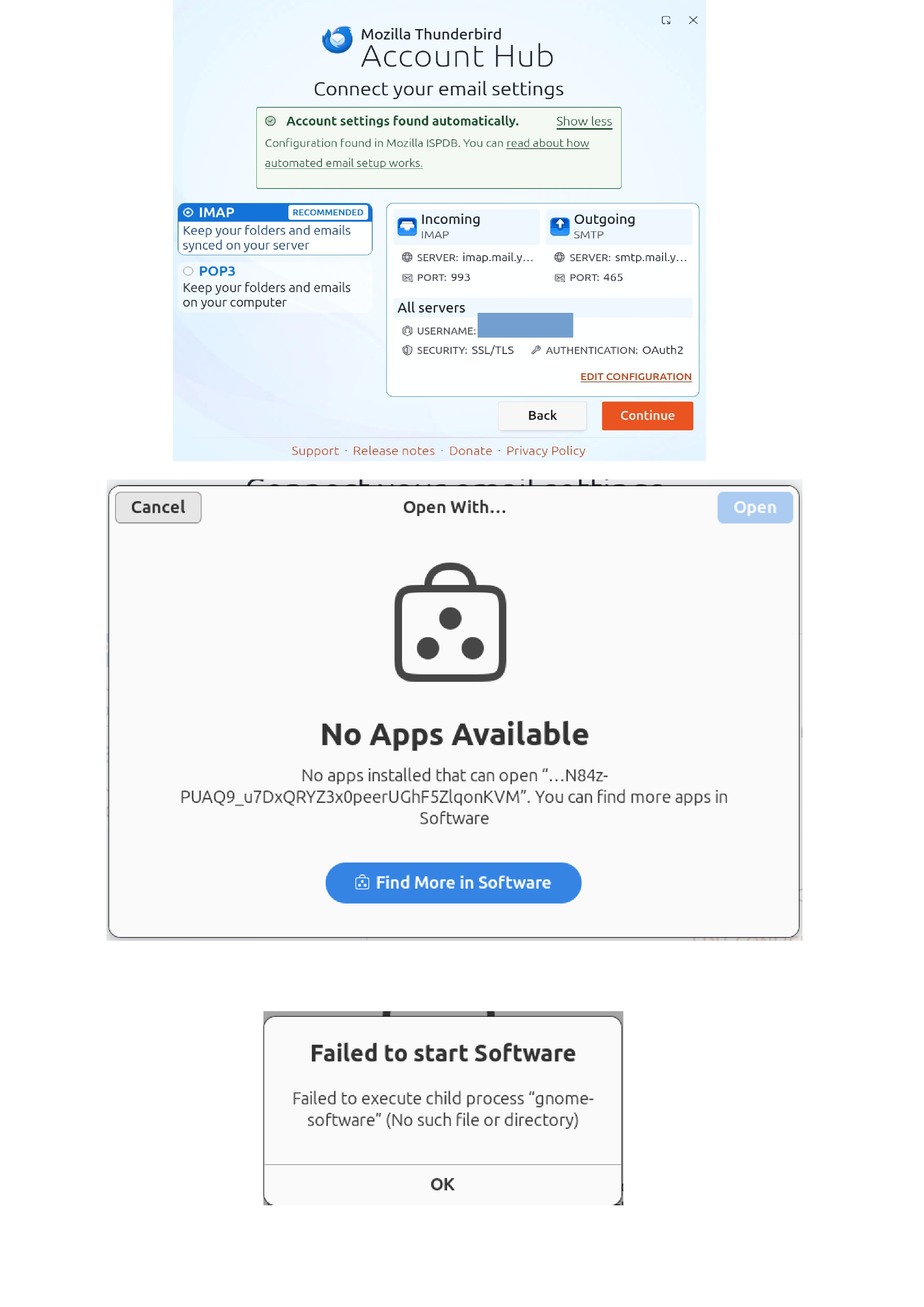
153.0 esr "No Apps Available" appears during oauth when I try to connect to the Yahoo mail server" after update on Ubuntu and also reinstall from the App Center.

Was working OK. Now, "No Apps Available" appears when I try to connect to the Yahoo mail server. The "Find more in Software" button causes the "Failed to start software" message to appear. The reinstall is from the App Center.
It also opens the following link on the Firefox browser which displays a blank page. https://api.login.yahoo.com/oauth2/request_auth?response_type=code&client_id=dj0yJmk9WVZUaWRNUUZSQTBNJmQ9WVdrOVNqbHJUMGhtTkU4bWNHbzlNQT09JnM9Y29uc3VtZXJzZWNyZXQmc3Y9MCZ4PTgz&scope=mail-w+ycal-w+sdct-w&state=AUCYywsENF9wWMx1nhJAefu3yJtqIlLxOCP9laluGgA&code_challenge_method=S256&code_challenge=BhhyhkNZvKm5SUrRFTxgmp3HR7vX26vggsjMoThl4wk&login_hint=randylh%40cox.net&redirect_uri=net.thunderbird%3A%2F%2Foauth%2Fyahoo
Modified by Wayne Mery

All Replies (3)
So you are seeing a problem with oauth. As stated in https://www.thunderbird.net/en-US/thunderbird/153.0.2esr/releasenotes/, 153.0.2 should have some config settings updated for yahoo.
Open your email Config Editor with Settings > General > Config Editor. See https://support.mozilla.org/en-US/kb/config-editor for more information.
Paste the following preference names into the editor.
- Is mailnews.oauth.usePrivateBrowser set to true?
- Is mailnews.oauth.useSchemeRedirect set to false?
If any of these values do not match, please set them per above, and restart Thunderbird.
What are your findings.
Modified by Wayne Mery
Thank you for the prompt reply. Unfortunately, I have to be away from the computer at times. If I am understanding correctly (?), I open Settings (not Account settings). I do not see anything that says "Config Editor." When I use the "Find in Settings" search box, it brings up "Advanced Preferences" and finds "Config Editor" that has a Boolean setting of either True or False. I guess this is not what you are referring to? how do I get to mailnews.oauth.usePrivateBrowser and mailnews.oauth.useSchemeRedirect ? Would you prefer I reply here on the forum or directly to your email?