


SEND button vanished after update (bug1989214)

After updating to 153.0.1esr(aarch64). the SEND button has disappeared. There's no way to send an email. (I can receive emails.) I am a Mac mini M2 Pro. OS 26.4.1
I cannot find a link to download a previous release of Thuderbird, which was working fine until this update.
Modified by Wayne Mery
All Replies (11)
- click 'new message' button from main screen
- click the alt key to display the menu bar
- click view>show and tick composition toolbar
This doen't help. 153.0.2 has the same problem: NO WAY TO SEND. No Send button. And Macs don't have an alt key. Tell me how to SEND an email please.

You may want to try a short cut key for now : control key + enter ( or cmd + enter for Mac )
https://support.mozilla.org/en-US/kb/keyboard-shortcuts-thunderbird
Does this help? I know nothing about mac. https://iboysoft.com/wiki/alt-key-on-mac.html

There's no need to invoke the menu because the menu is always visible on a Mac, at least through version 140. Not showing the menu all the time would be very un-Mac-like.
Tagtagtag, would you please say or show what happens when you start a new message and show the the composition toolbar? The composition toolbar has a "send" button it. If it doesn't, you can customize it to show the "send" button. Can you not show the composition toolbar? Does it not have a "send" button"? Have you tried to customize the composition toolbar by right clicking on it?
There are other ways to send a message. On the keyboard, press <command>+<return>, as Michel wrote. In the menu, select File > Send Now.
See attaches pictures
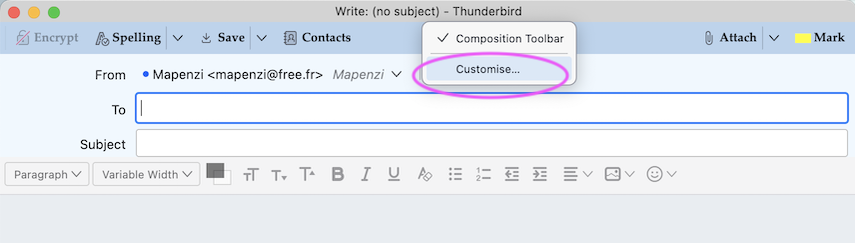
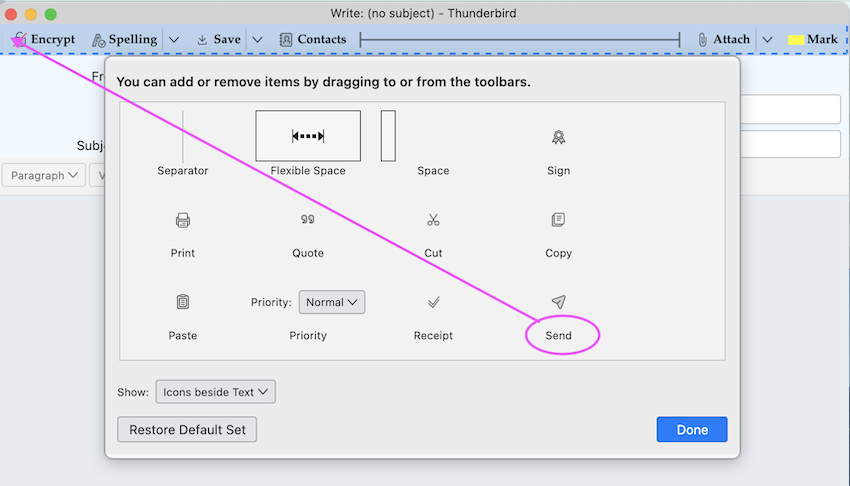
If you cannot find a "send" button to add to your composition toolbar:
- See if the problem persists in troubleshooting mode (under the "Help" menu).
- Follow this thread: https://support.mozilla.org/en-US/questions/1570231

No Send Button also on 153.0.3esr (64-bit) ... Windows 11 Only way to send emails is File/Send Now or Send Later
RonSH said
No Send Button also on 153.0.3esr (64-bit) ... Windows 11 Only way to send emails is File/Send Now or Send Later
What happens when you try the suggestions above?
Just solved it! Settings had been slightly changes during update. All good now Thanks

Hello Everyone, This problem is a result of the New Update (150) NOT checking the Show Composition Toolbar in the Main Thunderbird Menu Bar.
1. Open up a new message. 2. Once it's open click on the "View" option in the Thunderbird Main Menu. You'll see Toolbars. 3. Click on that and you'll see that the Show Composition Toolbar is NOT checked. Check it and you'll now see the Send Button and other composition options in the new message.
Dennis
Modified by Wayne Mery