My Address Book appears to be old and out of date. How can I fix it?

My Address Book appears to be old and out of date. There's at least 10 years of emails in there somewhere. Random old emails are there, but what's visibile is not really useful here and now. How can I restore at least some degree of usefulness?
All Replies (6)
Please restate your question with more detail. Addressbooks do not contain emails, so I am unclear on the issue. Thank you.
Thanks, your reply is appreciated. Thunderbird has elements that don't do anything useful. Address Book, for example, doesn't do anything. It doesn't find or display any results that I can see. Nor does it offer any help tools to explain what it can or can't do. It would be nice, for example, if it could search for emails from a given name. I would really like that.
I don't see any way to make Address Book a useful tool.
The addressbook is only intended to contain addresses. Its use is that, when composing, you just need to enter part of the recipient information and be prompted for matches. You can also, in compose window press F9 to have a list to pick from. I am aware of no email client that uses the addressbook to search for email. To search for emails from someone, there is the edit>find feature that does well.
Thanks. Since I don't know what "Address Book" actually does when it's working properly, I may be using the wrong terminology. I'm thinking that if I'm starting an email to " Airbus Sales", that Thunderbird would suggest similar addresses if I start typing to "Air . . .". Am I wrong? Then I'd see suggestions and be able to pick the correct one. That would be useful. However, even if I already have a dozen emails from "Airbus . . ." in my Thunderbird history, no suggestions appear in my "To" window. It may then take some time to find the correct email address in my Thunderbird since I have to go through my entire Thunderbird history, looking for the address, one "sent" line at a time until I find the address. Then I can copy the email address and paste it into my new email
Are my expectations out of line? Thunderbird would be really useful if it could do that.
Since there's some old addresses already in Thunderbird, I'm guessing that there's an SQL file full of addresses somewhere in TBird that may only need refreshing or indexing. I'm guessing that this might be called "Address Book", but I could be wrong in that.
Address books hold details about people, i.e. "contacts", that you can use to send emails to inidivduals.
It cannot be used, for example, as a database to find the message history of a contact or a company, nor for that matter to find all messages from a contact or company. It also cannot be used when composing a message to show contacts only for company X.

rjburke1 said
Thanks. Since I don't know what "Address Book" actually does when it's working properly, I may be using the wrong terminology. I'm thinking that if I'm starting an email to " Airbus Sales", that Thunderbird would suggest similar addresses if I start typing to "Air . . .". Am I wrong? Then I'd see suggestions and be able to pick the correct one. That would be useful.
Thunderbird does that. It uses information stored in address books to show matching recipients.
However, even if I already have a dozen emails from "Airbus . . ." in my Thunderbird history, no suggestions appear in my "To" window.
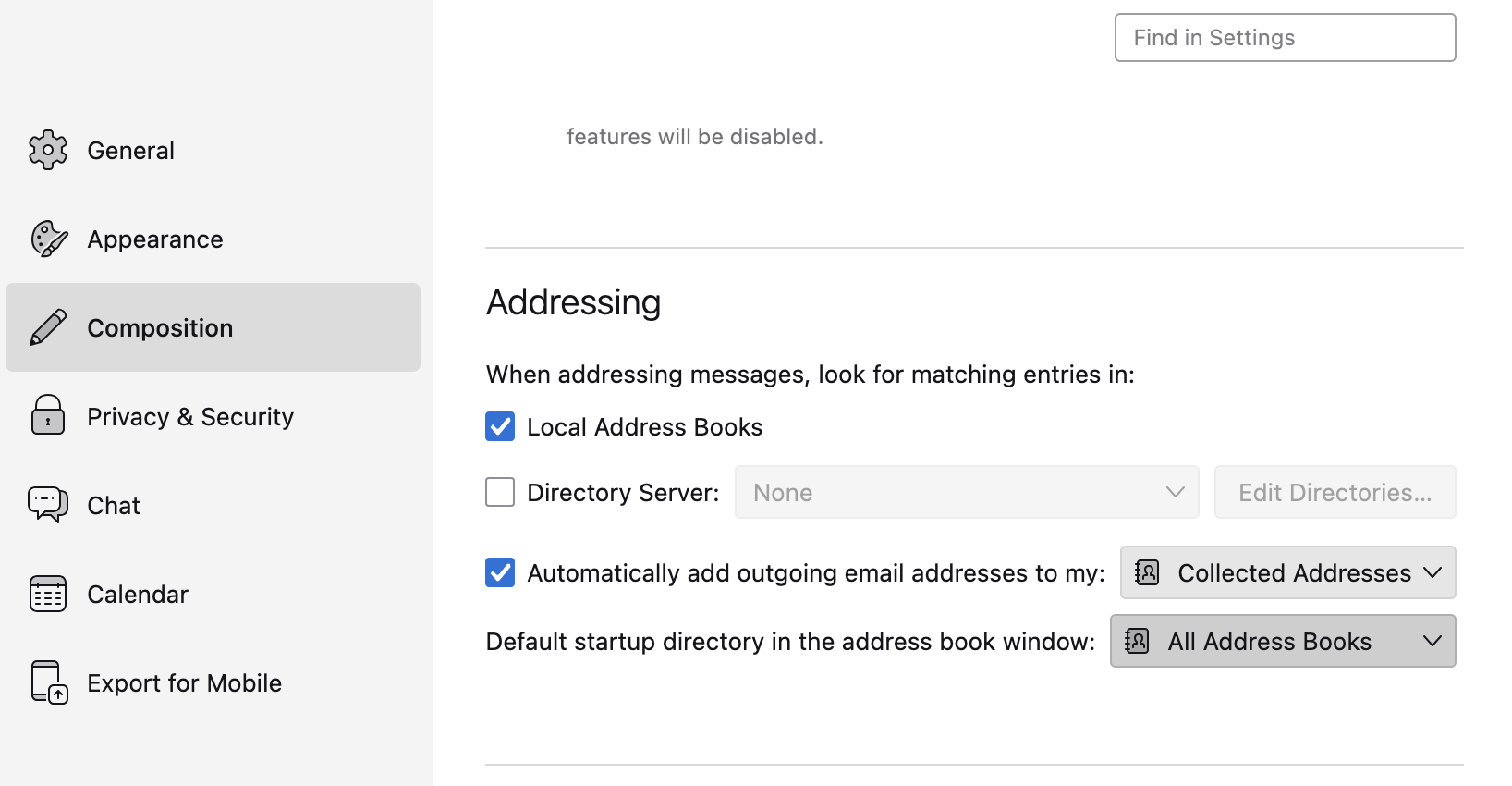
Thunderbird can automatically add to an address book the addresses of recipients to whom you send messages (see my attached image for settings), not the addresses of recipients from whom you have received messages. If you expect to write to those addresses, you should add them to an address book by right-clicking on their addresses in a message header and selecting "Add to Address Book". Or add them to the system-level address book.
It may then take some time to find the correct email address in my Thunderbird since I have to go through my entire Thunderbird history, looking for the address, one "sent" line at a time until I find the address. Then I can copy the email address and paste it into my new email
You'll want to learn the three ways of searching for messages in Thunderbird so you don't have to browse message by message. To search the current folder, use the quick filter. To search many folders, use the global search. You should also check that all the folders that you want to search are set to be searchable. Right click on a folder name, select "Properties", then see that "Include this folder in Global Search results" is checked.
Since there's some old addresses already in Thunderbird, I'm guessing that there's an SQL file full of addresses somewhere in TBird that may only need refreshing or indexing. I'm guessing that this might be called "Address Book", but I could be wrong in that.
To see what's in your address books, press control-2.