Why is Thunderbird suddenly not receiving messages (I already checked my password settings)?

I've been using Thunderbird for years but suddenly as of yesterday it's stopped receiving messages. First it told me my password was incorrect. Ever since then when I try to click "Get Messages," it simply has no response at all. Nothing happens. I went into my Thunderbird password settings, and upon seeing that the incoming-message password had for some reason reverted to an old, obsolete password, I corrected it and saved the correct one. I've checked several times and the passwords are correctly saved now. But this did not fix the problem. When I click "Get Messages," nothing happens. My Thunderbird is connected to my Earthlink account, which is working fine. When I go into Earthlink, I am able to send and receive messages as normal. So the problem is not with Earthlink but with Thunderbird.
All Replies (4)
re :When I go into Earthlink, I am able to send and receive messages as normal. So the problem is not with Earthlink but with Thunderbird.
You are logged on to the webmail account. That proves your password is correct which is useful to know. Webmail account is directly logged onto the server. It is not using the IMAP/POP/SMTP protocols. There is no comparison.
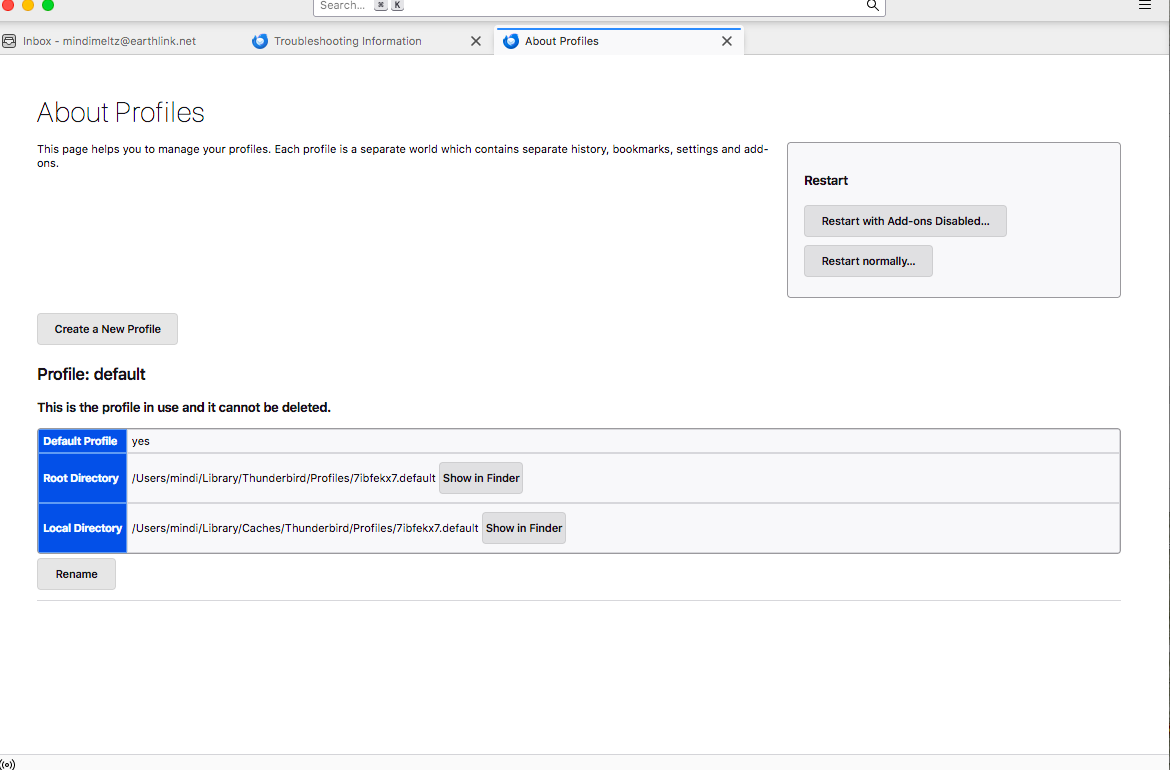
It's weird that suddenly an old password has been restored as that's not possible. Not unless you have suddenly swapped over to an old profile ?! In Thunderbird
- Help > TRoubleshooting Information'
- Under 'Application Basics' section near the bottom locate: Profiles and click on 'about:profiles'
- It opens in a new tab.
- Upload image(s) so we can see what you see -
- How many 'profiles' do you see?
Also, post info on what server settings you are using:
- Help > TRoubleshooting Information'
- Scroll down to 'Mail and News Accounts' section
- Copy all the data and paste it into this forum question - or upload an image.
After altering the password for both the incoming and outgoing. Did you exit Thunderbird - wait a while and then restart Thunderbird to ensure it was now using the newly saved password ?
Please check computer for the following: Firewall - it might be controlled by OS and default on computer OR if you installed an Anti-Virus product then it might be controlling the firewall. Access Firewall Thunderbird must be set up as an allowed program otherwise it might get blocked.
- Confirm Thunderbird is set up as an allowed program.
VPN. Most servers do not like VPN as it hides your IP address, so server will just block you as it thinks you might be a hacker. Many Anti-Virus now offer a VPN and in some cases people have discovered it was auto enabled. So please check computer for a VPN and switch it off.
- Confirm no VPN enabled.
Also check the following: In Thunderbird
- Account Settings > Server Settings,
- setting "Check for new messages every X minutes"
- whatever you currently have set up please increase it to minimum of 15 minutes or more.
- Temporarilly uncheck "Check for new messages at startup"
Do the above as a test to see if it helps to avoid hitting Earthlink’s timeout or rate limits that might be triggering a problem.
I need to see the 'Mail and News Accounts' info because the server settings depend upon the type of protocol you are using eg: IMAP or POP
There are several reasons why a password would not work. Right password but wrong server settings. No access to server would not help. That could be because of something on your computer blocking Thunderbirds access or the server blocking access.
IF you get any errors pop up please get an image of the error and upload the image.
Also, after trying to 'Get Messages', please do this: Ctrl+Shift+J to open the Error Console Make window a bit larger to show as much as possibe and upload an image.
Thank you so much for all your ideas.
"It's weird that suddenly an old password has been restored as that's not possible. Not unless you have suddenly swapped over to an old profile ?!" No, I haven't. I don't understand either. To clarify what I mean, when I first stopped receiving messages, I checked the password settings in Thunderbird and saw that the password for incoming messages was different from the password for outgoing -- and I read online that this is NOT supposed to be the case, they are supposed to be the same. The password listed for incoming messages was a password I use for many things, but not for my Earthlink email, so I'm not sure how it got there. I assumed it was a password I used to use for Earthlink a long time ago, but I'm not really sure. I don't think I'd ever looked at these settings before. Anyway, I simply changed it to my current Earthlink password. I hope that was the right thing to do. But the problem didn't go away.
You asked me to upload an image of Profiles-- these are attached.
You asked me to upload an image of Mail and News Accounts -- this is also attached.
"After altering the password for both the incoming and outgoing. Did you exit Thunderbird - wait a while and then restart Thunderbird to ensure it was now using the newly saved password ?" Yes, I did. I have reopened it many times now.
Regarding Firewall and VPN, I do not have any new anti-virus programs installed. For many years I have run certain anti-virus checks periodically, but I haven't run any recently. I don't know how to look at Firewall or VPN. I don't know how to check these things. But nothing has changed that I know of. I have not added any VPN or anything.
I made the changes you suggested regarding "check for new messages." That didn't change anything.
I have not gotten any error messages or popups since the first time this happened -- at that time a message came up regarding incorrect passwords, but unfortunately I did not take an image of it. Since then, when I click "Get Messages," nothing happens at all. It's as if I'm not doing anything. No error message appears. I tried Cntl-Shift-J but nothing happened. No Error Console opened.
Is it possible the problem is simply that my operating system is getting too old for Thunderbird to function properly? I've noticed some other issues with online things like gmail, etc., but I have been avoiding updating because of the other changes that would cause that I don't want. But could that be the problem? I have MacOS Sierra 10.12.6.