


Shopping Trolley
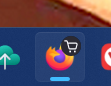
I have a tiny black shopping trolley/cart on my Fiefox icon. Why is it there? How do I make it go away?
All Replies (3)
This is indicator of your profile. I guess it shows up when you have two or more profiles.
I am unaware of having >1 profile. In any case, the 'answer' is not an answer. It helps me naught.
If you are seeing this icon and want to remove it, you need to delete the extra profiles so that only one remains.
Type about:profiles in the address bar.
You will see a list of profiles.
The one currently in use will say "This is the profile in use and it cannot be deleted."
If there are other profiles listed, you can click Remove on the ones you don't use.
Only do this if you don't have important bookmarks or passwords saved in those other profiles.
Once only one profile remains, the badge on the taskbar icon should disappear (you may need to restart Firefox).
More info Profile Manager - Create, remove or switch Firefox profiles