


SMTP configuration

I have been using Thunderbird with two POP3 Hotmail accounts for some time and I am trying to set up a third account with exactly the same configuration. However, both the automatic and the manual configurations failed. The new account receives mail, but the outgoing smtp server config seems to have a problem. Sending messages times out or keeps prompting for a new password.
The Hotmail account has POP3 and IMAP enabled. Thunderbird is set to receive all cookies. I cleared history and cache after every attempt and also temporarily disabled the firewall.
Any suggestions about what the problem could be?
All Replies (8)
Thank you Matt. I tried that already, but it does not make any difference. Still unable to send mail on this new account, while the other two work perfectly.
Modified by CGV
well can you show the eror report you get when sending the email and your current SMTP configuration that got the ewrrors (not the new account wizard)
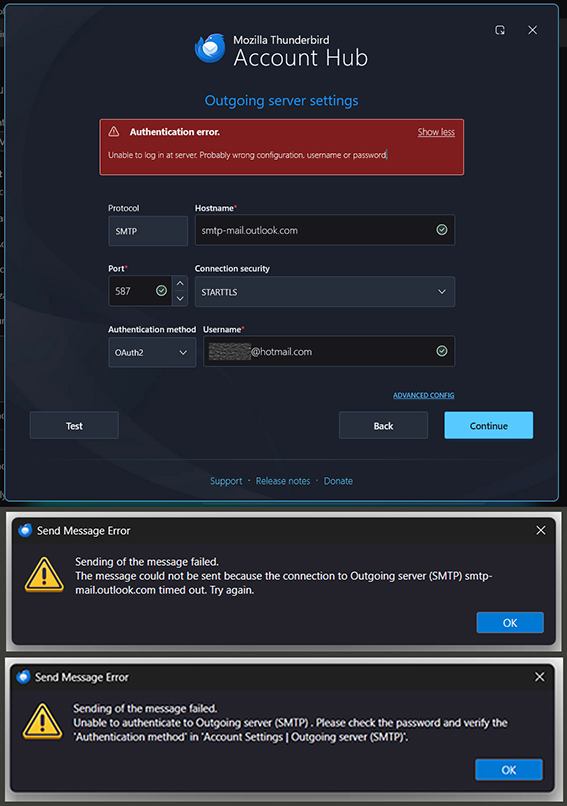
You find a screenshot of my smtp config and both the error messages above. It is all still the same.
CGV said
You find a screenshot of my smtp config and both the error messages above. It is all still the same.
I said
Matt said
(not the new account wizard)
The first image is the new account wizard, not your current SMTP settings, at that point nothing has been written to the actual account settings I asked you to post.
Go to account settings open the entry of outgoing server (SMTP) and had a look at the settings there. Those are the settings that generated the next two errors in your image. Not the account hub, it is trying to add the account again.
Until we can get to your current settings and start correcting them nothing is going to happen.
Well, here is another screenshot. The settings are definitely what they are suggested to be. During setup I get the authentication window to log into the Hotmail account. It closes without any error message. The result is that I am able to receive, but not to send any messages. I also tried the outlook.office365.com option. And by the way, my Hotmail account has no 2-factor auth activated and pop3 is on.
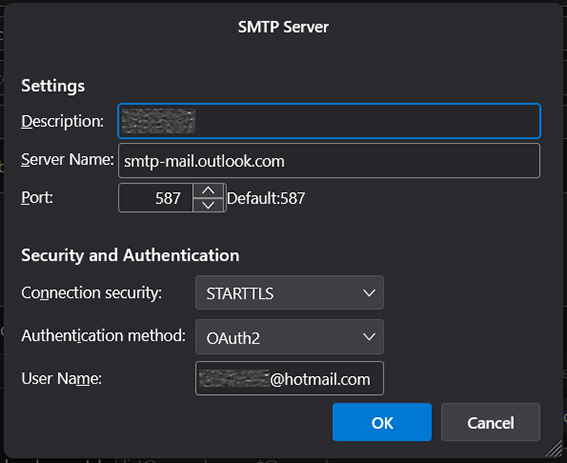
re : The new account receives mail, but the outgoing smtp server config seems to have a problem.
Microsoft Account considers all it's email addresses as 'alias'. You say you have more than one hotmail account. In the Microsoft Account accessed via abrowser, One of the email address will be set up as 'primary'. Microsoft will only allow sending via smtp in Third party email client using whatever is set up as the 'primary' account. Ideally, set up all passwords for all accounts to be the same as the 'Microsoft Account password.
So, for that additional hotmail, set up the outgoing smtp to use the 'primary' email address as username and also set the 'password' to be whatever is set for the 'primary' email address.
Then once account is set up, access the Account SEttings and select name of account - enter the email address of the account into the 'Reply-to Address', so regardless of what is used to send, the reply should come back to correct email address.
Modified by Toad-Hall
Thank you for your suggestion. I figured that it might have to do with one of those weird Hotmail settings. Meanwhile, I shut down one of the Hotmail accounts, which was obsolete, and deleted it from Thunderbird. So there are only two accounts left: The new one, which is set as default (primary) and the remaining old one as secondary, but this one still has an active Office subscription which expires in four days from now. Both accounts use the same password. According to your explanation, I replaced the smtp username of the secondary (old) mail with the username of the primary (new) default mail account.
I also tried it the other way, leaving the old account as default and replacing the smtp username of the new account instead.
None of both options worked, I only get an error message that hotmail #1 is not allowed to send through hotmail #2, which sounds logical to me. Is it possible that the still active Office subscription interferes in some way?