


TB not recognizing Outlook Personal account as viable SMTP account (evidently)

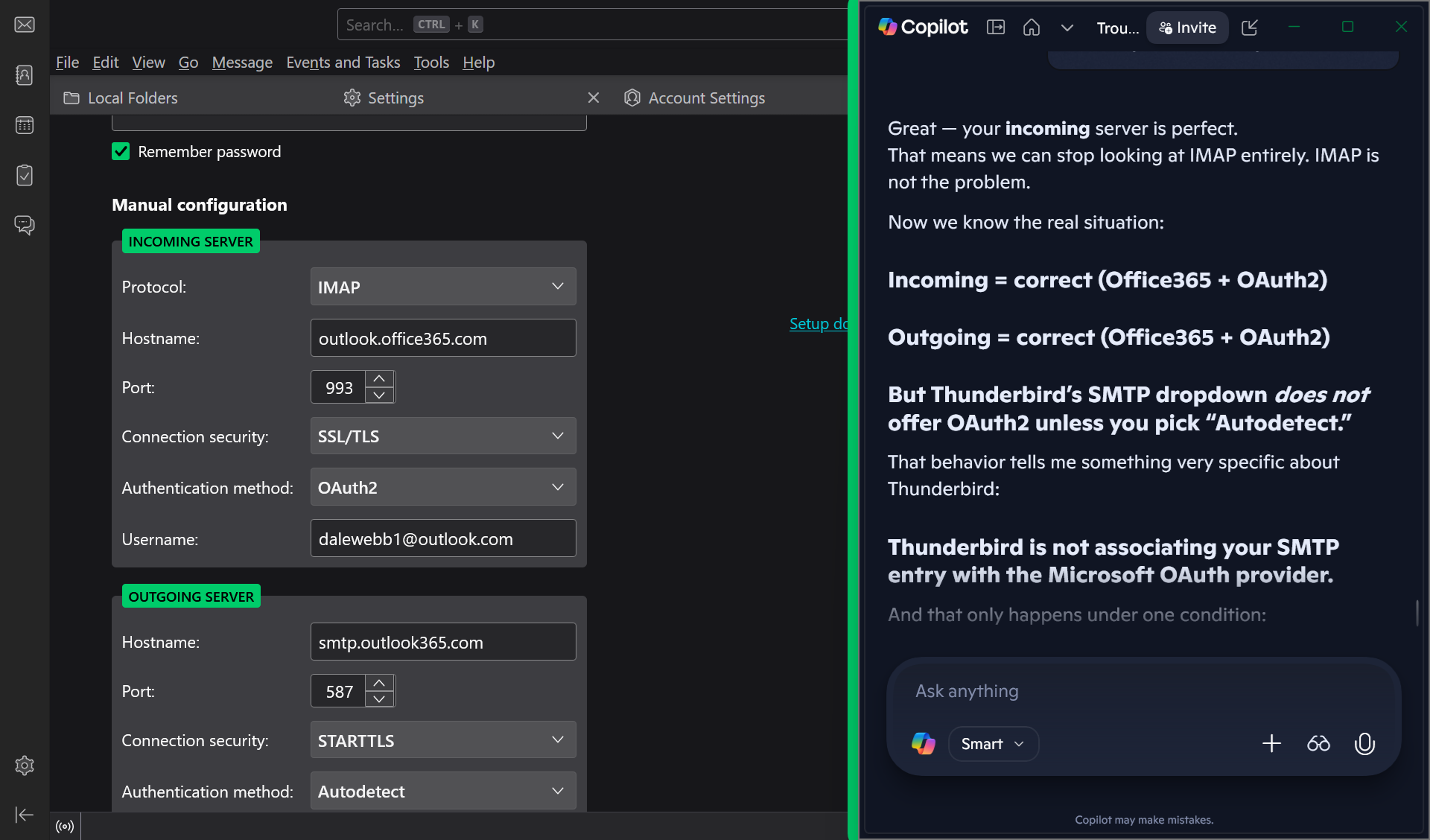
I get this error ALL THE TIME from TB. Sending of the message failed. The message could not be sent because connecting to Outgoing server (SMTP) smtp-mail.outlook.com failed. The server may be unavailable or is refusing SMTP connections. Please verify that your Outgoing server (SMTP) settings are correct and try again. Copilot says that TB is NOT recognizing my personal Outlook email account as a viable SMTP account. Been on line with Copilot for couple of hours without success. Does anyone at Mozilla have anything to offer me?
All Replies (13)
Just a thought: it is not TB not recognizing the account; it is Microsoft. TB is just the messenger. Posting your SMTP server settings may help. Personally, I use smtp.office365.com, but I know there are different attitudes on that.

I don't use Outlook so I can't compare settings, but here's a Microsoft article that describes their recommended settings. How do they compare with yours?
Those are the settings that Copilot eventually gave me. They are not working with TB.
I've never used outlook.com... until today. I tried setting up a free account just to see what happened. I had much trouble getting past its 'are you human' verifier, but I finally did and got the account opened with them. I have not been able to get Thunderbird to connect - I can get the account seemingly set up correctly, but then I get the error message, "User is authenticated but not connected." I find suggestions on how to fix, including one to disable IPV6 in Thunderbird, but it didn't help me.
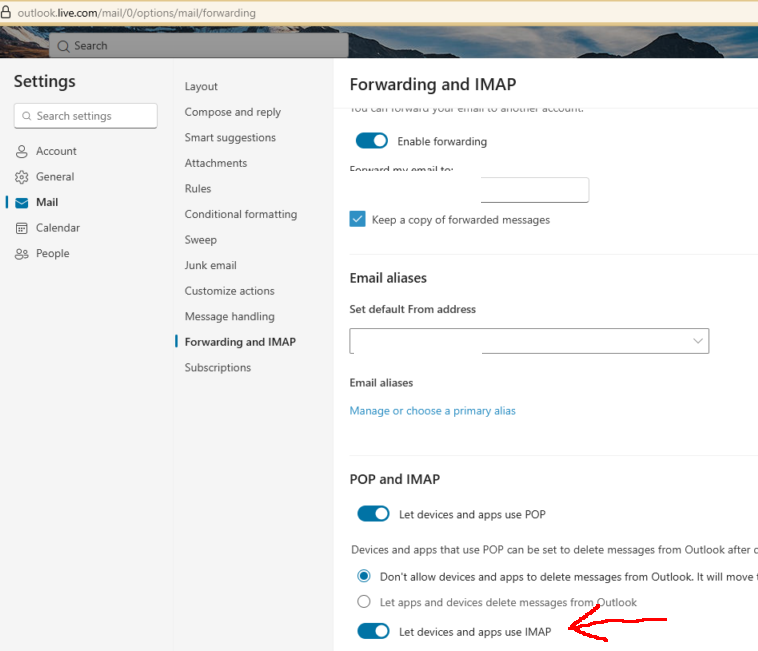
The MS instructions I mentioned above claim that there is a setting at their site that says, "Under POP and IMAP, toggle the slider for Let devices and apps use POP or Let devices and apps use IMAP to ON depending on the account you are enabling." I find no such setting.
I'm afraid I have nothing more to offer at this time. Sorry!
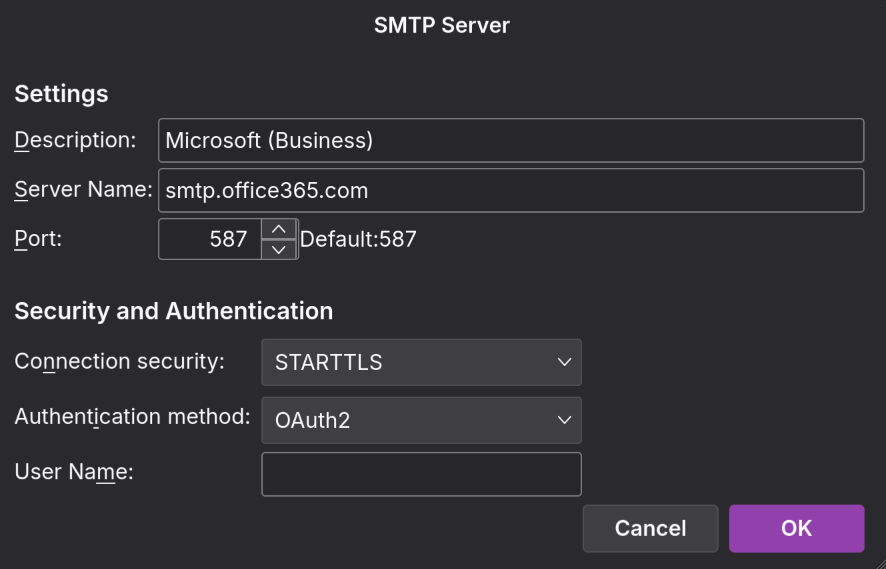
Your picture shows smtp.outlook365.com. The correct server is smtp.office365.com. That will offer OAuth2 for the authentication (on port 587, STARTTLS).
The correct settings have been posted several times in this forum for years, long before the advent of chatbots.
Lin said
I've never used outlook.com... until today. I tried setting up a free account just to see what happened. I had much trouble getting past its 'are you human' verifier, but I finally did and got the account opened with them. I have not been able to get Thunderbird to connect - I can get the account seemingly set up correctly, but then I get the error message, "User is authenticated but not connected." I find suggestions on how to fix, including one to disable IPV6 in Thunderbird, but it didn't help me. The MS instructions I mentioned above claim that there is a setting at their site that says, "Under POP and IMAP, toggle the slider for Let devices and apps use POP or Let devices and apps use IMAP to ON depending on the account you are enabling." I find no such setting. I'm afraid I have nothing more to offer at this time. Sorry!
See the attached picture. Enabling IMAP should eliminate the error.
sfhowes said
Lin said
I've never used outlook.com... until today. I tried setting up a free account just to see what happened. I had much trouble getting past its 'are you human' verifier, but I finally did and got the account opened with them. I have not been able to get Thunderbird to connect - I can get the account seemingly set up correctly, but then I get the error message, "User is authenticated but not connected." I find suggestions on how to fix, including one to disable IPV6 in Thunderbird, but it didn't help me. The MS instructions I mentioned above claim that there is a setting at their site that says, "Under POP and IMAP, toggle the slider for Let devices and apps use POP or Let devices and apps use IMAP to ON depending on the account you are enabling." I find no such setting. I'm afraid I have nothing more to offer at this time. Sorry!See the attached picture. Enabling IMAP should eliminate the error.
I won't go into a lot of detail because this is someone else's thread, but I still can't make it work. After much hoop-jumping I was finally presented with the 'enable IMAP' switch, but when I log out and back into outlook.com the option is off again. Grrr. It's not important, this was just a test. I'll work on it sometime later. This is not a Thunderbird problem. Thanks.
Sorry. Image was captured while setting it up and I have since corrected it to smtp.office365.com. Thanks for pointing it out.
PathMan said
Sorry. Image was captured while setting it up and I have since corrected it to smtp.office365.com. Thanks for pointing it out.
I've arrived at the same place as you. I can receive email at my outlook address, but not send. I have tried both SMTP server names, Microsoft's specified "smtp-mail.outlook.com" and david's suggested "smtp.office365.com". I get the same error message either way,
"Sending of the message failed. Unable to authenticate to Outgoing server (SMTP) . Please check the password and verify the 'Authentication method' in 'Account Settings | Outgoing server (SMTP)'."
All other settings appear correct, although my closest Authentication Method option is "OAuth2", not "OAuth2/Modern Auth". Maybe there's a difference?
So, I'll be watching this space for tips.
Don't know exactly why, but TB seems to be cooperating with Outlook as present. As has happened in the past however, things change. I suppose, Lin, if you are serious, you can spend several hours with Copilot as I did and still not get the correct answer ;).
Modified by PathMan
Did some further troubleshooting. Copilot and I came to the conclusion that is wasn't TB, wasn't windows, wasn't my router, it was my ISP. Apparently, ISPs commonly block port 587 for reasons only they know. Evidently don't care if it screws up Outlook access. ISP promised to do SOMETHING (not sure what) to 'fix' it. Thanks for the suggestions.

I have the same issue, though oddly enough, the first outlook account seems to work. I can't seem to remember what i did differently, or maybe it's some sort of SMTP mixup on TB's end? Really not sure, I've used the same recommended settings for both.
I do remember having issues with the outlook account as well though, there's definitely something weird with Microsoft accounts and Thunderbird.
Thunderbird mobile gave me an actual usable error code:
Gmail of course has always loaded without any issue at all on both devices.
Modified by alexanderweitzel