


UNABLE TO SEND EMAILS FROM FREE-ONLINE (PLUSNET SERVER)

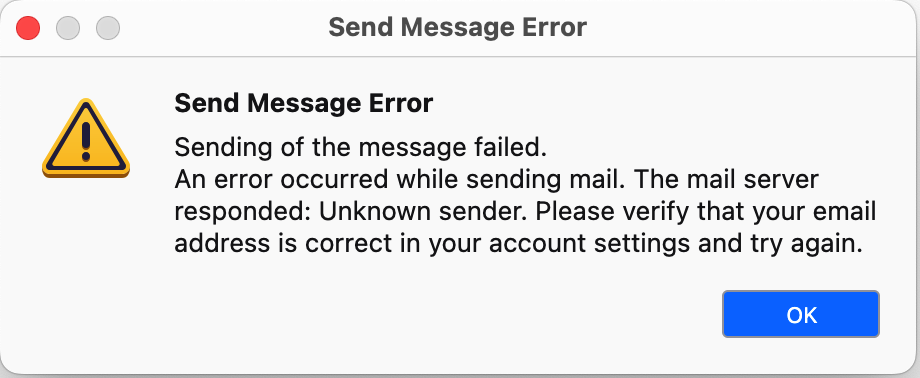
1. Was able to receive emails sent to my address xxxxxx@xxxxxxx.free-online.co.uk, but unable to SEND my replies. Was getting this notification: 'Send message error. Sending of message failed. An error occurred while sending mail. The mail server responded: Unknown sender. Please verify that your email address is correct in your account settings and try again, OK' (see attached). 2. Checked all settings, all correct as used to be before the problem started. 3. At some stage, I tried changing the password in Settings > Privacy & Security > Passwords > Saved passwords > Saved logins to see if that helped. It didn't. 4. I removed the free-online Server from the Saved logins (Provider: smtp://relay.free-online.net, User: xxxxxxx) with the intention of restoring it with a new password - but found I couldn't restore the free-online server. So I decided the best thing to do was to restore the password as it was before and to ask for help here. >>> That line has now been restored.
NB1. Free-online is a sub section of Plusnet. NB2. Last year I received an email from Greenby saying something about maybe taking over from Plusnet and that I would be notified if and when I had to do anything. I have not received any such instructions so left things as they were. Many thanks for your help from a not-very-techy so stressed old lady.
Modified by Marilou
Chosen solution
OK, one parting thought: you mentioned a fear of Windows 11. Just do it. The look and feel is 99%, and within an hour you'll be right at home. My wife was nervous about it, yet found Thunderbird and Chrome (her main two products) worked the same and looked the same. Plus, you continue with the built-in antivirus of windows 11. AND, if you ever buy a new PC, that is what will be there.
Read this answer in context 👍 0All Replies (16)
I do not know Plusnet, but I suggest using full email address in SMTP server, not just email prefix.
Thank you but I'm not sure what you mean - the smtp setting has always been 'smtp://relay.free-online.net', how do you suggest I add my email to this (my email address being xxxxxx@xxxxxxx.free-online.co.uk)? (sorry not sure what you meant by email prefix).
The error message you posted gave me the impression that your entry for 'user name' for SMTP server is only the prefix, not the full email address. If true, most email providers require the full email address there.
Modified by david
Oh gosh I hadn't realised that screenshot showed my details. I've now deleted it, and please delete my user name from your post, I'd appreciate it. I've tried your suggestion but it didn't work, I got the same notif. as before (ie.it failed with my email address as a user name), plus the one I'm attaching now (Send message error). I entered the same password as it shows on the Saved logins settings, and the Authentication method is Normal, as it used to be (and as it is with my other email addresses).
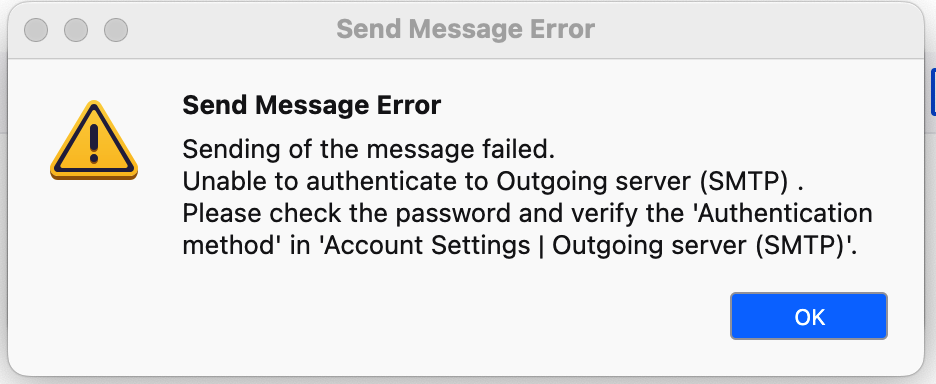
Well, there has been some improvement; you are not getting the 'unknown sender' error. That is why it is important to share exactly what thunderbird is seeing. Screenshots do that. Otherwise, people here have no idea of the problem. It was in your posted error that I was able to deduce part of the problem. You are receiving an error that there is an error in the SMTP configuration, yet you refuse to share exactly what it is. I see one of your attempts to fix this was changing password. All I can suggest is to experiment with different SMTP settings, such as SSL/TLS and port 465, STARTTLS and port 587, normal password. If no combination works, you may have a password problem. You can select settings>privacy&security, click savedpasswords and then showpasswords. That lets you see whatever password thunderbird is attempting to use.
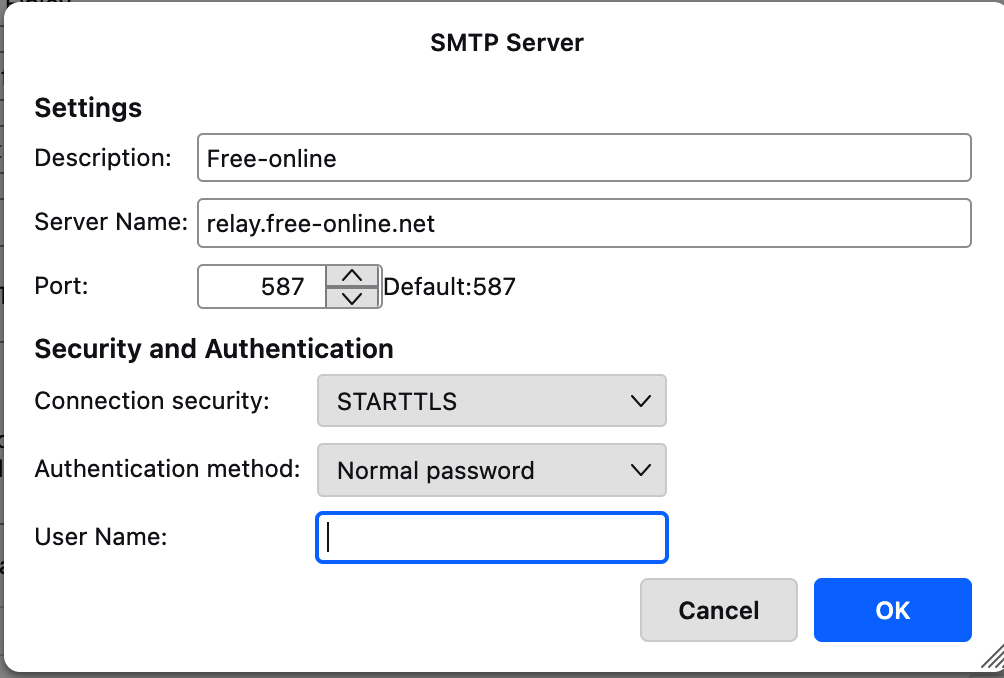
Thank you for your reply. Re: "You are receiving an error that there is an error in the SMTP configuration, yet you refuse to share exactly what it is." >>> We are always told not to share personal info in social media, forums, etc, which is the reason why I was being cagey (please could you delete my user name from your post, thanks in advance). >>> I have re-instated my usual User name in the SMTP Server settings (as my email address didn't work, see my last post). >>> I am attaching a screenshot with the User name, ie xxxxxxx left blank >>> I tried to send an email but again got the 'You are receiving an error that there is an error in the SMTP configuration', see attached. >>> I have checked my Account settings, as follows: - Account name: my email address, xxxxxx@xxxxxxx.free-online.co.uk - Your name: Xxxxxx X Xxxxxx - Email address: xxxxxx@xxxxxxx.free-online.co.uk - Outgoing server (SMTP): Free-online - relay.free-online.net - SMTP Server: as 1st screenshot below (with Username xxxxxxx)
>>> I changed the SMTP server setting to SSL/TLS and port 465: gets stuck on 'Sending message'. >>> I went back to STARTTLS and port 587: get Send message error as before (2nd attachment). >>> Both the above with Normal password >>> I have checked my passwords in the Saved passwords, and my saved password is correct (I assume it is as Thunderbird fills my Inbox).
This is still puzzling. Would you please post everything in your email address that occurs to the right of the @. That may help. have you contacted Plusnet support for the official settings?
1. At the right of @ is: xxxxxxx.free-online.co.uk (xxxxxxx being my User name). 2. You have still not deleted it from your earlier post - why? I'd rather it didn't stay in this conversation. 3. I will try to contact Plusnet support but it's far from easy, from experience.
That would be very unusual. why don't you try this instead: use your email prefix followed by @free-online.co.uk. For example, if your userprefix was sally, it would appear as sally@free-online.co.uk try that and let me know.. Again, what you have is a technical problem, and technical problems require detail and you are refusing detail. Sorta' like going to the doctor with a chest pain and then telling the doctor that you were taught not to take your clothes off. Persons who are trying to help you need to see what the issues are. Let me know how it goes.
You keep saying I refuse to give information. As I said before I am an old lady and we are consistently warned not to leave our personal details online (see Mozilla re sensitive information: 'Don't post any sensitive information'), I am surprised you don't seem to understand my nervousness about doing so. Instead I tried to help by using xxxetc for my User name etc. I also notice you haven't deleted my personal User name as I requested several times and that makes me nervous. I can't understand why you wouldn't respect my request. Re your suggestion, I am not sure what a prefix is, I am assuming you mean the 1st part of my email address, ie xxxxxx You don't say where I should change it, so I changed it in 'Account settings > Email address', which seems to be what you mean from your 'sally' example. I then tried to send an email but had the same problem as before (not surprising as the From box hasn't changed)
Your email prefix has been removed. I suggest you contact plusnet for appropriate setup requirements. You might also want to consider switching to an email service that provides an excellent online interface that does not require using an email client such as Thunderbird. There are two that I have had good luck with: outlook.com and gmx.com, both offer free email accounts that work directly from a web browser and require no setup whatever. These two are popular, especially for users who need email access but do not have technical assistance readily available.
Thank you for your reply, and for deleting my username from your post. I have contacted Plusnet and am awaiting a reply. Thanks also for the email services you suggested, I will have a look at them but my feeling is that I'm not sure I want to access my emails via a browser. I like Thunderbird as I can manage all my email addresses from one place. I might change my mind though.
I should add that if you get an outlook.com or a gmx.com account, you can use on PC if desired, and there are many persons here who are familiar with the setup for those accounts. Your frustration (and mine) is that neither of us know exactly how to set up that free plusnet account. Using a popular email provider ensures there will be help available. I wish you well. If you do go that route and need assistance, please open a new thread. :)
Chosen Solution
OK, one parting thought: you mentioned a fear of Windows 11. Just do it. The look and feel is 99%, and within an hour you'll be right at home. My wife was nervous about it, yet found Thunderbird and Chrome (her main two products) worked the same and looked the same. Plus, you continue with the built-in antivirus of windows 11. AND, if you ever buy a new PC, that is what will be there.