Single space when enter key is used

It has been several months since Thunderbird has always resulted in a double space when the ENTER key is pressed while composing an email. I have tried all the suggestions offered on this forum. None has been successful. Windows 11 Pro, with all current updates. The app data files are in my Documents folder. Does anyone have a solution? Am I the only one having this problem?
I have been a Thunderbird fan for many years. This is the first time I feel it is time to look for a new email application program.
Chosen solution
I assume you're writing HTML-style messages. Look at the setting:
<Tools | Settings | Composition | HTML Style> and make sure the "Use Paragraph format instead of Body Text by default" option is UNchecked.
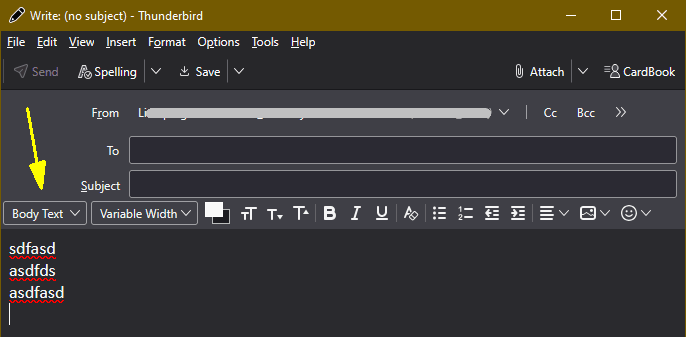
You can also switch on a temporary basis while composing the message by choosing a different style from the Style drop-down list in the compose window (usually found on the left side of the Formatting Toolbar.)
Read this answer in context 👍 0All Replies (3)

Chosen Solution
I assume you're writing HTML-style messages. Look at the setting:
<Tools | Settings | Composition | HTML Style> and make sure the "Use Paragraph format instead of Body Text by default" option is UNchecked.
You can also switch on a temporary basis while composing the message by choosing a different style from the Style drop-down list in the compose window (usually found on the left side of the Formatting Toolbar.)
Modified by Lin
Lin, Thank you for the response. I changed the setting per your suggestion. The change had no effect. Skips a line every time.
What about the Style chooser list in the Compose window? Is it set to Body Text? See attached image.