


Windows 10 reached EOS (end of support) on October 14, 2025. If you are on Windows 10, see this article.

Search Support

Avoid support scams. We will never ask you to call or text a phone number or share personal information. Please report suspicious activity using the “Report Abuse” option.

Learn More

Icon against 'subject line' in Thunderbird message list

  • 2 replies
  • 0 have this problem
  • 40 views
  • Last reply by post.smith

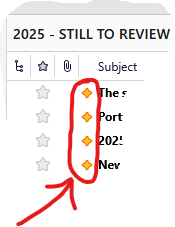
What does the icon that shows (for a while) against the SUBJECT line of messages indicate?

After some time, or perhaps following my general activity within the application or some other trigger, it seems to disappear for reasons I have yet to understand.

I attach a screen clip showing four of these icons ("2025 - STILL TO REVIEW" is one of my user-created folder names.)

Secondly, is the answer to the above question available already in online help for Thunderbird? If so, and since I haven't found it yet, I would be grateful to be pointed towards the relevant article. As a new user, I expect it would tell me other things that will be useful for me to learn!

I am using version 146.0.1 (64-bit).
What does the icon that shows (for a while) against the SUBJECT line of messages indicate? After some time, or perhaps following my general activity within the application or some other trigger, it seems to disappear for reasons I have yet to understand. I attach a screen clip showing four of these icons ("2025 - STILL TO REVIEW" is one of my user-created folder names.) Secondly, is the answer to the above question available already in online help for Thunderbird? If so, and since I haven't found it yet, I would be grateful to be pointed towards the relevant article. As a new user, I expect it would tell me other things that will be useful for me to learn! I am using version 146.0.1 (64-bit).
Attached screenshots

Chosen solution

The yellow (golden?) diamond icon indicates "new message" since the last time the folder was opened https://support.mozilla.org/fr/kb/new-thunderbird-128-nebula

Read this answer in context 👍 1

All Replies (2)

Chosen Solution

The yellow (golden?) diamond icon indicates "new message" since the last time the folder was opened https://support.mozilla.org/fr/kb/new-thunderbird-128-nebula

Thank you very much, Mapenzi. Very useful and prompt assistance.

Ask a question

You must log in to your account to reply to posts. Please start a new question, if you do not have an account yet.