


Moving Thunderbird to a new computer after export function is no longer possible on the old computer

Hi everyone - and big thanks in advance for considering my request: I have/ had windows 11 on my old machine and windows 11 on my new machine; because my 'old computer' is not running anymore at all (liquid damage), I can no longer start Thunderbird and follow the 'export tool function' (https://support.mozilla.org/en-US/kb/thunderbird-export) and thus can only do the manual transfer (https://support.mozilla.org/en-US/kb/moving-thunderbird-data-to-a-new-computer); I didn't think that I would need to go through the export tool steps when I saved the Thunderbird profile folder regularly as backup on the cloud; yet when I started Thunderbird on my new machine following the above steps by moving the Thunderbird profile folder manually, the result is that - although Thunderbird is 'running' and the mailbox is functioning properly - the key folders are empty (i.e. the sub-folder structure is completely lost, in fact there are no individual emails at all); the issue seems to be that the size of the Thunderbird profile folder is too large (the "Profiles" folder has a size of 20.5 GB) for doing this transfer via copy & paste of the Thunderbird profile folder from the cloud (I also tried USB) to the new machine; I understand that the size issue via the manual transfer could be 'overcome' just by starting Thunderbird on the 'old machine' and following the above steps explained under mozilla support; yet that's no longer an option; what could I do please?
All Replies (6)
Size is no issue if manually copying. I suggest doing a screenshot of the copied profile, showing the folders where content does not appear after the transfer. That would at least be a starting point.
Thanks David - this 'Helsinki' folder is completely empty within Thunderbird - see attached screenshot please: what I labeled 'Level 0' shows you the different Thunderbird profiles below 'roaming' (that I had created after multiple re-installations and trials); then I go all the way down 'Level 1' is the screenshot showing the 'Helsinki' folder among the others; then 'Level 2' goes down and shows you what's within the 'Helsinki' folder; finally, the screenshot which I labeled 'Thunderbird open' shows you that there's nothing within the 'Helsinki' folder when I open the mail program; might I have already screwed up with the labeling/ indexing of the path ('Level 1' screenshot shows 'Thunderbird', 'Thunderbird_old', 'Thunderbird_old2'? THANKS!!!
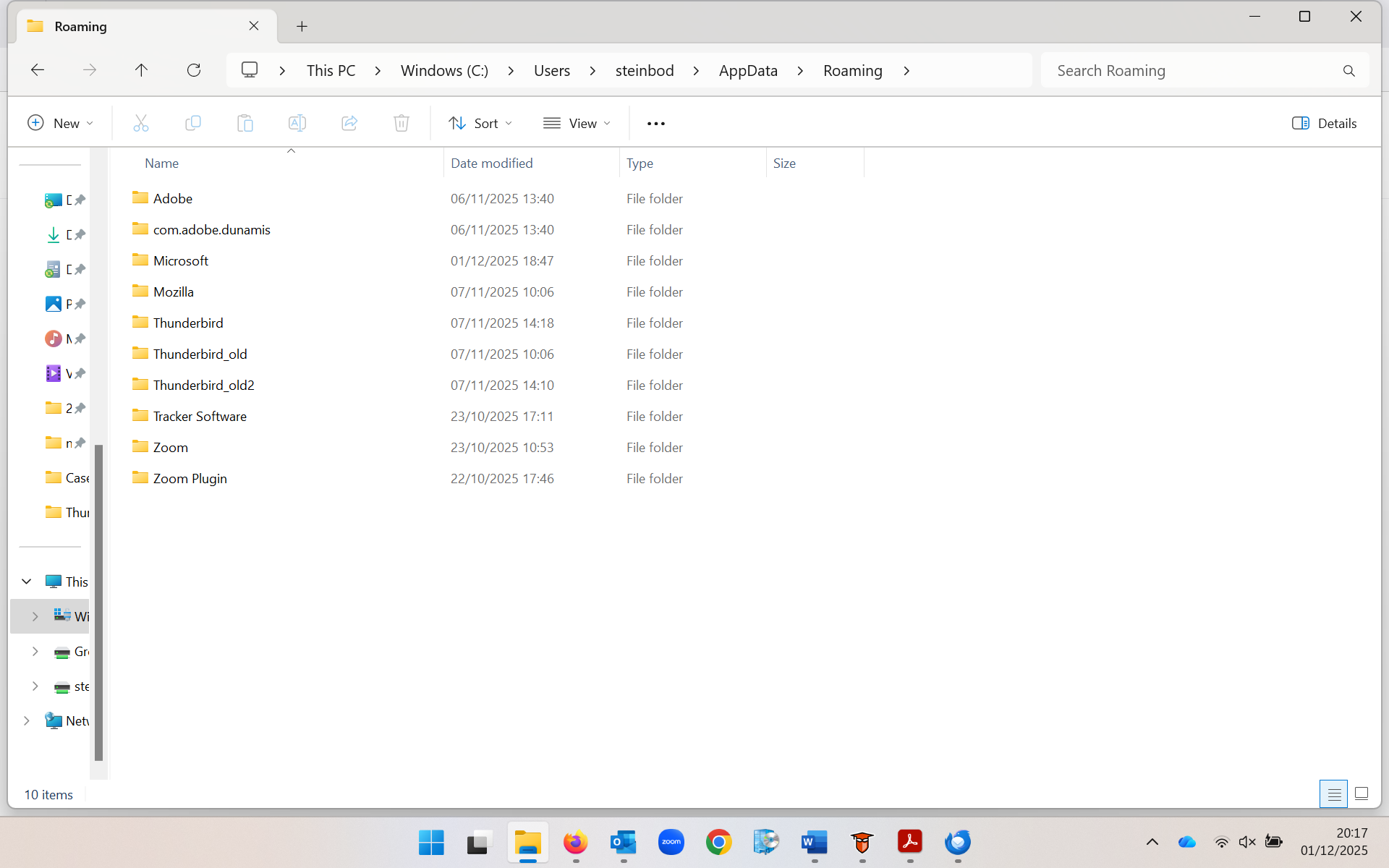
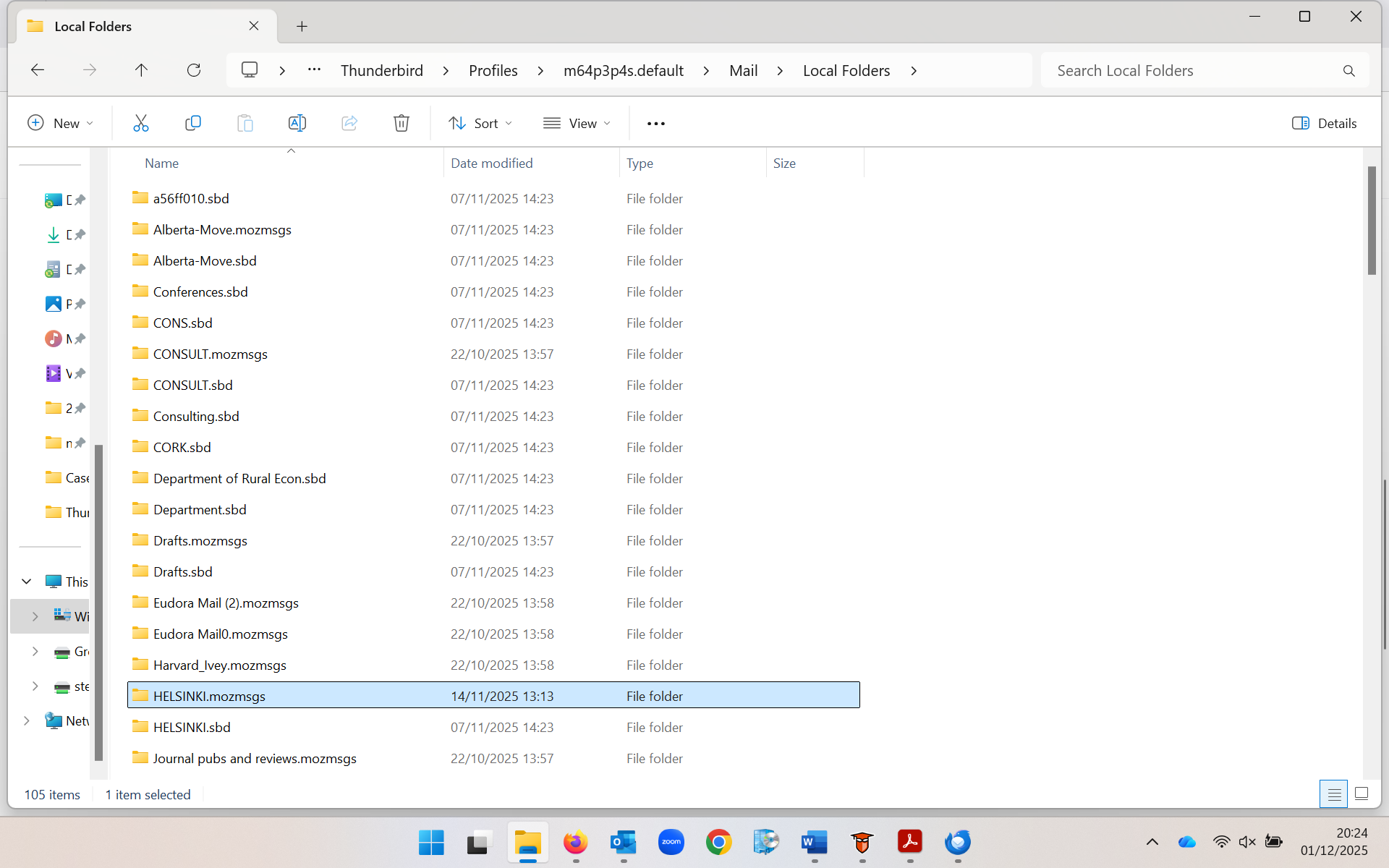
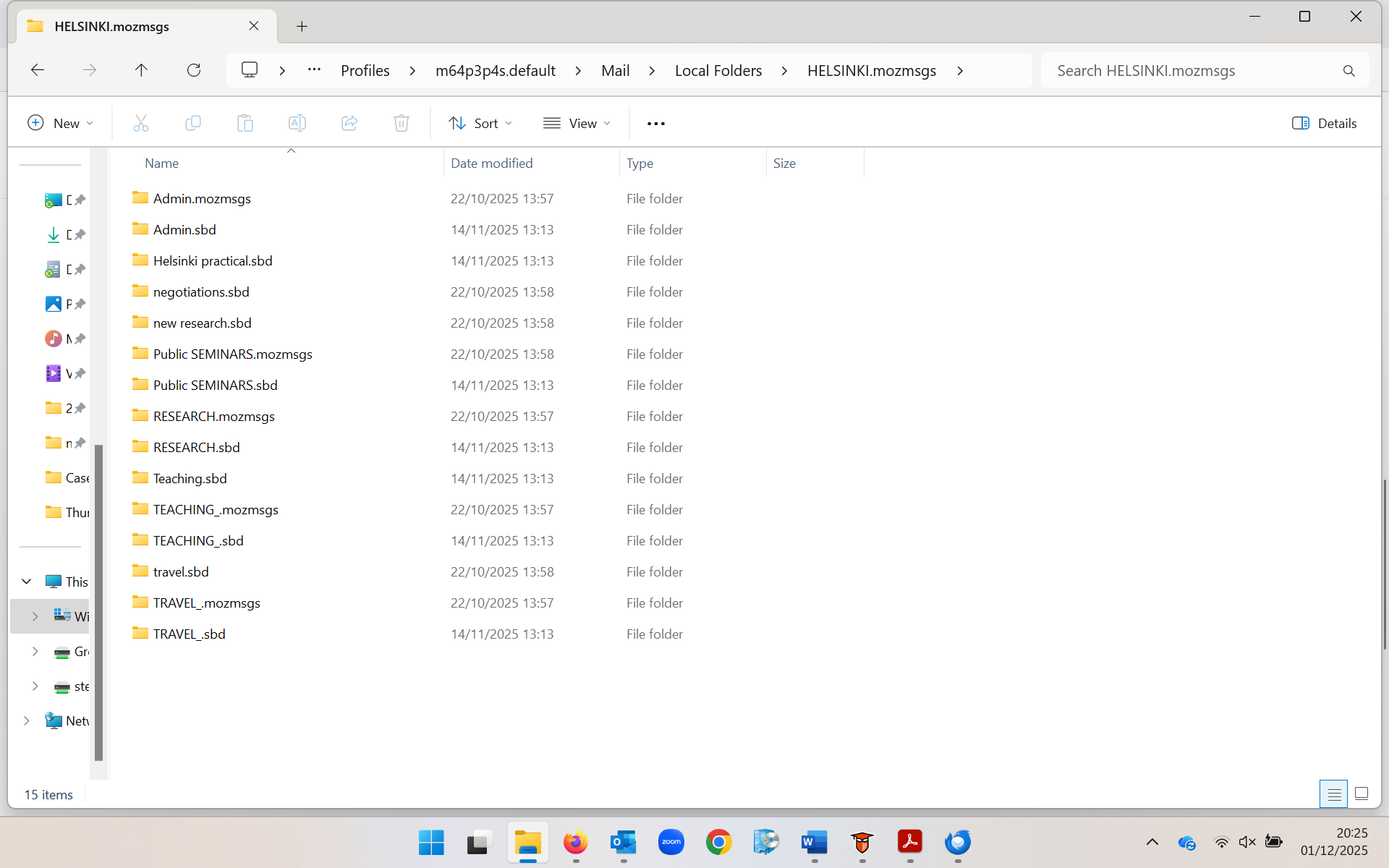
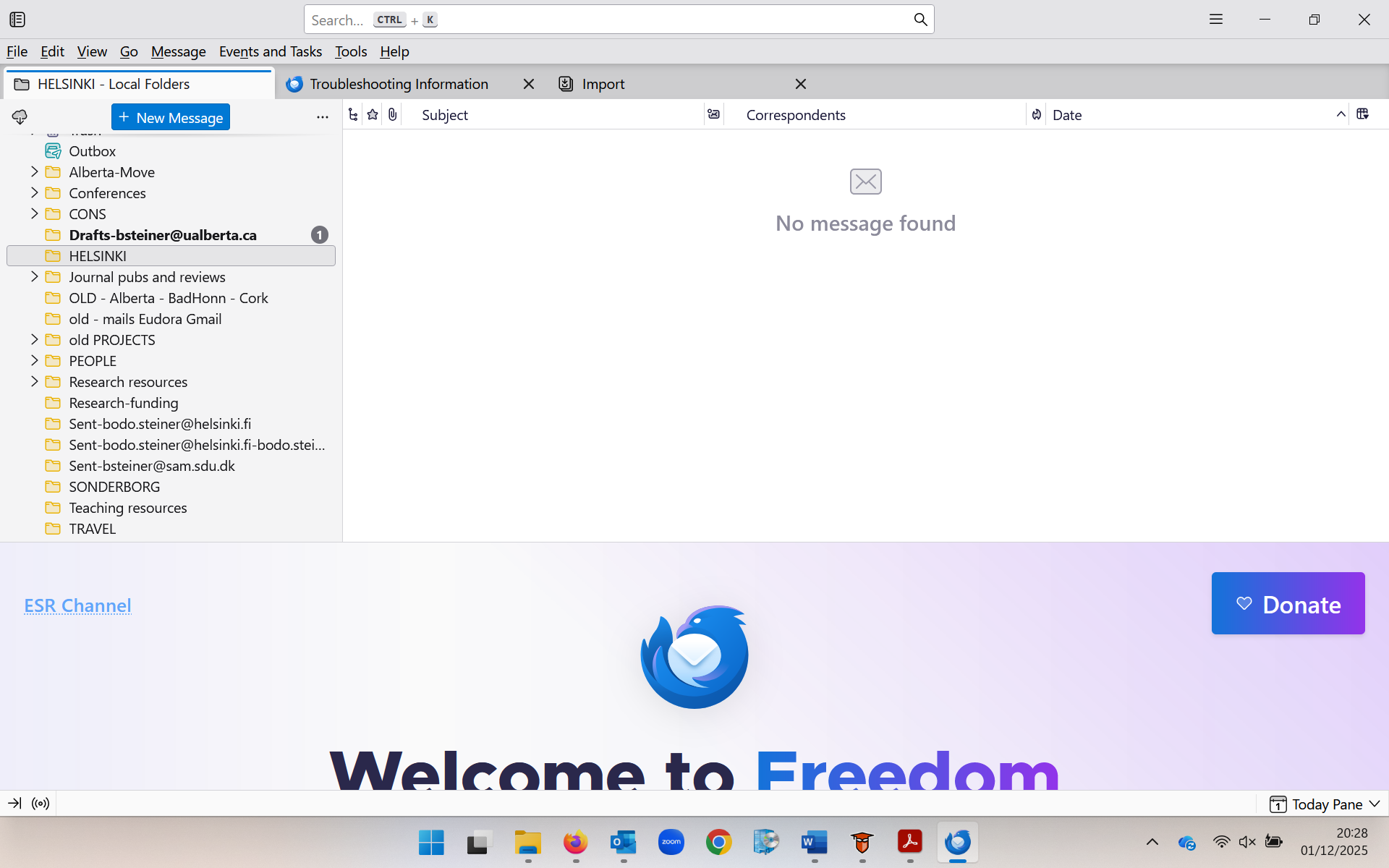

Which are the contents (screen shot) of the Helsinki.sbd file folder in Local Folders in the Thunderbird profile? Your image shows the contents of a Helsinki.mozmags folder but not of Helsinki.sbd!
Modified by Mapenzi
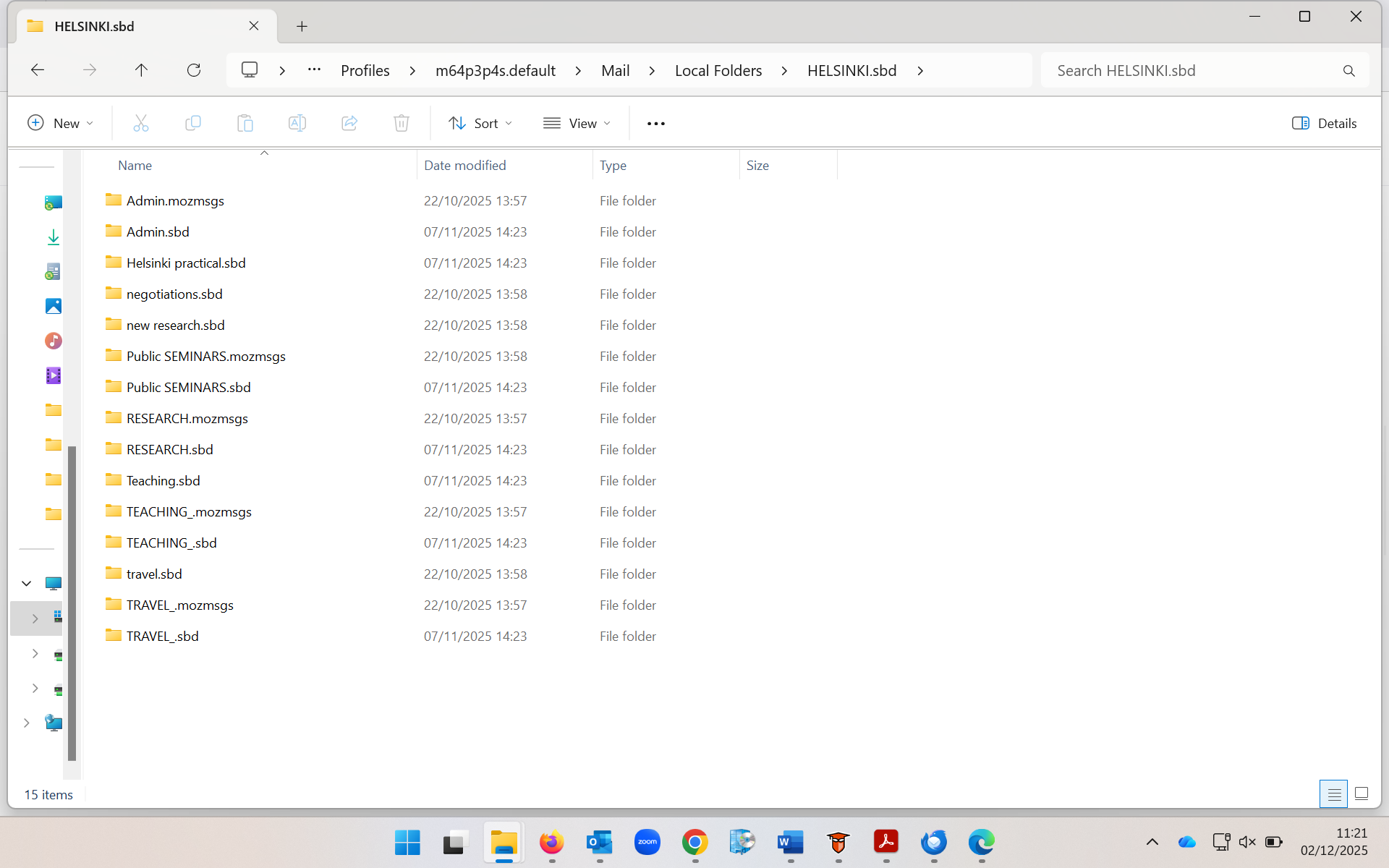
Thanks, Bodo! The "HELSINKI.sbd" folder content shown in the new image is exactly the same as in "HELSINKI.mozmsgs" and it has the same flaw. A folder XYZ in Thunderbird having sub-folders is represented in the profile by an "XYZ.sbd" file folder and an "XYZ" mailbox (or mbox) file (without extension) and an "XYZ.msf" mail summary file. We won't bother about the mail summary file since it doesn't contain messages. Each sub-folder of XYZ in Thunderbird is is represented in the profile by an mbox file (without extension) carrying the same name as the sub-folder in Thunderbird. Your sub-folders of HELSINKI are themselves parent folders for other sub-folders. That means that file folders like Admin.sbd or TRAVEL.sbd contain mbox files of the sub-sub-folders and even other .sbd folders depending of the depth of the folder hierarchy....
Your "HELSINKI.sbd" folder doesn't contain any mbox (mailbox) file which is absolutely necessary for displaying the corresponding sub-folder of HELSINKI in the folder pane. i.e. Admin.sbd should be paired with an (even empty) Admin mbox file without extension, TRAVEL.sbd should be paired with a TRAVEL mbox file , ...etc, etc
To "recover" the sub-folders (make them again visible as sub-folders of HELSINKI) you'll have to create all those missing mbox files manually in a text editor, delete the .txt extension Windows will add and move them in HELSINKI.sbd On TB restart you should find all sub-folders in HELSINKI Don't bother about .mozmsgs folders, they have been created by the Windows search.
Modified by Mapenzi
Alright, big thank you in advance first of all, and really, if I could get this to work, it would feel to me like a lottery win, seriously (and let me say it plainly again, this is complete new territory to me, and manually doing things in a text editor feels a bit like walking on a rope to me ;-)
Now, I am totally clear on "Your "HELSINKI.sbd" folder doesn't contain any mbox (mailbox) file which is absolutely necessary for displaying the corresponding sub-folder of HELSINKI in the folder pane'."; yet there are two 'but's'; first, this problem (Helsinki folder being empty / no mbox) is also a problem in several other folders (so fixing it manually in this Helsinki folder would only be the beginning); second, I can see some folders that are, when I open Thunderbird on the new machine, showing a partial sub-folder structure, and yet when I go into those sub-folders under PROFILES that actually show up, I still don't see any "mbox" extension files (example of a sub-folder that shows up while others don't: it is appearing with three names, "Marketing Analytics.mozmsgs" (yes, you told me to ignore), "Marketing Analytics" and "Marketing Analytics.msf".
So, your help in (a) understanding where I see those "mbox" files [thus confirming that when I see "Marketing Analytics" without any file extension it actually is the right thing, the mbox file? because you write "i.e. Admin.sbd should be paired with an (even empty) Admin mbox file without extension"] and (b) how to do things via 'one procedure' so that all folders that have this issue of not at all or partially showing sub-folders are fixed simultaneously (and not just 'Helsinki' folder).
Sorry to be so clumsy ... thanks in advance! -bodo.