

Natao arisiva ity resaka mitohy ity.
Mametraha fanontaniana azafady raha mila fanampiana.

Natao arisiva
where is the reload page button? not a bookmark - a page - #4 is slower than molasses

There is NOTHING to click on to reload a page. I am NOT talking of the plugin - reload every - just reload the page I am on. #4 is constantly "not responding" and extremely slow to load or do anything.
There is NOTHING to click on to reload a page. I am NOT talking of the plugin - reload every - just reload the page I am on. #4 is constantly "not responding" and extremely slow to load or do anything.
All Replies (2)

There is a reload button at the end of the URL bar. See attached.
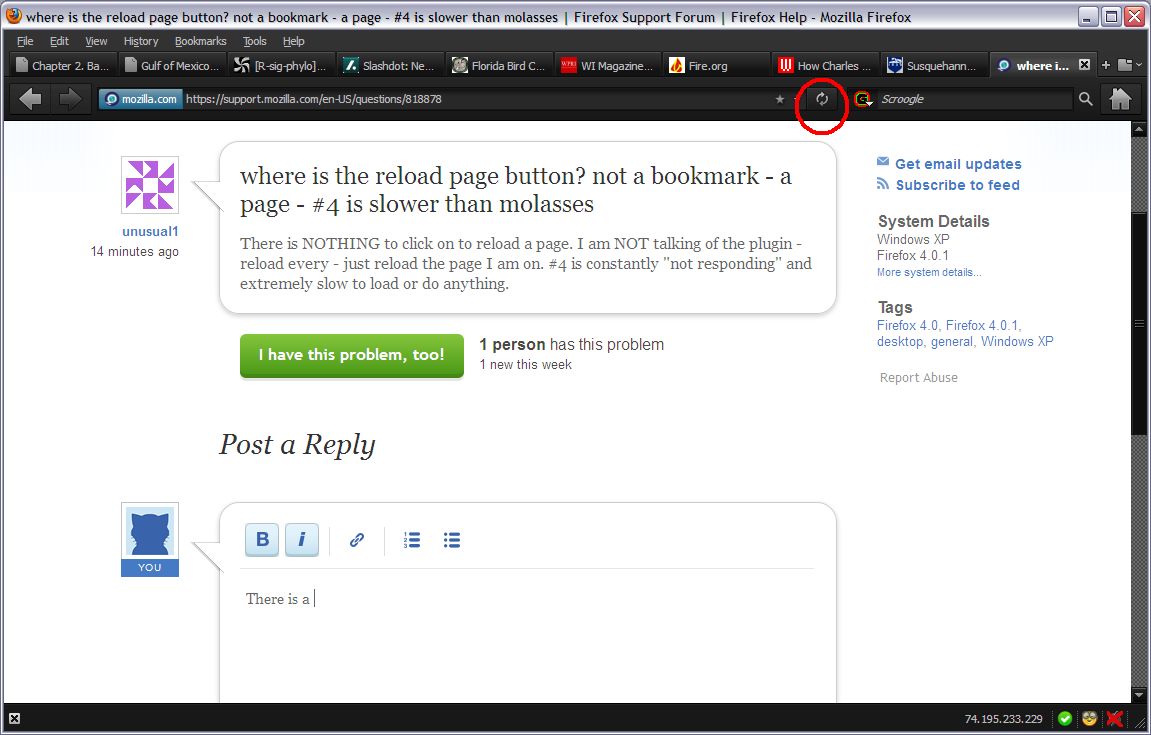
Firefox 4 uses a combined Stop/Reload/Go button that is positioned at the right end side of the location bar.
During the page load process it shows as a Stop button and after the loading has finished the button is changed to a Reload button.
If you type in the location bar then that button becomes a Go button.
You can middle-click that Reload button to duplicate the current tab to a new tab.