


Rakuten.com claim cookies are not enabled

Why does Rakuten.com claim cookies are not enabled? It works fine on Chrome. I have set my cookies to Standard and cleared all cookies data.
All Replies (4)

I have set my cookies to Standard and cleared all cookies data.
Try a temporary [Allow all cookies] to see if that works
There is no Allow all cookies setting. There is just Standard, Strict and Custom.
The correct way how to except sites from standard tracking protections is, while on the site:
- Click the shield
 icon at the left of the address bar.
- In the panel, toggle off the Enhanced Tracking Protection switch
 . The site will be added to your Enhanced Tracking Protection exception list, allowing trackers on it, and the page will reload automatically.
-
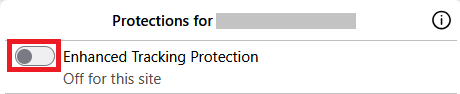
This will allow trackers to load on that website while keeping you protected on other sites. To learn more, see Enhanced Tracking Protection in Firefox for desktop.
In general error messages like these usually tend to confuse the culprits — it might be a privacy addon causing this, or if coming from email a mail provider anti–tracking feature etc., so it doesn't necessarily have to be linked to actual inability to set/use cookies — but something more adjacent to current privacy trends and users' choices in browser customizations.
Can you share the actual link that's triggering this for anyone else to try if it's not sensitive/authwalled?