


Windows 10 reached EOS (end of support) on October 14, 2025. If you are on Windows 10, see this article.

Search Support

Avoid support scams. We will never ask you to call or text a phone number or share personal information. Please report suspicious activity using the “Report Abuse” option.

Learn More
Open

Thunderbird adds a fix for quoted styles, then its own filter throws the fix away again

Christoph Brück

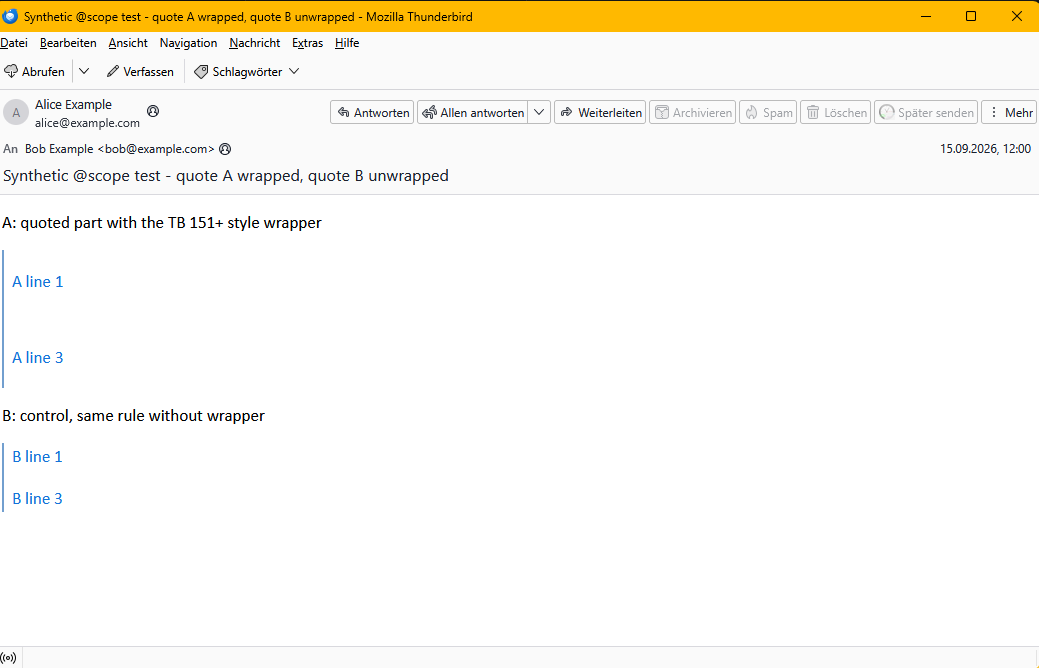
What I see When I reply to an email written in classic Outlook for Windows, the quoted Outlook text gets a big gap above and below every single line, and its font changes. This happens as soon as Thunderbird processes such a message again, for example when I view my sent reply, reply to my own reply, forward it, or reopen a saved draft. Thunderbird users who receive my replies should see the same gaps.

Why it happens (as far as I can tell) - Outlook writes every line as its own paragraph and relies on a small style rule that says "no extra space between paragraphs". - Since version 151, Thunderbird puts the quoted email's style rules into a protective container (`@scope`) so they cannot change my own text (bug 1967725). - Thunderbird's own safety filter for HTML emails treats this container as a suspicious rule and deletes it, together with everything inside it. The "no extra space" rule is lost, and the gaps appear. - Older versions such as Thunderbird 140 ESR don't understand the container at all and ignore the rules even in the first reply.

In short: one Thunderbird feature adds the container, another Thunderbird feature removes it again.

How to reproduce (no Outlook needed) The attached test message contains two quotes with the same spacing rule: quote A inside the container, quote B without it. In Thunderbird 155.0.1 quote A shows big gaps, while quote B stays tight.

What would help Keep protecting my own text from the quoted styles, but in a form that Thunderbird's own filter and older email programs don't remove, for example by limiting the quoted rules to the quote with an ordinary class name instead of `@scope`.

Technical pointers - Filter: pref `mail.html_sanitize.drop_conditional_css` (default true); `NoConditionalRules` in `stylesheet.rs` rejects `CssRule::Scope`. - Container: `QuoteSanitizer.sys.mjs` (Phase 2), called from `MsgComposeCommands.js`. - Tested with Thunderbird 155.0.1 on Windows 11.
'''What I see''' When I reply to an email written in classic Outlook for Windows, the quoted Outlook text gets a big gap above and below every single line, and its font changes. This happens as soon as Thunderbird processes such a message again, for example when I view my sent reply, reply to my own reply, forward it, or reopen a saved draft. Thunderbird users who receive my replies should see the same gaps. '''Why it happens (as far as I can tell)''' - Outlook writes every line as its own paragraph and relies on a small style rule that says "no extra space between paragraphs". - Since version 151, Thunderbird puts the quoted email's style rules into a protective container (`@scope`) so they cannot change my own text (bug 1967725). - Thunderbird's own safety filter for HTML emails treats this container as a suspicious rule and deletes it, together with everything inside it. The "no extra space" rule is lost, and the gaps appear. - Older versions such as Thunderbird 140 ESR don't understand the container at all and ignore the rules even in the first reply. In short: one Thunderbird feature adds the container, another Thunderbird feature removes it again. '''How to reproduce (no Outlook needed)''' The attached test message contains two quotes with the same spacing rule: quote A inside the container, quote B without it. In Thunderbird 155.0.1 quote A shows big gaps, while quote B stays tight. '''What would help''' Keep protecting my own text from the quoted styles, but in a form that Thunderbird's own filter and older email programs don't remove, for example by limiting the quoted rules to the quote with an ordinary class name instead of `@scope`. '''Technical pointers''' - Filter: pref `mail.html_sanitize.drop_conditional_css` (default true); `NoConditionalRules` in `stylesheet.rs` rejects `CssRule::Scope`. - Container: `QuoteSanitizer.sys.mjs` (Phase 2), called from `MsgComposeCommands.js`. - Tested with Thunderbird 155.0.1 on Windows 11.
Sarin'efijery napaingotra

Novain'i Christoph Brück t@

All Replies (1)

.....

Novain'i Christoph Brück t@

Mametraha fanontaniana

You must log in to your account to reply to posts. Please start a new question, if you do not have an account yet.