


I have problems with my Orcon emails and they say it is Thunderbird.

On Saturday morning 27 June 2026 I tried to login my Orcon email account via Thunderbird (which I have been using for a long time). But my login didn't work, I got a message saying "login to POP3.orcon.net.nz with username habitation failed." On 30th June 2026 I reported the problem to Orcon.
Orcon gave me the following settings for Thunderbird. I have done that and even made a new account: Incoming Server Type: IMAP Mail Server: imap.orcon.net.nz Port: 143 SSL: Off Authentication: On (username and password required)
Outgoing SMTP Server: Mail Server: smtp.orcon.net.nz Port: 25 SSL: Off Authentication: Off
Since then I have spent many hours and going around in circles with Orcon's Technical Support to resolve this, but no luck. They blame Thunderbird. I used Thunderbird Troubleshoot Mode. The message that comes up reads: login to server mail orcon.net.nz with username habitation failed. Please can you check that your server settings above are correct? And if there is a bug? Irma
All Replies (53)
Done see screenshot
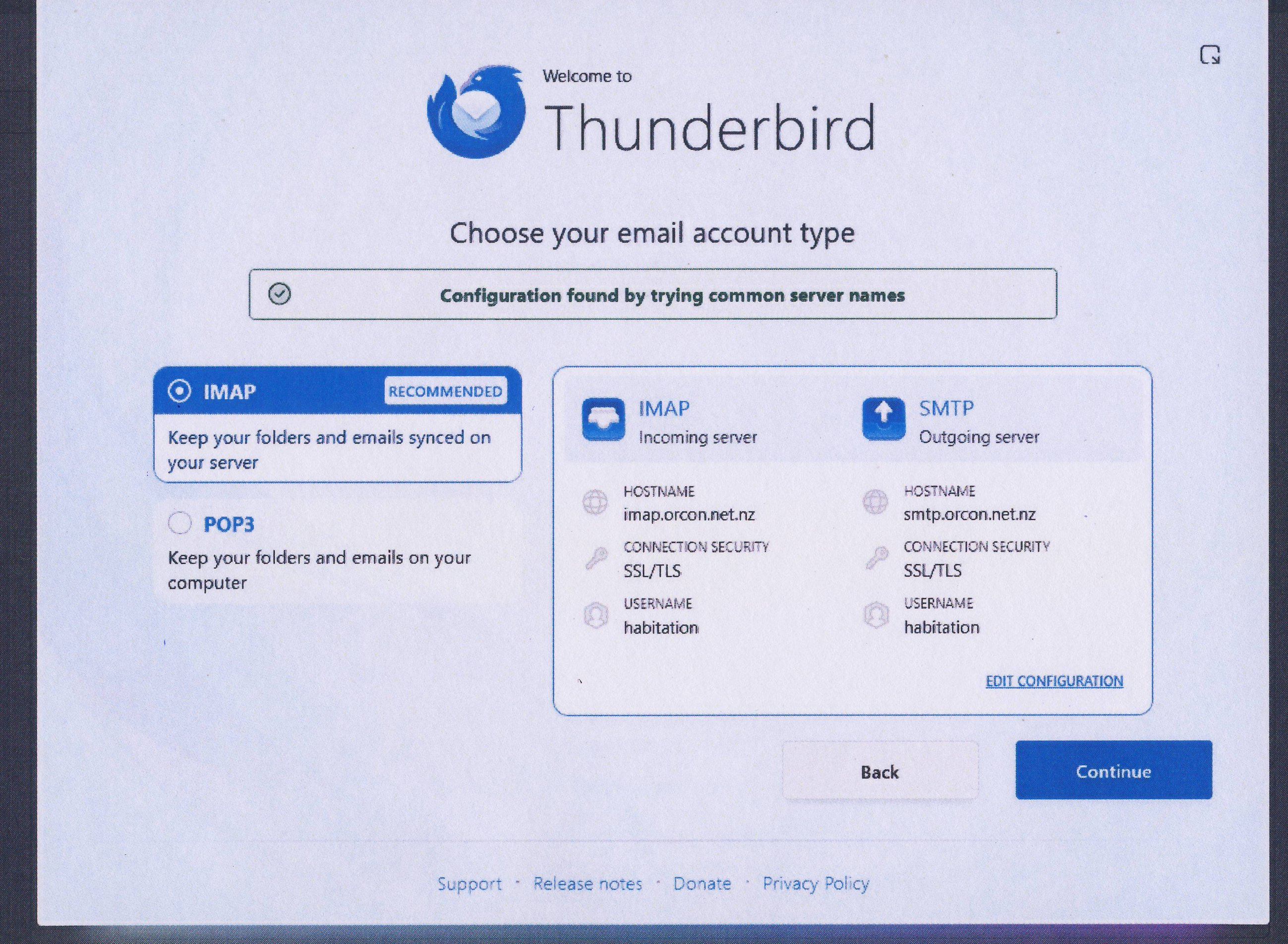

Good.
Now at bottom right, click on "edit configuration". Here are the settings that we want:
IMAP Username: <Your username> E-mail Address: <Your username>@orcon.net.nz Incoming mail server: mail.orcon.net.nz Port: 993 Connection security: SSL Authentication method: normal password
SMTP You may not have to change. Username: <Your username> E-mail Address: <Your username>@orcon.net.nz Server name: mail.orcon.net.nz Port: 465 Connection security: TLS or SSL/TLS Authentication method: normal password
I am concerned that Thunderbird will stumble on the SMTP server because one already exists. This may be why Ed wanted to deleted your whole profile (if I recall correctly). We'll see.
Please make the changes and share another screen image.
Novain'i Rick t@
Done. see screenshot of In- and Outgoing setup
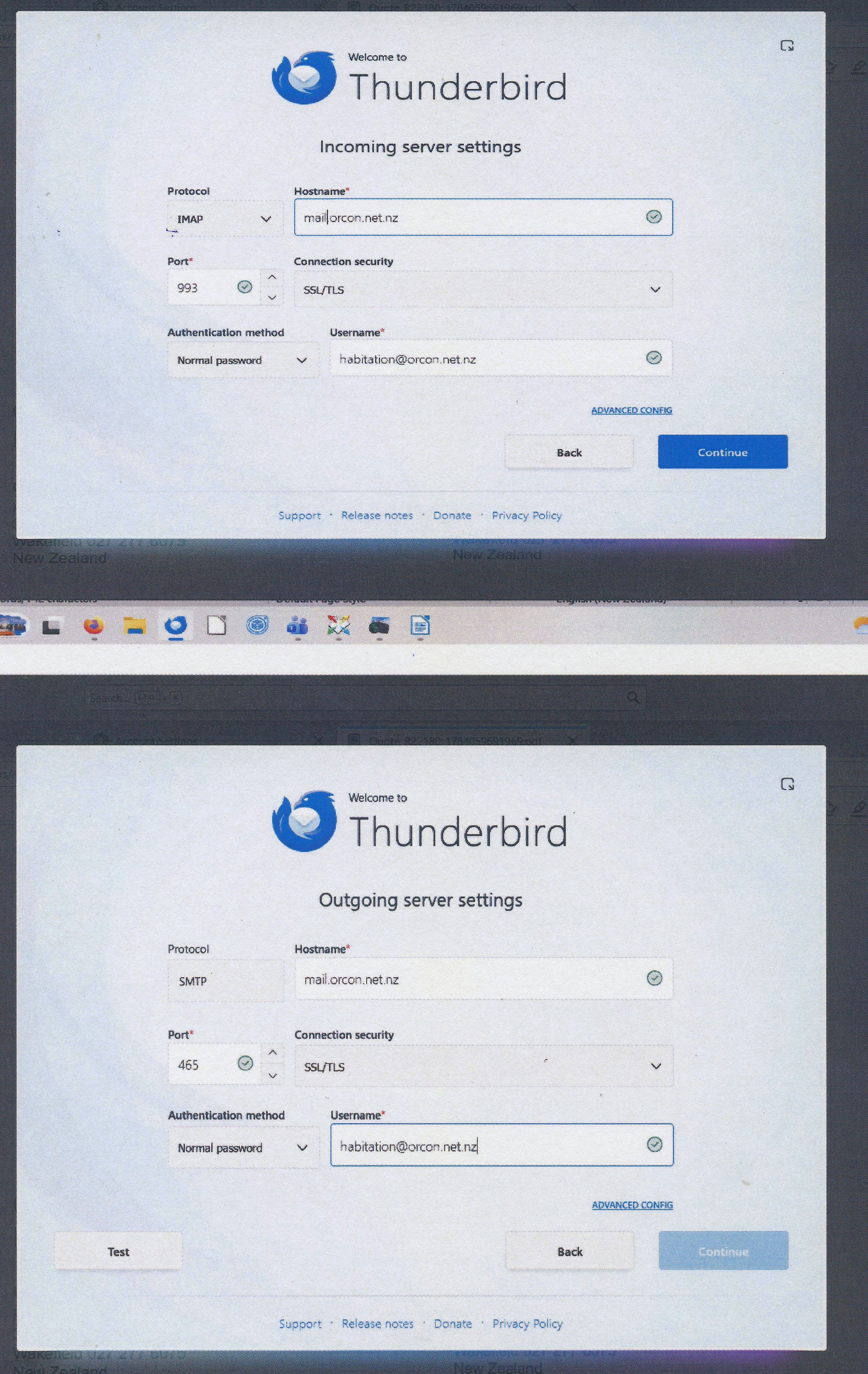
Looks good to me. You put your e-mail address in the username field, but that should be appropriate.
I am concerned about the "continue" button that is not enabled.
Do you have a "test" button on the current screen that you can press? Please do that next.
Note: some of these settings are different from what Orcon told you, but they are what Orcon publishes on its website, so I believe that these are the best ones to start with.
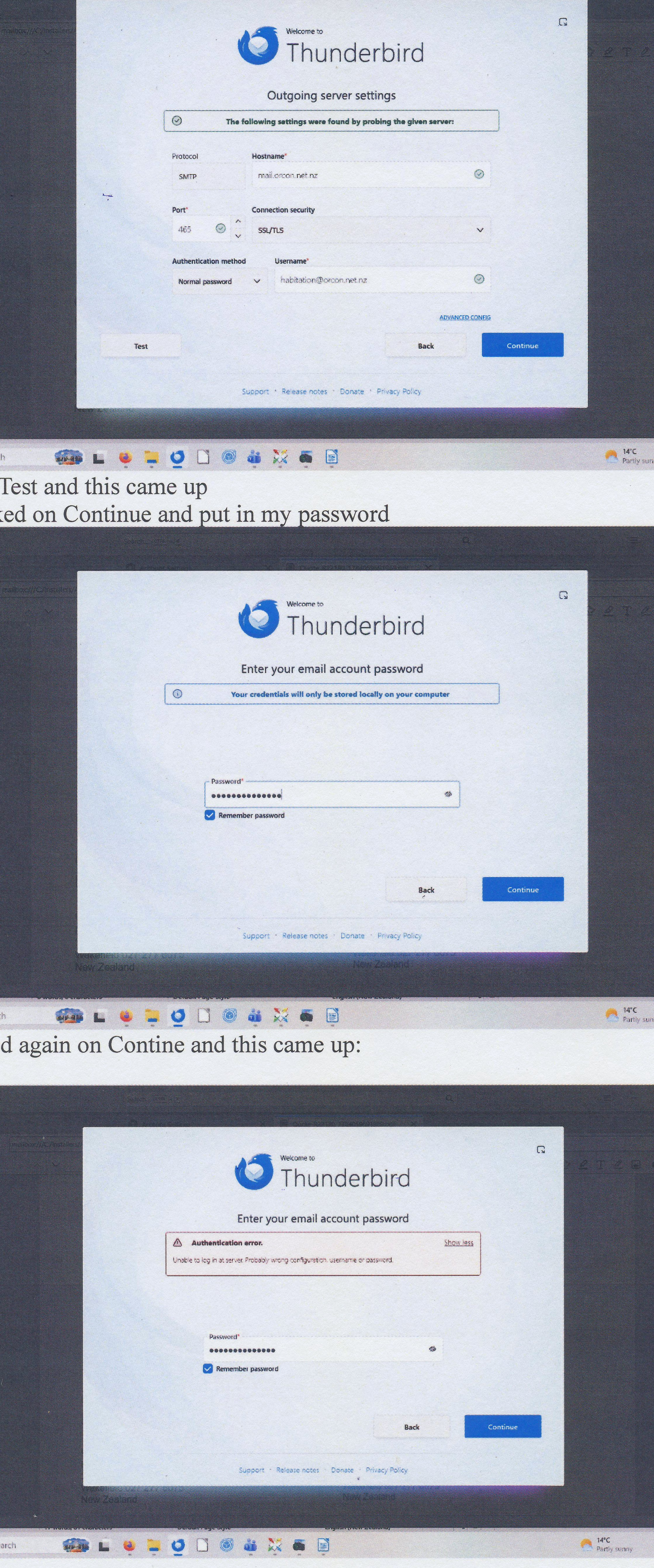
see screenshots
PS: I just heard back from Orcon again (I thought they had forgotten me). I haven't answered them back. Do you want to know what they are saying? I don't want to confuse things.
I will have to leave soon.
Have you checked that your password is correct? Click on the symbol next to it to reveal it.
And, of course, your e-mail address is correct?
If your e-mail address and password are correct, we must return to the settings and try other ones. Can you go back (use the "back" button) to earlier in the new account set-up and get Thunderbird to look for the settings again? Then accept those settings and test.
If that does not work, then we are back to using the settings that Orcon gave you. You already tried them many times and some of them seem obviously wrong (and different from what Orcon puts on its website), so I am not optimistic. We could use trial and error and hope.
Irma van der Linden said
PS: I just heard back from Orcon again (I thought they had forgotten me). I haven't answered them back. Do you want to know what they are saying? I don't want to confuse things.
Yes.
My email and password are correct. I login to Orcon webmail with the same password and it works. The only thing is that when I login to Orcon's webmail as username I use habitation (not the full email address) and it works.
Orcon says in their latest email to me: "You can also try removing and re-entering the email account password in Thunderbird, then restart the application and test again. If some folders are missing, right click the email account, select Subscribe, and ensure all required folders are ticked. As a useful test, if webmail can successfully send and receive emails but Thunderbird cannot, this usually indicates a local configuration, authentication, or connectivity issue within the email application.
I also have to go now but will be back tomorrow afternoon.
email from Orcon: Hi Irma,
Thanks for your email regarding your thunderbird enquiry.
I'm sorry this has been frustrating. As webmail is working, this confirms that your mailbox is active and accessible, which suggests the issue is likely related to the email application settings or connection rather than the email account itself.
If Thunderbird is already set up you can verify that it is using IMAP and syncing correctly with Webmail by following these steps:
• Open Thunderbird.
• Click the Menu button in the top right corner.
• Select Account Settings.
• Click Server Settings under your Orcon email account.
• Check the Server Type field.
The incoming server settings should be:
• Server Type: IMAP Mail Server
• Server Name: mail.orcon.net.nz
• Port: 993
• Connection Security: SSL/TLS
If the account is using POP Mail Server instead, emails may not sync correctly with Webmail.
You can also test whether Thunderbird is syncing with Webmail by:
• Logging in to Orcon Webmail and creating a test folder.
• Refreshing Thunderbird or clicking Get Messages.
• Checking whether the new folder appears in Thunderbird.
• Sending a test email to yourself.
• Moving or deleting the email in Thunderbird and confirming the same change appears in Webmail.
If the changes appear in both locations, this confirms the account is syncing via IMAP.
If you're unable to send emails from Thunderbird, please also check the outgoing server settings:
• Server: mail.orcon.net.nz
• Port: 465
• Connection Security: SSL/TLS
• Authentication Method: Normal Password
• Username: Your full email address
You can also try removing and re-entering the email account password in Thunderbird, then restart the application and test again. If some folders are missing, right click the email account, select Subscribe, and ensure all required folders are ticked.
As a useful test, if webmail can successfully send and receive emails but Thunderbird cannot, this usually indicates a local configuration, authentication, or connectivity issue within the email application.
If possible, please send us a screenshot of the Server Settings page and the Outgoing Server (SMTP) settings page in Thunderbird. That will help us confirm whether everything is configured correctly and identify what may be causing the issue.
My last message tonight.
Orcon's guidance is not helpful right now.
I would try your username Habitation instead of your full e-mail address.
Then I would try whatever settings Thunderbird finds, once with Habitation, once with your full e-mail address.
Then I would try the settings that Orcon gave you, once with Habitation, once with your full e-mail address.
If we get the connection to the incoming server working but not the SMTP server, I have another idea for it.
Trial and error is no fun. Orcon should just know exactly what you need and be able to tell you and not give conflicting information.
This part is useful:
If possible, please send us a screenshot of the Server Settings page and the Outgoing Server (SMTP) settings page in Thunderbird. That will help us confirm whether everything is configured correctly and identify what may be causing the issue.
I would do that.
Done it before but will do it again. Everytime you get another Tech person person (14 and counting!) at Orcon and they start with the same story like you can access Orcon Webmail so nothing is wrong.
Till tomorrow.