


Thunderbird 140.9.1esr (64-bit) keeps changing default email account from a MS365 account to my Gmail account on startup
Hello!
I am using Thunderbird 140.9.1esr (64-bit) on a Ubuntu 24.04 system. Every time I restart Thunderbird, it reverts to a little used Gmail account as the default account. I have several accounts, but my main email account is a MS365 account. I reset the setting, but every time it is restarted, the default goes back to Gmail. I have tried everything that I've found online, but cannot correct this behaviour.
Do you have any suggestions or assistance?
Many thanks!
All Replies (15)

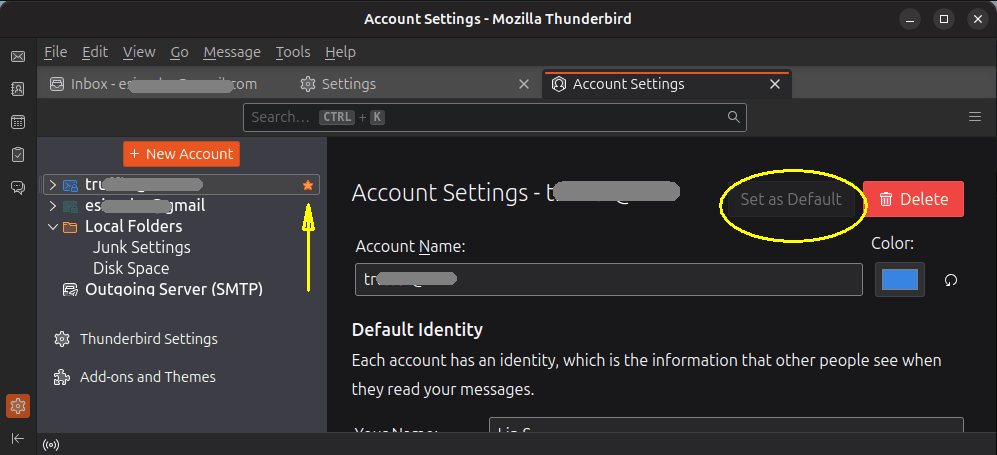
You don't say what you consider to be "the setting", but when you go to <Account Settings>, each account has a "Set as Default" button, and you will then see a star by the designated default account. Is this not what you see?
Hi Lin,
Yes, that is what I see, however, when I set my desired email account as default, it always reverts back to the Gmail account when Thunderbird is restarted.
So, is the little star moving to your desired account, but then when you reopen Thunderbird, it's back to the Gmail account? And the "Make Default" button's grayed-out property reverts as well?
Do you notice any other preferences not sticking? I ask because the Default Account designation is stored in the prefs.js file, located in your Profile. If one preference is not sticking, I would expect to see other properties not sticking, either.
First thing to try is to restart Thunderbird in Troubleshooting Mode. Go to menu item <Help | Troubleshoot Mode...>. Let it temporarily, not permanently, disable all your add-ons. After it restarts, try changing the default account again. If it's successful, that could indicate a misbehaving add-on.
Please let us know the results. If that doesn't do it there are some other things to try.
Hi Lin,
Yes, when I restart Thunderbird, the little star appears beside the Gmail account, and I have to manually go back to my MS365 account and make it default again, which it accepts as long as I don't restart the program. The "Set as Default" box seems to operate normally.
I haven't noticed any other preferences not sticking.
I tried what you suggested in Troubleshoot Mode. Doing so made my three MS365 email accounts disappear, and the Gmail became the default. My two IMAP accounts were unaffected.
Just for clarification, I have: three MS365 email accounts (including the one that I want to have as default); two IMAP accounts; and the one Gmail (also IMAP) account. In order to have the MS365 accounts operate in Thunderbird, I have an add-on called Owl, which was needed to provide MS Exchange Server support.
Curious to know if you have any other suggestions. Many thanks for your assistance to date.
Lyle
go to the help menu in Thunderbird and select troubleshooting information. Use the show profile button In the windows file explorer widow that opens, how many versions of the profs.js file do you have. I am guessing you get a new numbered version on every restart of Thunderbird.
Novain'i Matt t@
Thanks, Matt.
I navigated to the folder called "mv372oao.default" within /home/lyle-beaman/snap/thunderbird/common/.thunderbird
There was only one version of prefs.js in there.
Any other thoughts?
Lyle
was it showing the date you last closed Thunderbird as the date modified? the prefs.js is written on the successful closing of the application. Not the taking down of the last visible window. The shut down of the application. I am increasingly seeing folk that close all the windows and Thunderbird does not close because some other software on their system is keeping it alive (mostly antivirus products, but not exclusively). Check in Windows task manager (ctrl+Shift+Esc) that there is no Thunderbird application and no Thunderbird background process as that is what it becomes when the last window is pulled down still running.
Matt,
As I mentioned in my first post on this thread, I'm running Thunderbird in Linux, not Windows.
Lyle
LyleB said
Matt, As I mentioned in my first post on this thread, I'm running Thunderbird in Linux, not Windows. Lyle
You can use the GUI System Monitor utility to list and kill processes in Ubuntu Linux, or ps and kill in a terminal session. Those are the equivalent of Windows' Task Manager.
Novain'i Lin t@
Ok. I did a system search, and have found many prefs.js files, in different folders. Too many to check each one. Are they all related to TB, or are they for other applications? How do I stop this from happening?
I have also checked the processes running in the System Monitor, and there are none related to TB when the application is NOT running.
Any help with this would be greatly appreciated!
It would be the one in the profile folder. You might also check to see if it is read-only.
The only instance that is not locked (showing a little padlock symbol) in the search is in the following folder: /usr/share/gnome-shell/extensions/ding@rastersoft.com
The properties show that it is read only.
I am not sure where the profile folder is for TB. Can you point me in the right direction? I'm relatively new to Linux.
Thanks!
FYI... Matt was correct. I have counted 93 instances of prefs.js on this PC.
I have also noticed that TB has started putting duplicate copies of sent mail into the Sent Items folder. The recipients only receive one copy. Looks like this may be a related issue.