


Saving Earthlink Messages to My Harddrive using Thunderbird

I recently switched to Thunderbird from MS Office10 Outlook. Formerly, once I downloaded an email it was stored on my hard drive until I erased it. I could delete the email from the Earthlink account online, and still have it stored, thus staying under the 100mb storage limit in Earthlink. With Thunderbird, when I delete an email on line it disappears from Thunderbird.
How do I get Thunderbird to save my emails to my hard drive, so that I can delete them from my Earthlink account?
Phil
Vahaolana nofidina
You are very welcome. I was glad to assist.
Hamaky an'ity valiny ity @ sehatra 👍 0All Replies (9)
You appear to have set up the account as IMAP. With IMAP, the account syncs to the server. What you see on the PC is a copy of what is on the server. When you delete from the PC, the account syncs to the server and deletes it there as well. This is not a thunderbird bug or unique process; it's how IMAP works. To do what you want, first COPY (not move) the message to local folders. Then, delete it.
So, canI change the account to POP? If so, how? And would that solve my problem?
It depends. If you also want full access via smartphone or an additional PC, then IMAP is the way to go. If you want POP, just set up a second account alongside the IMAP account and then delete the IMAP account when done.
I set up a new POP account and THOUGHT that I had copied my messages to local folders. (In fact, I did it a couple of times). I haven't been able to get the POP-version to find these off-line messages.
Can you be more specific about how I must "Copy" the messages? One at a time? After opening them? Folder at a time? Where do I put them? Do folder names matter?
I've tried an AMAZING number of things that didn't work. Now, I must admit that I don't know what I don't know.
Please be gentile and detailed. I'm 91 years old, and don't grasp the "Magic" stuff like I used to.
Well, with the POP account, the default setting is to remove from server and save on PC. Are you keeping the IMAP account? If so, that may get confusing to you. On your question, assuming you have messages on the IMAP account to save, these steps should work: - create a new folder in Local Folders - highlight the desired messages to save in the IMAP account folder, - rightclick and select the menu option to 'COPY to' and then select the receiving folder
Let me know how it goes. And, this is a routine issue for users. People half your age report having difficulties in moving and copying. You still have the magic. :)
I appreciate your kind words. Everything seems to have worked, but I still have a concern.
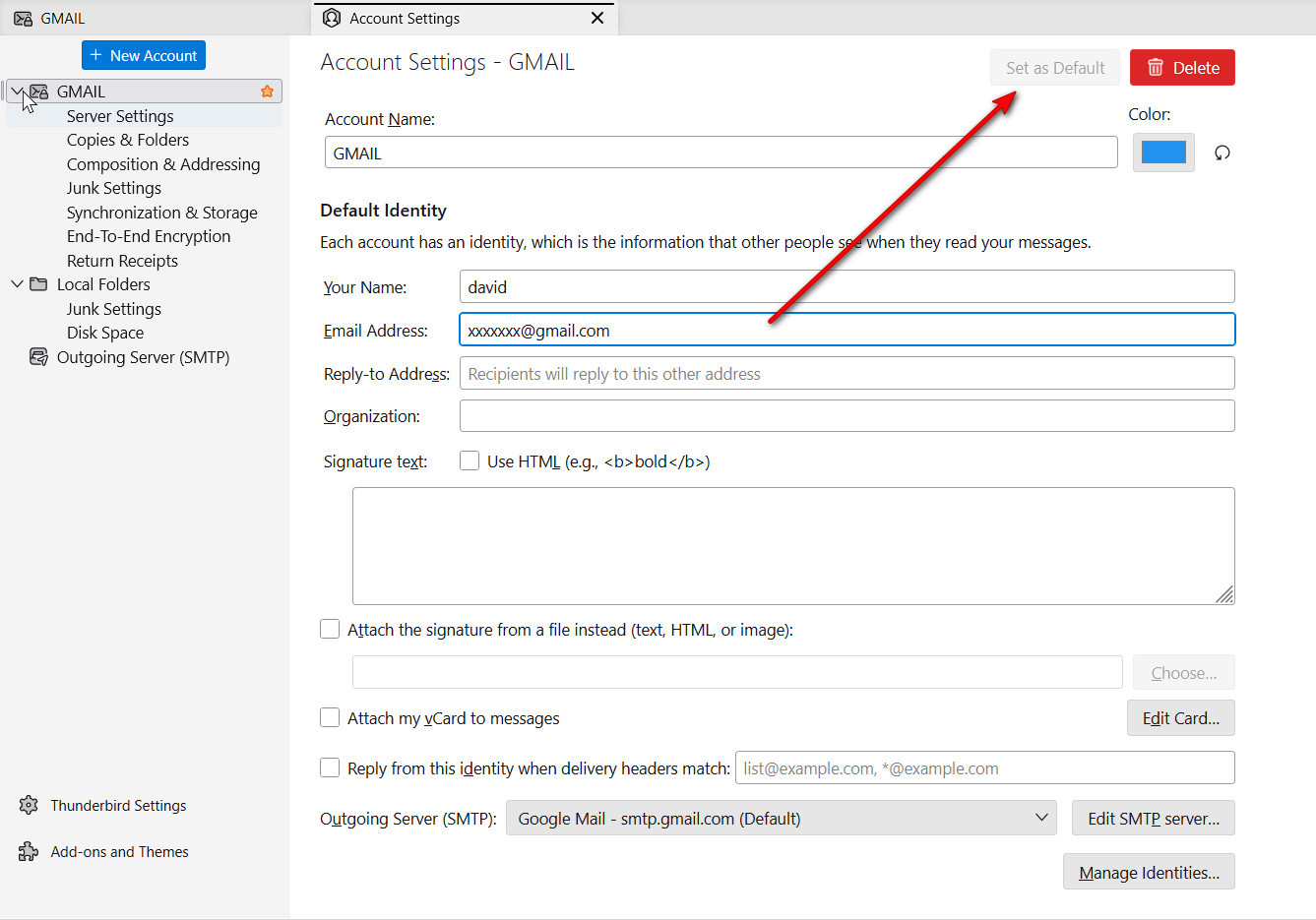
Earlier, I found and used a "button" that let me set which account was "Primary". With today's release, I can't find it. I want to be sure that the POP3 account is working before I delete the IMAP account, and with it, the stuff on the server.
My Mail page shows:
>gate . . .POP3 >gate . . .IMAP >Local Folders
Which leads me to wonder if the Local Folders belong to the IMAP account.
First, the Local Folders belong to you, not to either the POP or IMAP accounts. They will remain. For default, click 'account settings' and then click to desired account. On the right side of the account pane, just to the left of the DELETE button, is the default button. It will be greyed out on the current default. Select the desired account and click that button to set default. See attached example. And, deleting the IMAP account does not delete any actual data; it only removes from your PC.
Appears to have worked!
In version 115.10.1 (32-bit), the selection of Default Accounts is now accessed under Account Actions.
Thanks for your time and patience. Solved the problem.