


Thunderbird does not move folders

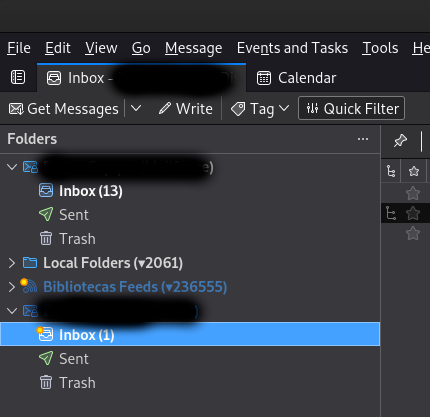
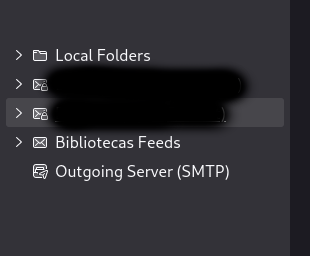
Hello! I have difficulty moving my folders and accounts on Thunderbird. I've been to Account Settings and moved the accounts and folders. But on the Thunderbird home screen the folders are not changed, remain disorganized.
Observe the image1 and image2.
Given this, can you help me? I use Linux/Debian. Thanks.
All Replies (6)
Is anyone experiencing the same problem?
> Observe the image1 and image2.
This is version 102? Without labels or notations it's not possible to understand what those images represent. Let's take one issue at a time.
What did you do or what mechanism did you use to try to move an account?
(...) What did you do or what mechanism did you use to try to move an account? _______________________________________________________________________________ Hello W.Mery. Thunderbird version is 102.15.1(64-bit).
I'll try to be more clear: I want to move the accounts and folders from the Thunderbird email home page. The one where there is an email account, folders and feed.
How did I try to move them? I accessed the "Account Settings" option and on the left side of the screen I tried to move the email accounts, folders and feed. I can move them on this screen, but they don't actually move on the Thunderbird home screen.
Thanks!
Novain'i ecop1 t@
Can anyone who has been through this help me? Thanks!
I can see you have accessed 'Account Settings' and used left click - hold down and drag the 'Local Folders' account to the top and then done the same to the feeds account except moved to bottom.
However, in the Folder Pane, it does not display the same new listed order of the accounts.
I've tested this in Windows 10 OS using beta 121.0b5 - moved 'Local Folders' account to the top (using drag and drop method) in Account Settings and then reselected the Inbox tab to show 'Folder Pane'. In my case, 'Local Folders' is now at the top. So any movement of account names in 'Account Settings' is reflected in the 'Folder Pane'.
However, the image you posted which shows the Folder Pane, also looks like you have a 'Mail Toolbar' and so it seems you are not using the latest versions. Maybe you are using version 102*.
So, I performed another test using version 102.15.1 accessed 'Account Settings' and used 'drag and drop' method to move accounts about and also put 'Local Folders' at the top. The 'Folder Pane' matches the order shown in Account Settings.
Please note: I did not change the 'default account', just the visual order of accounts. I do not have a 'Feeds' account, but I do have several Pop and Imap accounts.
Basically, I'm not seeing this issue but I'm using a Windows OS. As user says "I use Linux/Debian"
I did locate a bug which maybe relevant: https://bugzilla.mozilla.org/show_bug.cgi?id=1866668
Questions:
This installation of Thunderbird.....did you originally download from:
OR Is it a 'Flatpak' installation etc?
Have you got any addon extensions which deal with sorting the order of folders or accounts whether they are enabled or disabled?
Please test using 'Troubleshoot Mode' In Thunderbird
- 'Help' > 'Troubleshoot Mode'
- select 'Restart'
- select 'Continue in Troubleshoot Mode'
Please report on results.
Hello! I'm using version 115.5.0 (64-bit) on Debian (5.10.0-26-amd64 #1 SMP Debian 5.10.197-1 (2023-09-29) x86_64 GNU/Linux).
The hold and drag method isn't working, unfortunately. Both the feed and account folders are not changed when dragging and dropping.
I executed it identically to the link you sent me but it still doesn't move the folders.
My version was already installed on Debian and the updates were made through the Debian repository (sudo apt-get upgrade). I don't use any extensions, zero.
I tried the 'Troubleshoot Mode' recommendation but it didn't work either!